RPG Leingham Tavern Story
Aktualisiert
Aktuelle Version
1.08g
Angeboten von

Bei all Ihrer Leidenschaft für das Spielen von RPG Leingham Tavern Story sollten Ihre Hände nicht auf einen winzigen Bildschirm Ihres Telefons beschränkt sein. Spielen Sie wie ein Profi und übernehmen Sie die volle Kontrolle über Ihr Spiel mit Tastatur und Maus. MEmu bietet Ihnen all die Dinge, die Sie erwarten. Laden Sie RPG Leingham Tavern Story herunter und spielen Sie es auf dem PC. Spielen Sie so lange, wie Sie wollen, ohne Grenzwerte für Akku, mobile Daten und störende Anrufe. Das brandneue MEmu 9 ist die beste Wahl, um RPG Leingham Tavern Story auf dem PC zu spielen. Das exquisite voreingestellte Tastaturbelegungssystem, das mit unserem Fachwissen vorbereitet wurde, macht RPG Leingham Tavern Story zu einem echten PC-Spiel. Der MEmu Multi-Instanz-Manager ermöglicht das Spielen von 2 oder mehr Konten auf demselben Gerät. Und das Wichtigste: Unsere exklusive Emulations-Engine kann das volle Potenzial Ihres PCs freisetzen und für reibungslose Abläufe sorgen.
Mehr anzeigen
Laden Sie Play RPG Leingham Tavern Story auf dem PC mit MEmu Android Emulator. Viel Spaß beim Spielen auf großmundieren. [Supported Devices].
[Supported Devices]
Requires higher specs than previous titles.
A trial version is available to test performance.
Recommended: Android OS 11+, 8 GB+ RAM.
[Story]
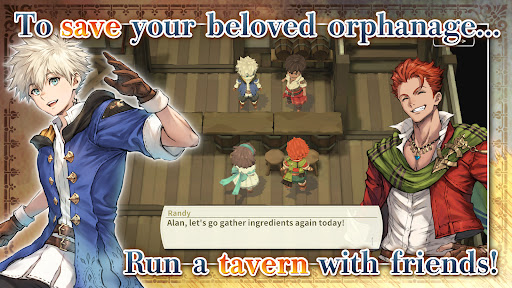
Save an orphanage from closure and build a thriving tavern in Leingham Tavern Story: Alan and the Time Goddess, a charming fantasy RPG combining cooking, tavern management, and dungeon exploration!
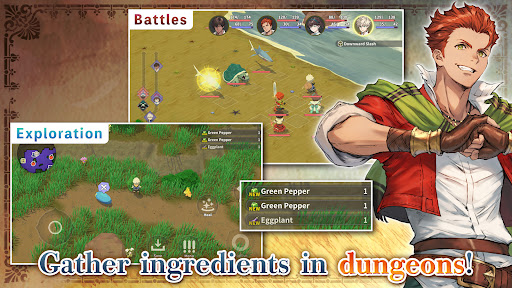
Join Alan and his friends as they venture into monster-filled dungeons in search of ingredients, discover new recipes, and serve delicious dishes to bring customers through the door. Along the way, meet the people of the Kingdom of Leingham and enjoy a heartwarming story where food, friendship, and adventure come together.
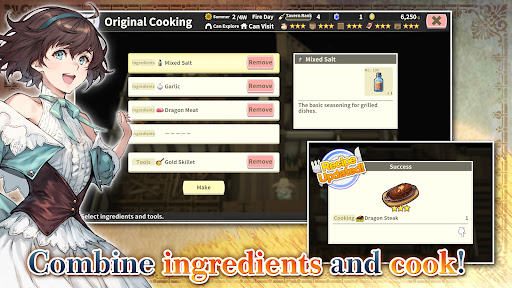
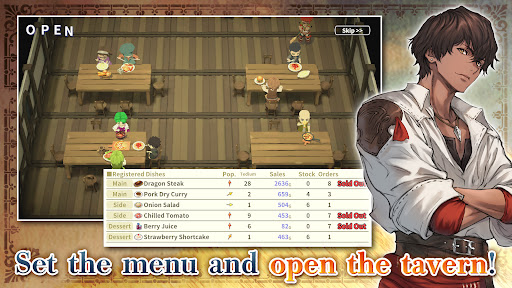
Explore dungeons, gather ingredients, and battle roaming monsters in classic turn-based RPG combat, then return to your tavern to create from over 800 different dishes. Experiment with ingredients, expand your recipe collection, adjust your menu to seasonal trends, and assign employees strategically to maximize sales. Grow vegetables on your farm, relax with a spot of fishing, and strengthen your characters by eating the meals you prepare instead of earning experience from battles.
From dungeon crawling and character progression to cooking and tavern management simulation, build your business and enjoy a deliciously different fantasy RPG adventure!
[IMPORTANT NOTICE]
Your use of the application requires your agreement to the following EULA and 'Privacy Policy and Notice'. If you do not agree, please do not download our application.
End User License Agreement: http://kemco.jp/eula/index.html
Privacy Policy and Notice: http://www.kemco.jp/app_pp/privacy.html
[Game Controller]
- Not Supported
[Languages]
- English (Coming Soon), Japanese
[Non-Supported Devices]
This app has generally been tested to work on any mobile device released in Japan. We cannot guarantee full support on other devices. If you have the Developer Options enabled in your device, please turn off the "Don't keep activities" option in case of any issue.
Get the latest information!
[Newsletter]
http://kemcogame.com/c8QM
[Facebook page]
https://www.facebook.com/kemco.global
*The actual price might differ depending on the region.
© 2024-2026 KEMCO/RideonJapan,Inc./Rideon,Inc.
Mehr anzeigen

1. Laden das MEmu-Installationsprogramm herunter und beenden die Installation

2. MEmu starten und Google Play auf der Homepage öffnen

3. Suchen RPG Leingham Tavern Story in Google Play
Install
4. Herunterladen und Installieren RPG Leingham Tavern Story
5. Klicken nach Abschluss der Installation auf das Symbol, um es zu starten

6. Viel Spaß beim Spielen von RPG Leingham Tavern Story auf dem PC mit MEmu
MEmu App Player ist der beste kostenlose Android-Emulator und 50 Millionen Menschen genießen bereits seine hervorragende Android-Gaming-Erfahrung. Mit der MEmu-Virtualisierungstechnologie können Sie Tausende von Android-Spielen problemlos auf Ihrem PC spielen, selbst bei grafikintensiven Spielen.
BGrößeres Bild mit besserer Grafik; Keine unterbrechungen, keine sorgen um Akku
Komplette Tastenbelegung unterstützt mit Maus und Tastatur oder Controller
Mit dem „Multi-Instance-Manager“ können Sie mehrere Spielkonten oder Spiele gleichzeitig auf einem PC ausführen.
Play RPG Leingham Tavern Story on PC by following steps: