Game of Thrones: Dragonfire
Actualizada
Versión actual
26.6.53367
Ofrecida por

Con toda tu pasión para jugar Game of Thrones: Dragonfire, no se supone que tus manos estén limitadas en una pequeña pantalla de tu teléfono. Juega como un profesional y obtén el control total de tu juego con el teclado y el mouse. MEmu le ofrece todas las cosas que espera. Descargar y jugar Game of Thrones: Dragonfire en PC. Juega todo el tiempo que quieras, sin más limitaciones de batería, datos móviles y llamadas molestas. El nuevo MEmu 9 es la mejor opción para jugar Game of Thrones: Dragonfire en PC. Preparado con nuestra experiencia, el exquisito sistema de keymapping preestablecido convierte a Game of Thrones: Dragonfire en un verdadero juego de PC. Codificado con nuestra absorción, el administrador de instancias múltiples hace posible jugar 2 o más cuentas en el mismo dispositivo. Y lo más importante, nuestro exclusivo motor de emulación puede liberar todo el potencial de su PC, hacer que todo sea más fluido. Nos importa no solo cómo juegas, sino también todo el proceso de disfrutar de la felicidad de los juegos.
Más detalles
Descargar Game of Thrones: Dragonfire en PC con MEmu Android Emulador. Disfruta jugando en la pentalla grande. Comanda dragones legendarios, forja poderosas alianzas y conquista los Siete Reinos en el juego de estrategia definitivo de Game of Thrones.
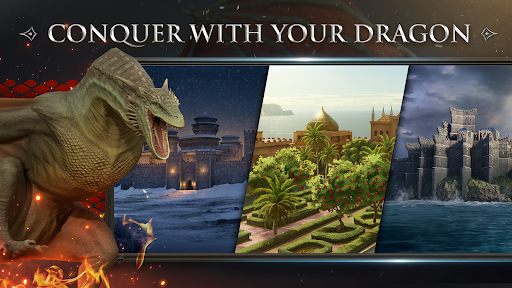
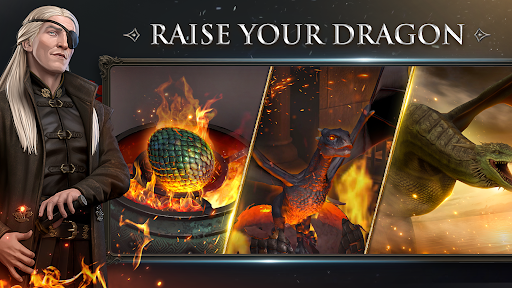
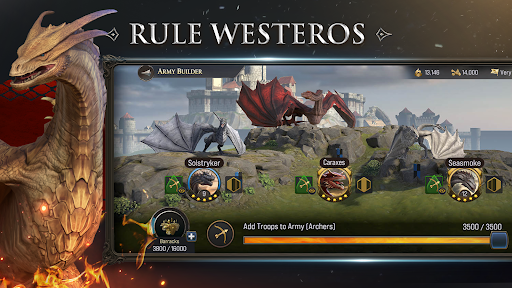
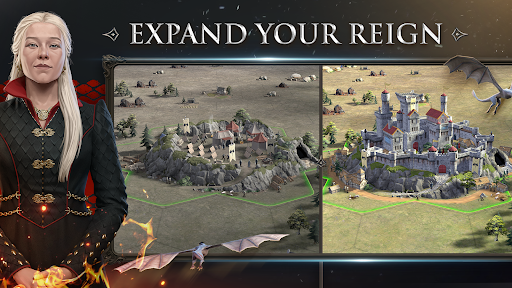
Comanda dragones legendarios, forja poderosas alianzas y conquista los Siete Reinos en el juego de estrategia definitivo de Game of Thrones. Construye tu imperio, forma un ejército de temibles dragones y libra una guerra de estrategia en tiempo real (RTS) por todo Poniente para reclamar el Trono de Hierro. Game of Thrones: Dragonfire es un juego épico de guerra y estrategia 4X en el que lideras a tu Casa en misiones de conquista, diplomacia y guerra de dragones en el juego de fantasía medieval más inmersivo del momento para móvil.
COLECCIONA Y DOMINA PODEROSOS DRAGONES
Cría, entrena y comanda dragones legendarios. Lucha con Syrax, Caraxes, Bruma y más. Cada dragón posee habilidades únicas que pueden cambiar el curso de la guerra táctica. Crea un ejército imparable de dragones, colecciona especies inusuales y hazlas evolucionar hasta convertirlas en una fuerza de destrucción pura para dominar los cielos de Poniente.
LIBRA UNA GUERRA ESTRATÉGICA ÉPICA
Lidera a tus ejércitos en una guerra JcJ de alto riesgo y en combates de estrategia en tiempo real. Asedia las fortalezas enemigas, defiende tu castillo y supera la estrategia de las Casas rivales en emocionantes batallas. Ya sea en campañas JcE o en guerras de clan globales, tu dominio de la mecánica de RTS y una estrategia ingeniosa determinarán quién alcanza la supremacía.
CONSTRUYE Y MEJORA TU REINO
Domina la construcción de bases mientras conviertes una pequeña fortaleza en una edificación inexpugnable. Gestiona recursos vitales para impulsar tu conquista de Poniente y entrenar tropas de élite en este emocionante juego de batalla. Una buena gestión del reino y mejoras defensivas eficaces son las claves para sobrevivir a la política brutal de los Siete Reinos.
CONQUISTA LOS SIETE REINOS
Explora un mapa detallado de Poniente, con lugares emblemáticos como la Fortaleza Roja, Rocadragón y Harrenhal. Expande tu imperio en regiones legendarias, conquista territorios rivales y controla las fortalezas más poderosas del reino. En el mundo de este MMO de estrategia, cada territorio reclamado te acerca un poco más al Trono de Hierro.
DESCUBRE HISTORIAS ÉPICAS
Adéntrate en el juego oficial de la serie de HBO, La casa del dragón, cuya historia se sitúa 172 años antes de Daenerys Targaryen. Sumérgete en una campaña llena de momentos de narrativa donde tus decisiones dan forma al destino del reino. Interactúa con personajes míticos, como Rhaenyra Targaryen y Daemon Targaryen, en una historia llena de drama, traición e intriga como las que definen Game of Thrones.
FORJA ALIANZAS MULTIJUGADOR
Une fuerzas con jugadores de todo el mundo en este MMO de estrategia multijugador masivo. Coordina grandes estrategias con tu alianza, domina el mapa del mundo y haz la guerra contra facciones rivales. En una tierra de lealtades volubles, una diplomacia fuerte y una guerra de alianzas bien coordinadas son esenciales para asegurar tu legado.
RAZONES POR LAS QUE QUERRÁS JUGAR A GAME OF THRONES: DRAGONFIRE
• Es el juego de estrategia definitivo de GoT: juego de rol y guerra de fantasía medieval con licencia oficial.
• Jugabilidad 4X profunda: explora, expande, explota y extermina en un mundo masivo.
• Imágenes impresionantes: los dragones y las fortalezas de Poniente cobran vida con gráficos de alta fidelidad.
• Eventos en vivo: actualizaciones frecuentes con nuevos dragones, eventos de temporada e historias.
• JcJ global: compite contra miles de estrategas en batallas por el trono en tiempo real.
¡Descarga ahora Game of Thrones: Dragonfire y comienza tu conquista! La batalla por los Siete Reinos ha comenzado: ¿controlarás el fuego para reclamar el trono?
Más detalles

1. Descargar el instalador de MEmu y finalice la instalación

2. Iniciar MEmu y abrir Google Play en la página de inicio

3. Buscar Game of Thrones: Dragonfire en Google Play
Install
4. Descargar y instalar Game of Thrones: Dragonfire
5. Hacer click al icono para iniciar

6. Disfruta jugando Game of Thrones: Dragonfire en PC con MEmu
MEmu App Player es el mejor emulador de Android gratuito y 50 millones de personas ya están disfrutando su magnífica experiencia jugando en Android. La tecnología de virtualización de MEmu te permite jugar a miles de juegos Android suavemente en tu PC, incluso los más intensivos gráficamente.
Pantalla más grande con mejores gráficos; Larga duración, sin limitación de batería o datos móviles.
Soporte completo de keymapping para un control preciso del teclado y el mouse o gamepad.
Múltiples cuentas de juegos o tareas en una sola PC a la vez con el administrador de instancias múltiples.
Play Game of Thrones: Dragonfire on PC by following steps: