로스트 소드
تاریخ بهروزرسانی
نسخه کنونی
1.591.1
ارائهکننده

با تمام اشتیاق شما به بازی 로스트 소드، قرار نیست دست های شما روی صفحه نمایش کوچک گوشی شما محدود شود. مانند یک حرفه ای بازی کنید و کنترل کامل بازی خود را با صفحه کلید و ماوس بدست آورید.MEmu همه ی انتظاراتی که دارید را برآورده می کند.로스트 소드 را بر روی رایانه شخصی دانلود و بازی کنید. تا زمانی که می خواهید بازی کنید، دیگر محدودیتی در باتری، داده تلفن همراه و تماس های مزاحم وجود ندارد.MEmu 9 کاملاً جدید و بهترین انتخاب برای بازی 로스트 소드 روی رایانه شخصی است. با تخصص ما، سیستم keymapping از پیش تعیین شده عالی،로스트 소드 را به یک بازی رایانه شخصی واقعی تبدیل می کند.مدیریت چند موردی MEmu امکان اجرای 2 یا چندین حساب در یک دستگاه را فراهم می کند.و مهمتر از همه، موتور شبیهسازی انحصاری ما میتواند پتانسیل کامل رایانه شما را آزاد کند و همه چیز را روان کند.
بیشتر نشان بده
Download 로스트 소드 on PC with MEmu Android Emulator. Enjoy playing on big screen. Epic Anime Fantasy RPG .
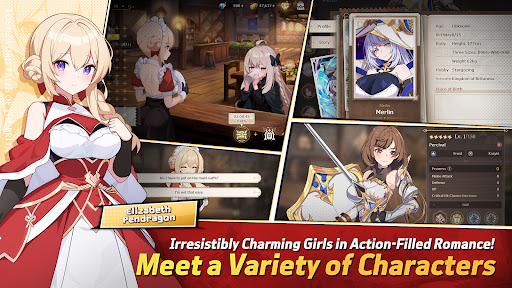
Epic Anime Fantasy RPG
Endless Romantic "Action X Flirting" with the Girls!
Begin the otherworld anime journey with the unique characters from Lost Sword now.
Meet the action flirting RPG with vivid character skill display and strong story line.
“Holy Sword Excalibur, forged by fairies,
has godlike powers that can halve a mountain in a single swing.
This divine relic of the Fairy, at some point, vanished without a trace;
it shall reappear to serve the true king when the blessing of the Red Dragon fades away.
This prophecy had only been taken as myth, but recently grew in prominence,
after Uther Pendragon, who had the blessing of the Red Dragon, was struck down by the False King Vortigern.
The war to determine the true king commenced,
and King Uther’s daughter, Elizabeth Pendragon, left to find Excalibur, but went missing.
Thus began the Great Disorder.”
▣Game Overview▣
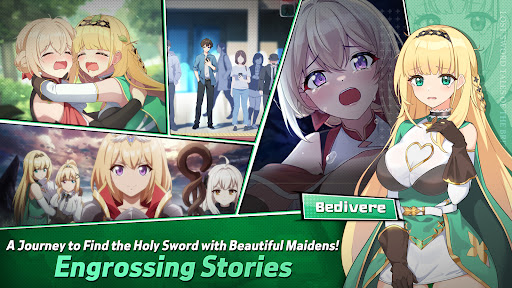
■ Isekai Adventure RPG Filled with Lively Chemistry and Charming Girls!
Fairy Queen Morgana, who becomes a shut-in after many rebirths,
Princess Elizabeth, who holds strong mind beneath her gentle smile,
Bedivere, one of the Britannia`s knights and a cry baby but who has a strong loyalty to Elizabeth,
and finally, Ethan, who joins the adventure to find the Holy Sword along with them!
Begin the journey with the attractive characters to find the Holy Sword together!
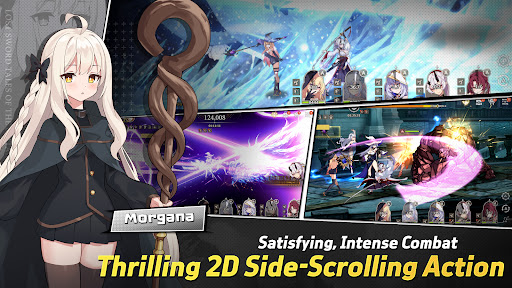
■ afk RPG of Your Dreams! 2D Side-Scrolling Real Time Action & Various Battles
Growing party play through endless real time afk battles!
From various dungeons and single raid to interesting event dungeons,
Enjoy the growth through interesting battle RPG contents!
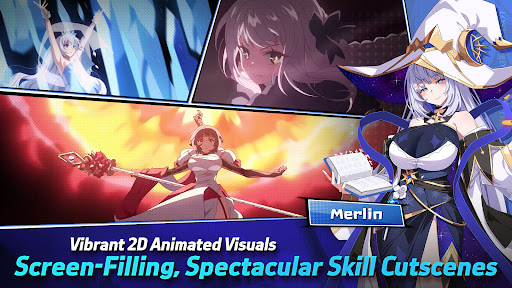
■ Visually Stunning High Quality 2D Anime Illustrations & Spectacular Skill Action!
Visually enjoyable afk battles with detailed Anime LD character motions and spectacular skill cutscenes!
With battle motions and skill cutscenes that feel like real animation,
Double the fun of character collection and battle!
■ Realistic Character Voice with the Top-Tier Voice Actors!
Best voice actors participated!
Deeply engaging experience enhanced by the realistic voices of our talented voice actors!
Dive deeper into the world of Lost Sword with the top-tier voice actors.
[Lost Sword Official Community Channel]
- Brand Webpage: https://lostsword.wemadeconnect.com/EN/index.html#Main
- Discord: https://discord.gg/ekgwAEQWu3
- Twitter (X): https://x.com/lostsword_en
- Facebook: https://www.facebook.com/LostSword.Global
- YouTube: https://www.youtube.com/@lostsword_en
- TikTok: https://www.tiktok.com/@lostsword_en
- Reddit: https://www.reddit.com/r/LostSwordOfficial
[Minimum Specs]
- OS: Android 6.0 or above
- Samsung Galaxy S9 or above
- RAM : 4GB or above
[App Permission Information]
In order to provide the services below, we request certain permissions.
[Optional Permission]
Phone: This is used to connect wireless devices, such as earphones, via Bluetooth.
Notifications: To allow the app to send service notifications
*Denying optional permissions does not affect gameplay.
[App Permission Management]
▶Android 6.0 or Higher:
- Revoking by Permission Type:
Device Settings > Apps > More Options (Settings & Controls) > App Settings > App Permissions > Select the desired permission > Choose to Allow or Deny access
- Revoking by App:
Device Settings > Apps > Select the specific app > Permissions > Choose to Allow or Deny access
▶Under Android 6.0:
Due to the limitations of the operating system, it is not possible to revoke individual permissions. Permissions can only be revoked by deleting the app.
We recommend upgrading your Android version to 6.0 or higher.
بیشتر نشان بده

1. نصب کننده Memu را دانلود کرده و راه اندازی را تمام کنید

2. Memu را اجرا کنید و سپس گوگل پلی را بر روی دستکتاپ باز کنید

3. 로스트 소드 را بر روی گوگل پلی جستجو کنید
Install
4. 로스트 소드 را دانلود و نصب کنید
5. پس از اتمام نصب روی آیکون کلیک کنید تا اجرا شود

6. از بازی کردن 로스트 소드 بر روی رایانه شخصی با MEmu لذت ببرید
MEmu بهترین نمونه ساز رایگان اندروید است و پیش از این 50 میلیون نفر از تجربه بسیار خوب بازی اندروید در آن لذت برده اند. تکنولوژی مجازی ساز MEmu شما را قادر می سازد هزاران بازی اندرویدی را در کامپیوتر به طور روان اجرا کنید، حتی آنهایی که گرافیک سنگین تری دارند.
صفحه نمایش بزرگتر با گرافیک بهتر؛ زمان طولانی تر، بدون محدودیت باتری یا داده تلفن همراه.
پشتیبانی کامل از Keymapping برای کنترل دقیق صفحه کلید و ماوس یا گیم پد.
چندین حساب بازی یا وظایف در یک رایانه شخصی در یک زمان با مدیریت همزمان همه
Play 로스트 소드 on PC by following steps: