로스트 소드
Atualizada
Versão atual
1.591.1
Oferecido por

Com toda a sua paixão por jogar 로스트 소드, não deixe os polegares te atrapalharem em uma pequena tela do seu celular. Jogue como um profissional e tenha controle total do seu jogo com teclado e mouse. O MEmu oferece todas as coisas que você está esperando. Baixe e jogue 로스트 소드 no PC. Jogue o tempo que quiser, sem mais limitações de bateria, dados móveis e aquelas ligações enquanto estiver jogando. O novíssimo MEmu 9 é a melhor escolha de jogar 로스트 소드 no PC. Com grandes novidades no sistema de mapeamento que faz 로스트 소드 um jogo de PC real. Nossa equipe melhorou o gerenciamento de várias instâncias do Android, reduzindo tempo de reprodução de 2 ou mais contas no mesmo dispositivo. O mais importante, nosso mecanimos de emulação exclusivo pode liberar todo o potencial do seu PC sem travamentos, rodando tudo liso. Nós nos preocupamos não apenas com você joga, mas com todo o processo de desfrutar de 100% do seu jogo favorito.
Mostre mais
Download do 로스트 소드 no PC com MEmu Android Emulador: Divirta-se jogando na tela grande. Epic Anime Fantasy RPG .
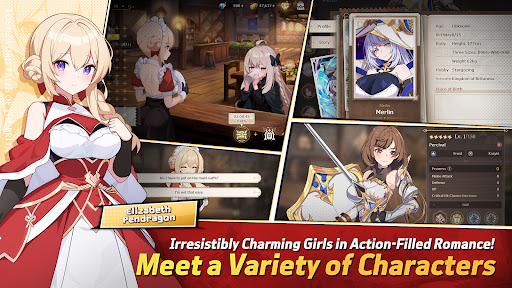
Epic Anime Fantasy RPG
Endless Romantic "Action X Flirting" with the Girls!
Begin the otherworld anime journey with the unique characters from Lost Sword now.
Meet the action flirting RPG with vivid character skill display and strong story line.
“Holy Sword Excalibur, forged by fairies,
has godlike powers that can halve a mountain in a single swing.
This divine relic of the Fairy, at some point, vanished without a trace;
it shall reappear to serve the true king when the blessing of the Red Dragon fades away.
This prophecy had only been taken as myth, but recently grew in prominence,
after Uther Pendragon, who had the blessing of the Red Dragon, was struck down by the False King Vortigern.
The war to determine the true king commenced,
and King Uther’s daughter, Elizabeth Pendragon, left to find Excalibur, but went missing.
Thus began the Great Disorder.”
▣Game Overview▣
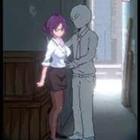
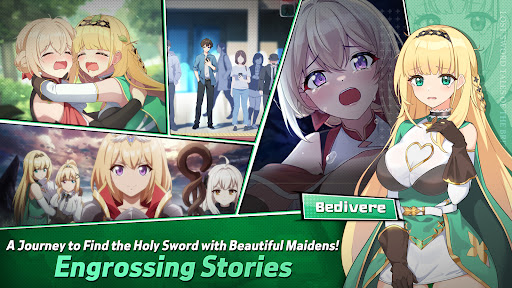
■ Isekai Adventure RPG Filled with Lively Chemistry and Charming Girls!
Fairy Queen Morgana, who becomes a shut-in after many rebirths,
Princess Elizabeth, who holds strong mind beneath her gentle smile,
Bedivere, one of the Britannia`s knights and a cry baby but who has a strong loyalty to Elizabeth,
and finally, Ethan, who joins the adventure to find the Holy Sword along with them!
Begin the journey with the attractive characters to find the Holy Sword together!
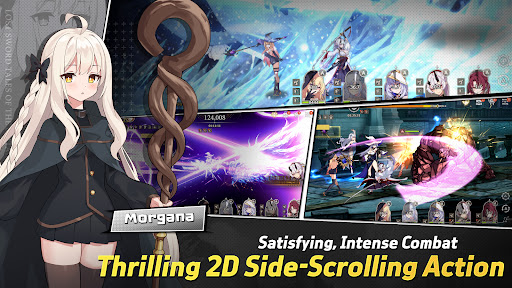
■ afk RPG of Your Dreams! 2D Side-Scrolling Real Time Action & Various Battles
Growing party play through endless real time afk battles!
From various dungeons and single raid to interesting event dungeons,
Enjoy the growth through interesting battle RPG contents!
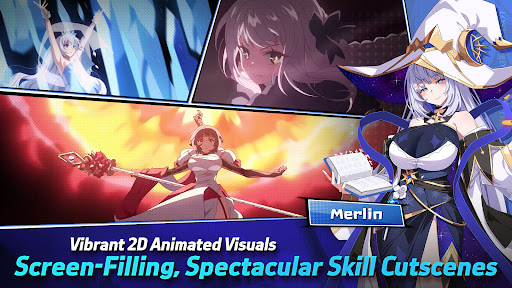
■ Visually Stunning High Quality 2D Anime Illustrations & Spectacular Skill Action!
Visually enjoyable afk battles with detailed Anime LD character motions and spectacular skill cutscenes!
With battle motions and skill cutscenes that feel like real animation,
Double the fun of character collection and battle!
■ Realistic Character Voice with the Top-Tier Voice Actors!
Best voice actors participated!
Deeply engaging experience enhanced by the realistic voices of our talented voice actors!
Dive deeper into the world of Lost Sword with the top-tier voice actors.
[Lost Sword Official Community Channel]
- Brand Webpage: https://lostsword.wemadeconnect.com/EN/index.html#Main
- Discord: https://discord.gg/ekgwAEQWu3
- Twitter (X): https://x.com/lostsword_en
- Facebook: https://www.facebook.com/LostSword.Global
- YouTube: https://www.youtube.com/@lostsword_en
- TikTok: https://www.tiktok.com/@lostsword_en
- Reddit: https://www.reddit.com/r/LostSwordOfficial
[Minimum Specs]
- OS: Android 6.0 or above
- Samsung Galaxy S9 or above
- RAM : 4GB or above
[App Permission Information]
In order to provide the services below, we request certain permissions.
[Optional Permission]
Phone: This is used to connect wireless devices, such as earphones, via Bluetooth.
Notifications: To allow the app to send service notifications
*Denying optional permissions does not affect gameplay.
[App Permission Management]
▶Android 6.0 or Higher:
- Revoking by Permission Type:
Device Settings > Apps > More Options (Settings & Controls) > App Settings > App Permissions > Select the desired permission > Choose to Allow or Deny access
- Revoking by App:
Device Settings > Apps > Select the specific app > Permissions > Choose to Allow or Deny access
▶Under Android 6.0:
Due to the limitations of the operating system, it is not possible to revoke individual permissions. Permissions can only be revoked by deleting the app.
We recommend upgrading your Android version to 6.0 or higher.
Mostre mais

1. Faça o download do instalador do MEmu e conclua a instalação

2. Inicie o MEmu e depois abra o Google Play na página inicial

3. Pesquise 로스트 소드 no Google Play
Install
4. Baixe e Instale 로스트 소드
5. Na conclusão da instalação, clique no ícone para iniciar

6. Divirta-se jogando 로스트 소드 no PC com MEmu
O MEmu App Player é o melhor emulador de Android grátis e 50 milhões de pessoas já desfrutam de sua excelente experiência de jogos no Android. A tecnologia de virtualização do MEmu permite que você jogue milhares de jogos do Android sem problemas no seu PC, mesmo os com gráficos mais intensivos.
Tela maior com gráficos melhores; Longa duração e sem limitação de bateria ou dados móveis.
Suporte completo ao Mapaeamento de Teclas para controle preciso do teclado e mouse ou gamepad.
Várias contas de jogos ou tarefas em um único PC de uma só vez com o Gerenciador de várias instâncias.
Play 로스트 소드 on PC by following steps: