로스트 소드
Aggiornata
Versione corrente
1.591.1
Offerta da

Vista tutta la passione dimostrata nel giocare a 로스트 소드, le tue mani non dovrebbero essere limitate al minuscolo schermo di un telefono. Gioca come un professionista e ottieni il pieno controllo del gioco con tastiera e mouse. MEmu ti offre tutto ciò che ti aspetti. Scarica e gioca a 로스트 소드 su PC. Gioca quanto vuoi, niente più limitazioni di batteria, dati mobili e chiamate inquietanti. Il nuovissimo MEmu 9 è la scelta migliore per giocare a 로스트 소드 su PC. Realizzato sulla base della nostra esperienza, lo squisito sistema di mappatura dei tasti preimpostati rende 로스트 소드 un vero e proprio gioco per PC. MEmu è un gestore multi-instanza che permette di giocare con 2 o più account sullo stesso dispositivo. E la cosa più importante, il nostro esclusivo motore di emulazione può liberare tutto il potenziale del tuo PC, rendendo tutto fluido.
Mostra altro
Scarica 로스트 소드 su PC con MEmu Android Emulator. Divertiti giocando sul grande schermo. Epic Anime Fantasy RPG .
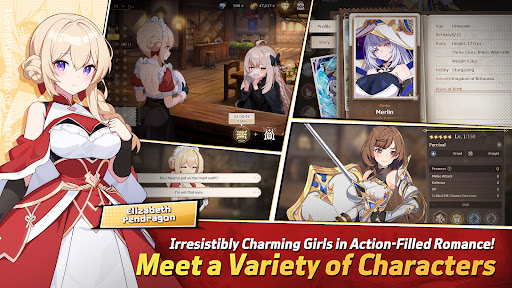
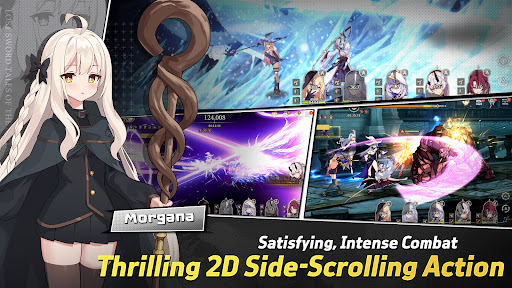
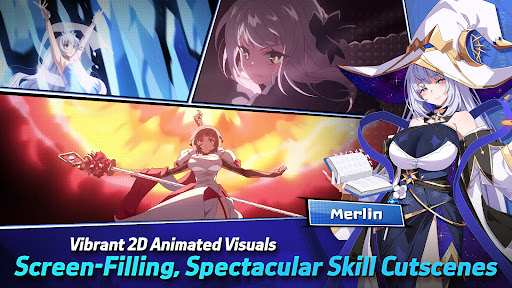
Epic Anime Fantasy RPG
Endless Romantic "Action X Flirting" with the Girls!
Begin the otherworld anime journey with the unique characters from Lost Sword now.
Meet the action flirting RPG with vivid character skill display and strong story line.
“Holy Sword Excalibur, forged by fairies,
has godlike powers that can halve a mountain in a single swing.
This divine relic of the Fairy, at some point, vanished without a trace;
it shall reappear to serve the true king when the blessing of the Red Dragon fades away.
This prophecy had only been taken as myth, but recently grew in prominence,
after Uther Pendragon, who had the blessing of the Red Dragon, was struck down by the False King Vortigern.
The war to determine the true king commenced,
and King Uther’s daughter, Elizabeth Pendragon, left to find Excalibur, but went missing.
Thus began the Great Disorder.”
▣Game Overview▣
■ Isekai Adventure RPG Filled with Lively Chemistry and Charming Girls!
Fairy Queen Morgana, who becomes a shut-in after many rebirths,
Princess Elizabeth, who holds strong mind beneath her gentle smile,
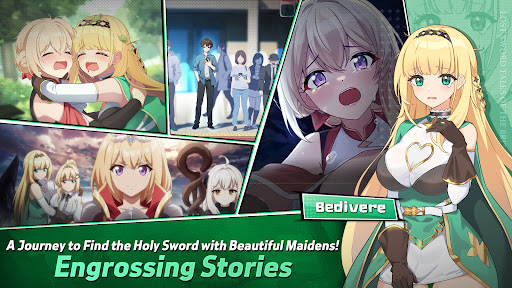
Bedivere, one of the Britannia`s knights and a cry baby but who has a strong loyalty to Elizabeth,
and finally, Ethan, who joins the adventure to find the Holy Sword along with them!
Begin the journey with the attractive characters to find the Holy Sword together!
■ afk RPG of Your Dreams! 2D Side-Scrolling Real Time Action & Various Battles
Growing party play through endless real time afk battles!
From various dungeons and single raid to interesting event dungeons,
Enjoy the growth through interesting battle RPG contents!
■ Visually Stunning High Quality 2D Anime Illustrations & Spectacular Skill Action!
Visually enjoyable afk battles with detailed Anime LD character motions and spectacular skill cutscenes!
With battle motions and skill cutscenes that feel like real animation,
Double the fun of character collection and battle!
■ Realistic Character Voice with the Top-Tier Voice Actors!
Best voice actors participated!
Deeply engaging experience enhanced by the realistic voices of our talented voice actors!
Dive deeper into the world of Lost Sword with the top-tier voice actors.
[Lost Sword Official Community Channel]
- Brand Webpage: https://lostsword.wemadeconnect.com/EN/index.html#Main
- Discord: https://discord.gg/ekgwAEQWu3
- Twitter (X): https://x.com/lostsword_en
- Facebook: https://www.facebook.com/LostSword.Global
- YouTube: https://www.youtube.com/@lostsword_en
- TikTok: https://www.tiktok.com/@lostsword_en
- Reddit: https://www.reddit.com/r/LostSwordOfficial
[Minimum Specs]
- OS: Android 6.0 or above
- Samsung Galaxy S9 or above
- RAM : 4GB or above
[App Permission Information]
In order to provide the services below, we request certain permissions.
[Optional Permission]
Phone: This is used to connect wireless devices, such as earphones, via Bluetooth.
Notifications: To allow the app to send service notifications
*Denying optional permissions does not affect gameplay.
[App Permission Management]
▶Android 6.0 or Higher:
- Revoking by Permission Type:
Device Settings > Apps > More Options (Settings & Controls) > App Settings > App Permissions > Select the desired permission > Choose to Allow or Deny access
- Revoking by App:
Device Settings > Apps > Select the specific app > Permissions > Choose to Allow or Deny access
▶Under Android 6.0:
Due to the limitations of the operating system, it is not possible to revoke individual permissions. Permissions can only be revoked by deleting the app.
We recommend upgrading your Android version to 6.0 or higher.
Mostra altro

1. Scarica il programma di installazione di MEmu e completa l'installazione

2. Avvia il Memu e apri il Google Play sulla homepage

3. Cerca 로스트 소드 in Google Play
Install
4. Scarica e installa 로스트 소드
5. Al termine dell'installazione, fai clic sull'icona per avviar

6. Divertiti giocando a 로스트 소드 su PC con MEmu
MEmu App Player è il miglior emulatore Android gratuito, utilizzato da 50 milioni di persone per ottenere un'esperienza di gioco Android superba. La tecnilogia di virtualizzazione MEmu ti permette di giocare a migliaia di giochi Android con semplicità sul tuo computer, anche i giochi con la grafica più esigente.
Schermo più grande con una grafica migliore; Lunga durata, senza limitazione di batteria o dati mobili.
Supporto completo per mappa di tastiera per un controllo preciso di tastiera e mouse o gamepad.
Multipli account di gioco o attività su un singolo PC contemporaneamente con il gestore di multi istanza.
Play 로스트 소드 on PC by following steps: