
Project63
Mise à jour
Version actuelle
Proposée par

Avec toute la passion que vous avez à jouer Project63, vos mains ne sont pas sensées se limiter à l’infime écran de votre téléphone. Jouez comme un pro et ayez le contrôle total de votre jeu à l’aide du clavier et de la souris. MEmu satisfait toutes vos attentes. Téléchargez et jouez Project63 sur PC. Jouez aussi longtemps que vous souhaitez sans aucune limitation de batterie, de données mobiles et d’appels embêtants. La toute nouvelle version de MEmu 9 est la meilleure option de jouer Project63 sur PC. Réalisé par nos experts, l’e magnifique système d’affectation de touches prédéfini fait de Project63 un jeu réaliste sur PC. Le gestionnaire multi-instances de MEmu permet 2 ou plusieurs comptes de jeu sur le même appareil. Et le plus important, le moteur d’émulation exclusif peut libérer le plein potentiel de votre PC, ce qui facilite tout.
Afficher plus
Téléchargez Project63 avec le simulateur d’Android MEmu sur votre PC. Profitez de jouer sur un grand écran. High school ghost-hunting horror game!
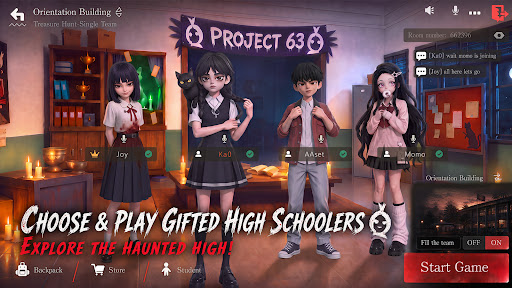

High school ghost-hunting horror game!Scream Together!Laugh Together!
Haunted High is in session — and the treasure's hidden inside.Join the Project63. Pick your gifted high schooler. Team up with your friends!Headless Teacher and Krasue are hunting you down! Loot ahead, ghosts behind — loot big or run for it?Either way,screams and laughs non-stop!
[Choose & play gifted high schoolers, explore the haunted high]
Multiple gifted characters to choose from!Sneak into the haunted high — abandoned halls, the sealed basement... and things best left alone.
Someone scouts ahead. someone fights.Someone "accidentally" wakes up every ghost in the building. What's around the next corner? Don't ask — just run.
[Team up & play,Scream Loud,Laugh Harder]
Hit up your classmates, your teammates, your best mates! Squad up to 4 and play anywhere!
Ghosts incoming — save your friends or run for it? Either way, screams and laughs non-stop!
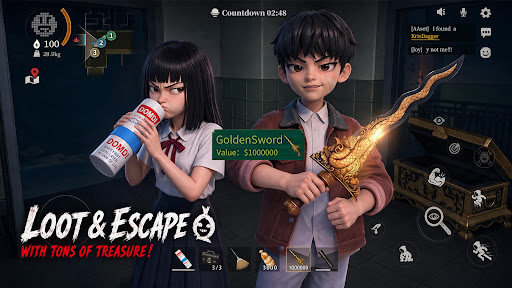
[Grab the Loot and Escape with Your Treasures]
Treasure's right there — but the ghosts are already in your face. Loot or run?
Too greedy? GG. Bail too early? Maybe miss the jackpot.
However,real ones will loot big and make it out alive.
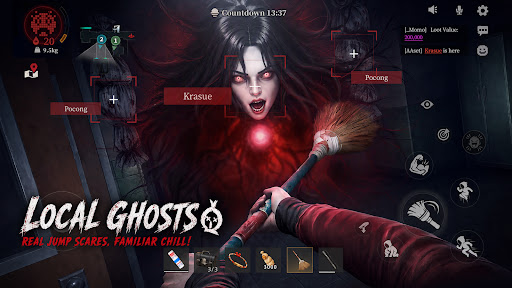
[Local ghosts,real jump scares, familiar chill]
Pocong. Krasue. White Lady. Aswang. They're coming for you. Real ghosts, real jump scares — the kind you grew up hearing about. Got chills yet? Whatever you do — don't look back.
[No Pay to Win! Win with Skill and Teamwork]
There is no character training or paying for stats. Every match is decided by your skill and your squad's teamwork. Pick the abilities that match your play style, coordinate with your team, and prove your skills!
[Test Version Notice]
Thanks for joining the test! This is a test version, and we’re still improving the game.
Found a bug? Have a new idea? Got suggestions? Tell us!
Every piece of feedback helps us build a better ghost-hunting world.
Discord: https://discord.gg/gW88vuJ8ba
Facebook: https://www.facebook.com/profile.php?id=61589974463235
Afficher plus

1. Téléchargez l'installateur MEmu et terminez l'installation

2. Démarrez MEmu puis ouvrez Google Play sur la page d'accueil

3. Recherchez Project63 dans Google Play
Install
4. Téléchargez et installez Project63
5. Une fois l'installation terminée, cliquez sur l'icône pour démarrer

6. Profitez de jouer Project63 sur PC avec MEmu
Le lecteur d'application MEmu est le meilleur émulateur Android gratuit, et 50 millions de personnes profitent déjà de sa fantastique expérience de jeu Android. La technologie de virtualisation MEmu vous donne la possibilité de jouer à des milliers de jeux Android sur votre PC sans aucune difficulté, même aux plus gourmands.
L’écran plus grand avec de meilleurs graphismes; Une longue durée, sans limitation de batterie ou de données mobiles.
Soutien du Keymapping pour un contrôle précis du clavier et de la souris ou de la manette de jeu
Plusieurs comptes de jeu ou tâches sur un seul PC en même temps avec le gestionnaire de multi-instance.
Play Project63 on PC by following steps: