RPG Leingham Tavern Story
Mise à jour
Version actuelle
1.08g
Proposée par

Avec toute la passion que vous avez à jouer RPG Leingham Tavern Story, vos mains ne sont pas sensées se limiter à l’infime écran de votre téléphone. Jouez comme un pro et ayez le contrôle total de votre jeu à l’aide du clavier et de la souris. MEmu satisfait toutes vos attentes. Téléchargez et jouez RPG Leingham Tavern Story sur PC. Jouez aussi longtemps que vous souhaitez sans aucune limitation de batterie, de données mobiles et d’appels embêtants. La toute nouvelle version de MEmu 9 est la meilleure option de jouer RPG Leingham Tavern Story sur PC. Réalisé par nos experts, l’e magnifique système d’affectation de touches prédéfini fait de RPG Leingham Tavern Story un jeu réaliste sur PC. Le gestionnaire multi-instances de MEmu permet 2 ou plusieurs comptes de jeu sur le même appareil. Et le plus important, le moteur d’émulation exclusif peut libérer le plein potentiel de votre PC, ce qui facilite tout.
Afficher plus
Téléchargez RPG Leingham Tavern Story avec le simulateur d’Android MEmu sur votre PC. Profitez de jouer sur un grand écran. [Supported Devices].
[Supported Devices]
Requires higher specs than previous titles.
A trial version is available to test performance.
Recommended: Android OS 11+, 8 GB+ RAM.
[Story]
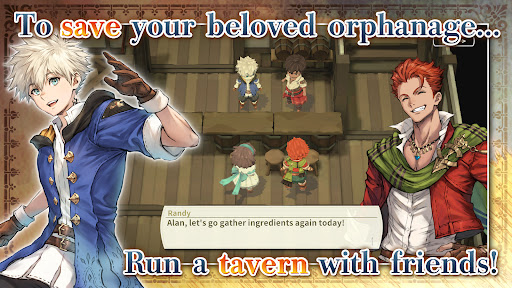
Save an orphanage from closure and build a thriving tavern in Leingham Tavern Story: Alan and the Time Goddess, a charming fantasy RPG combining cooking, tavern management, and dungeon exploration!
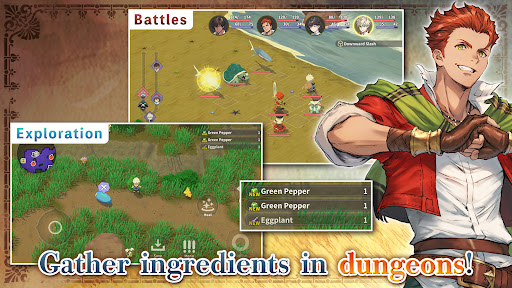
Join Alan and his friends as they venture into monster-filled dungeons in search of ingredients, discover new recipes, and serve delicious dishes to bring customers through the door. Along the way, meet the people of the Kingdom of Leingham and enjoy a heartwarming story where food, friendship, and adventure come together.
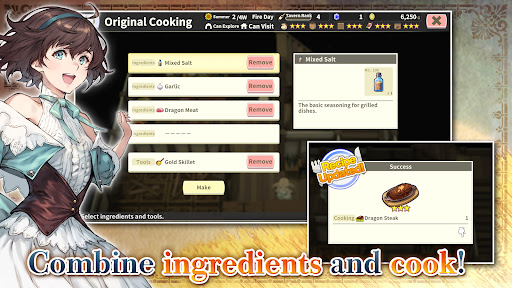
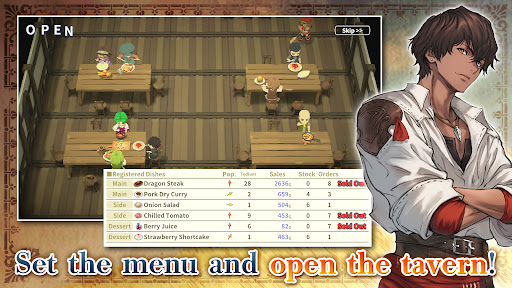
Explore dungeons, gather ingredients, and battle roaming monsters in classic turn-based RPG combat, then return to your tavern to create from over 800 different dishes. Experiment with ingredients, expand your recipe collection, adjust your menu to seasonal trends, and assign employees strategically to maximize sales. Grow vegetables on your farm, relax with a spot of fishing, and strengthen your characters by eating the meals you prepare instead of earning experience from battles.
From dungeon crawling and character progression to cooking and tavern management simulation, build your business and enjoy a deliciously different fantasy RPG adventure!
[IMPORTANT NOTICE]
Your use of the application requires your agreement to the following EULA and 'Privacy Policy and Notice'. If you do not agree, please do not download our application.
End User License Agreement: http://kemco.jp/eula/index.html
Privacy Policy and Notice: http://www.kemco.jp/app_pp/privacy.html
[Game Controller]
- Not Supported
[Languages]
- English (Coming Soon), Japanese
[Non-Supported Devices]
This app has generally been tested to work on any mobile device released in Japan. We cannot guarantee full support on other devices. If you have the Developer Options enabled in your device, please turn off the "Don't keep activities" option in case of any issue.
Get the latest information!
[Newsletter]
http://kemcogame.com/c8QM
[Facebook page]
https://www.facebook.com/kemco.global
*The actual price might differ depending on the region.
© 2024-2026 KEMCO/RideonJapan,Inc./Rideon,Inc.
Afficher plus

1. Téléchargez l'installateur MEmu et terminez l'installation

2. Démarrez MEmu puis ouvrez Google Play sur la page d'accueil

3. Recherchez RPG Leingham Tavern Story dans Google Play
Install
4. Téléchargez et installez RPG Leingham Tavern Story
5. Une fois l'installation terminée, cliquez sur l'icône pour démarrer

6. Profitez de jouer RPG Leingham Tavern Story sur PC avec MEmu
Le lecteur d'application MEmu est le meilleur émulateur Android gratuit, et 50 millions de personnes profitent déjà de sa fantastique expérience de jeu Android. La technologie de virtualisation MEmu vous donne la possibilité de jouer à des milliers de jeux Android sur votre PC sans aucune difficulté, même aux plus gourmands.
L’écran plus grand avec de meilleurs graphismes; Une longue durée, sans limitation de batterie ou de données mobiles.
Soutien du Keymapping pour un contrôle précis du clavier et de la souris ou de la manette de jeu
Plusieurs comptes de jeu ou tâches sur un seul PC en même temps avec le gestionnaire de multi-instance.
Play RPG Leingham Tavern Story on PC by following steps: