RPG Leingham Tavern Story
Actualizada
Versión actual
1.08g
Ofrecida por

Con toda tu pasión para jugar RPG Leingham Tavern Story, no se supone que tus manos estén limitadas en una pequeña pantalla de tu teléfono. Juega como un profesional y obtén el control total de tu juego con el teclado y el mouse. MEmu le ofrece todas las cosas que espera. Descargar y jugar RPG Leingham Tavern Story en PC. Juega todo el tiempo que quieras, sin más limitaciones de batería, datos móviles y llamadas molestas. El nuevo MEmu 9 es la mejor opción para jugar RPG Leingham Tavern Story en PC. Preparado con nuestra experiencia, el exquisito sistema de keymapping preestablecido convierte a RPG Leingham Tavern Story en un verdadero juego de PC. Codificado con nuestra absorción, el administrador de instancias múltiples hace posible jugar 2 o más cuentas en el mismo dispositivo. Y lo más importante, nuestro exclusivo motor de emulación puede liberar todo el potencial de su PC, hacer que todo sea más fluido. Nos importa no solo cómo juegas, sino también todo el proceso de disfrutar de la felicidad de los juegos.
Más detalles
Descargar RPG Leingham Tavern Story en PC con MEmu Android Emulador. Disfruta jugando en la pentalla grande. [Supported Devices].
[Supported Devices]
Requires higher specs than previous titles.
A trial version is available to test performance.
Recommended: Android OS 11+, 8 GB+ RAM.
[Story]
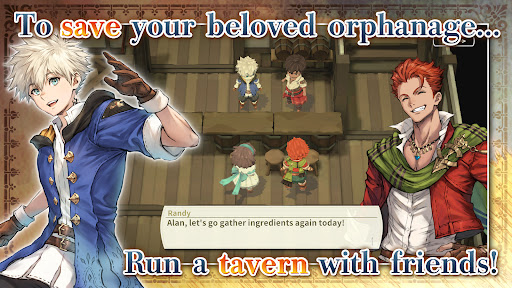
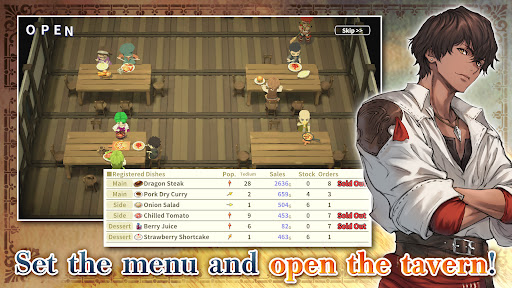
Save an orphanage from closure and build a thriving tavern in Leingham Tavern Story: Alan and the Time Goddess, a charming fantasy RPG combining cooking, tavern management, and dungeon exploration!
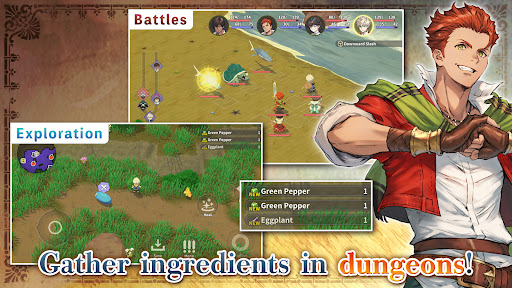
Join Alan and his friends as they venture into monster-filled dungeons in search of ingredients, discover new recipes, and serve delicious dishes to bring customers through the door. Along the way, meet the people of the Kingdom of Leingham and enjoy a heartwarming story where food, friendship, and adventure come together.
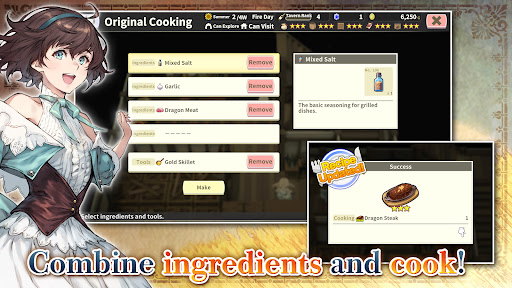
Explore dungeons, gather ingredients, and battle roaming monsters in classic turn-based RPG combat, then return to your tavern to create from over 800 different dishes. Experiment with ingredients, expand your recipe collection, adjust your menu to seasonal trends, and assign employees strategically to maximize sales. Grow vegetables on your farm, relax with a spot of fishing, and strengthen your characters by eating the meals you prepare instead of earning experience from battles.
From dungeon crawling and character progression to cooking and tavern management simulation, build your business and enjoy a deliciously different fantasy RPG adventure!
[IMPORTANT NOTICE]
Your use of the application requires your agreement to the following EULA and 'Privacy Policy and Notice'. If you do not agree, please do not download our application.
End User License Agreement: http://kemco.jp/eula/index.html
Privacy Policy and Notice: http://www.kemco.jp/app_pp/privacy.html
[Game Controller]
- Not Supported
[Languages]
- English (Coming Soon), Japanese
[Non-Supported Devices]
This app has generally been tested to work on any mobile device released in Japan. We cannot guarantee full support on other devices. If you have the Developer Options enabled in your device, please turn off the "Don't keep activities" option in case of any issue.
Get the latest information!
[Newsletter]
http://kemcogame.com/c8QM
[Facebook page]
https://www.facebook.com/kemco.global
*The actual price might differ depending on the region.
© 2024-2026 KEMCO/RideonJapan,Inc./Rideon,Inc.
Más detalles

1. Descargar el instalador de MEmu y finalice la instalación

2. Iniciar MEmu y abrir Google Play en la página de inicio

3. Buscar RPG Leingham Tavern Story en Google Play
Install
4. Descargar y instalar RPG Leingham Tavern Story
5. Hacer click al icono para iniciar

6. Disfruta jugando RPG Leingham Tavern Story en PC con MEmu
MEmu App Player es el mejor emulador de Android gratuito y 50 millones de personas ya están disfrutando su magnífica experiencia jugando en Android. La tecnología de virtualización de MEmu te permite jugar a miles de juegos Android suavemente en tu PC, incluso los más intensivos gráficamente.
Pantalla más grande con mejores gráficos; Larga duración, sin limitación de batería o datos móviles.
Soporte completo de keymapping para un control preciso del teclado y el mouse o gamepad.
Múltiples cuentas de juegos o tareas en una sola PC a la vez con el administrador de instancias múltiples.
Play RPG Leingham Tavern Story on PC by following steps: