The Ascent
अपडेट किया गया
वर्तमान वर्शन
संसाधन

अपने सेलफोन पर The Ascent का उपयोग करते समय ओवरचार्ज के बारे में चिंता करना बंद करें, अपने आप को छोटी स्क्रीन से मुक्त करें और बहुत बड़े डिस्प्ले पर ऐप का उपयोग करने का आनंद लें। अब से, कीबोर्ड और माउस के साथ अपने ऐप का पूर्ण-स्क्रीन अनुभव प्राप्त करें। एमईएमयू आपको उन सभी आश्चर्यजनक सुविधाओं की पेशकश करता है जिनकी आपको उम्मीद थी: त्वरित इंस्टॉल और आसान सेटअप, सहज नियंत्रण, बैटरी की कोई सीमा नहीं, मोबाइल डेटा और परेशान कॉल। आपके कंप्यूटर पर The Ascent का उपयोग करने का सबसे अच्छा विकल्प नया MEmu 9 है। हमारे अवशोषण के साथ कोडित, बहु-उदाहरण प्रबंधक एक ही समय में 2 या अधिक खाते खोलना संभव बनाता है। और सबसे महत्वपूर्ण, हमारा अनन्य उत्सर्जन इंजन आपके पीसी की पूरी क्षमता को जारी कर सकता है, सब कुछ सुचारू और सुखद बना सकता है।
और दिखाएं
डाउनलोड करें The Ascent पीसी पर MEmu एंड्रॉयड एमुलेटर के साथ बड़े पर्दे पर खेलने का आनंद लें। The Ascent is a solo and co-op Action-shooter RPG set in a cyberpunk world.
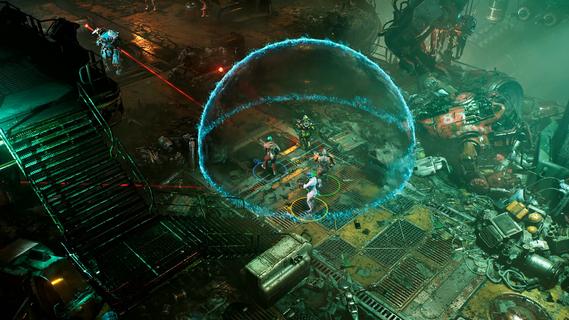
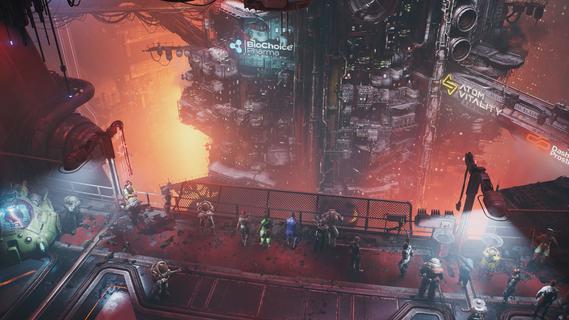
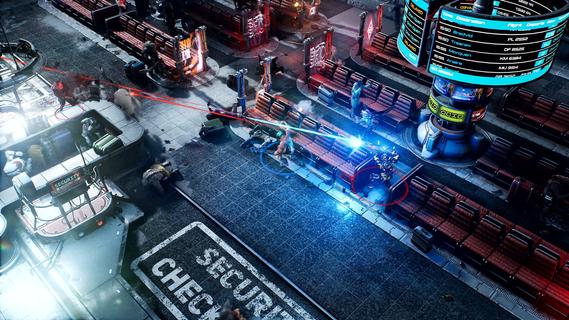
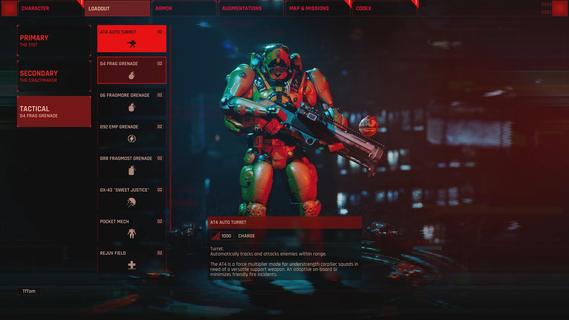
The Ascent is a solo and co-op Action-shooter RPG set in a cyberpunk world. The mega corporation that owns you and everyone, The Ascent Group, has just collapsed. Can you survive without it?The Ascent is a solo and co-op Action-shooter RPG, set on Veles, a packed cyberpunk world.Welcome to The Ascent Group arcology, a corporate-run metropolis stretching high into the sky and filled with creatures from all over the galaxy. You play as a worker, enslaved by the company that owns you and everyone else in your district. One day, you are suddenly caught in a vortex of catastrophic events: The Ascent Group shuts down for unknown reasons and the survival of your district is threatened. You must take up arms and embark on a new mission to find out what started it all.You belong to the corporation. Can you survive without it?SOLO OR CO-OPPlay the entire game alone or work together with up to three friends in local or online co-op.EXPLOSIVE SHOOTERAim low or high, switch weapons and equip lethal gadgets, take cover and use the destructible environments at your advantage and keep adjusting your tactic as you face new enemies.RPG ELEMENTSCustomize your character with cyberware that suits your playstyle. Allocate new skill points as you level-up and try various augmentations to take down your enemies in new creative ways.A VIBRANT CYBERPUNK WORLDMeet new allies and enemies and find loot as you explore the brimming world of The Ascent and its wide range of districts, from the deep slums to the higher luxury spheres.
और दिखाएं

1. MEmu इंस्टॉलर को डाउनलोड करें और इंस्टॉलेशन को पूरा करें

2. MEmu शुरू करें फिर होमपेज पर Google Play खोलें

3. Google Play में The Ascent खोजें
Install
4. The Ascent डाउनलोड कर इंस्टॉल करें
5. इंस्टॉल पूरा होने पर आइकन दबाएं

6. MEmu से पीसी पर The Ascent खेलने का आनंद लें
MEmu Play सबसे बेहतरीन मुफ़्त Android एमुलेटर है और 5 करोड़ लोग पहले ही इसके शानदार Android गेमिंग अनुभव का आनंद ले चुके हैं। MEmu 9 वर्चुअलाइज़ेशन तकनीक आपको अपने PC पर हज़ारों Android गेम, यहाँ तक कि सबसे ज़्यादा ग्राफ़िक्स वाले गेम भी, आसानी से खेलने की सुविधा देती है।
असीमित बैटरी या मोबाइल डेटा के साथ बेहतर ग्राफिक्स के साथ बड़ी स्क्रीन; लंबी अवधि।
कीबोर्ड और माउस या गेमपैड के उत्तम नियंत्रण के लिए संपूर्ण कीमैपिंग का समर्थन करता हैं।
एक ही पीसी पर मल्टी-इंस्टेंस मैनेजर के साथ एक समय में कई गेम खाते या कार्य कर सकते हैं।
Play The Ascent on PC by following steps: