Archery Duel 3D
Updated
Current Version
1.0.1
Offered By

With your passion for Archery Duel 3D, you shouldn’t have to limit yourself to the small screen of a phone. Play like a pro and take full control of the game using a keyboard and mouse. MEmu gives you everything you’re looking for. Download and play Archery Duel 3D on PC. Play as long as you want — no more worries about battery life, mobile data, or unexpected calls. The all-new MEmu 9 is the best way to play Archery Duel 3D on PC. With our expertly designed keymapping system, Archery Duel 3D feels just like a real PC game. The MEmu multi-instance manager lets you run two or more accounts on the same device at the same time. Most importantly, our exclusive emulation engine unlocks your PC’s full potential, delivering smooth and seamless performance.
Show more
Download Archery Duel 3D on PC with MEmu Android Emulator. Enjoy playing on big screen. This is a one-on-one fair archery competition game where victory or defeat depends entirely on shooting accuracy.

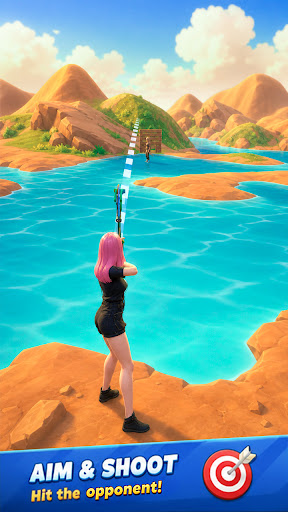


This is a one-on-one fair archery competition game where victory or defeat depends entirely on shooting accuracy. You will take turns to fight head-to-head against different enemy archers, relying on steady and accurate shots to eliminate opponents and win every duel.
The game follows real projectile motion physics. You can freely adjust the shooting angle and plan the arrow’s flight path to hit targets precisely. Meanwhile, opponents keep shooting arrows back. The fast-paced offense and defense test your aiming judgement and on-the-spot adaptability.
It features many battle scenes with complex terrain and diverse styles. While aiming, you need to calculate environmental variables such as wind speed and shooting distance, and adapt to unique terrain features of each map. Repeatedly predict ballistic trajectories and calibrate aiming points to deliver a decisive killing blow and quickly finish off enemies.
As battles go on, you unlock new maps, various weapons and rare skins to boost your combat power. Earn gold coins by defeating waves of foes, collect powerful gear to hone your archery skills, and finally become an unbeatable archery master.
Show more

1. Download MEmu installer and finish the setup

2. Start MEmu then open Google Play on the desktop

3. Search Archery Duel 3D in Google Play
Install
4. Download and Install Archery Duel 3D
5. On install completion click the icon to start

6. Enjoy playing Archery Duel 3D on PC with MEmu
MEmu Play is the best Android emulator and 100 million people already enjoy its superb Android gaming experience. The MEmu virtualization technology empowers you to play thousands of Android games smoothly on your PC, even the most graphic-intensive ones.
Bigger screen with better graphics; Long duration, without limitation of battery or mobile data.
Full Keymapping support for precise control of keyboard and mouse or gamepad.
Multiple game accounts or tasks on single PC at one time with Multi-Instance manager.
Play Archery Duel 3D on PC by following steps: