Best Guess Live
Updated
Current Version
1.7.3
Offered By

With your passion for Best Guess Live, you shouldn’t have to limit yourself to the small screen of a phone. Play like a pro and take full control of the game using a keyboard and mouse. MEmu gives you everything you’re looking for. Download and play Best Guess Live on PC. Play as long as you want — no more worries about battery life, mobile data, or unexpected calls. The all-new MEmu 9 is the best way to play Best Guess Live on PC. With our expertly designed keymapping system, Best Guess Live feels just like a real PC game. The MEmu multi-instance manager lets you run two or more accounts on the same device at the same time. Most importantly, our exclusive emulation engine unlocks your PC’s full potential, delivering smooth and seamless performance.
Show more
Download Best Guess Live on PC with MEmu Android Emulator. Enjoy playing on big screen. NETFLIX MEMBERSHIP REQUIRED.


NETFLIX MEMBERSHIP REQUIRED.
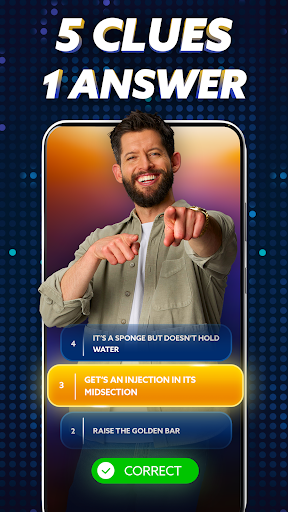
Compete for a chance to win real money in this live mobile game every weekday. Use your smarts and five clever clues to submit the right answer first.
On "Best Guess Live," anyone can win. You just need one right answer at the right moment to claim your share of a prize money jackpot worth thousands. Get ready to think fast, because you'll be in a nationwide race to be one of the first to figure out the riddle.
A NEW DAILY ROUTINE
The game streams live in the app every weekday (Monday through Friday) at 8 PM ET | 5PM PT. The broadcast is in English, and the game is open to players anywhere in the United States and Canada, except Quebec.
FUN FACTS; REAL MONEY
Got a brain packed with random trivia? Put it to good use: For each puzzle, you'll need to figure out what secret item is hidden inside a misty and mysterious crystal ball. It could be a person, place, or thing — anything!
THINK IN RIDDLES
For each puzzle, you'll get a series of five clues hinting at the answer. Every clue will build on the previous ones, starting out cryptic and gradually getting more obvious. After each clue, you'll have time to submit an answer. But don't risk it until you think you're right, since you only get one chance per puzzle.
BE FAST TO BE FIRST
The sooner you get the answer, the better your odds of winning. The fastest players to answer each puzzle correctly will split the prize pool.
TWO CHANCES TO WIN
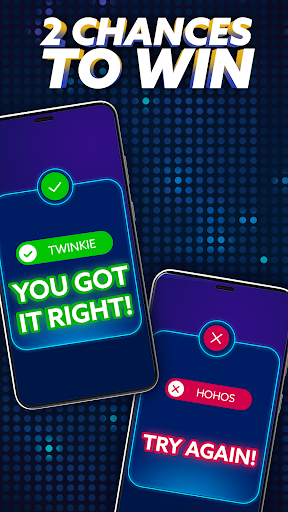
Each livestream includes two rounds, and the second will be harder than the first — with a bigger prize to match. If the first crystal ball mystery stumped you, jump back in and try again!
Participation open to legal residents of the 50 United States and D.C. and Canada (excluding Quebec), 18+. Void where prohibited. Access to a Netflix account and a PayPal account required for participation and prize fulfillment. "Best Guess" is a skill-based game. At least $15,000 in prizes available per episode. Official Terms & Conditions at http://bit.ly/BestGuessLive. Sponsor: Netflix, Inc.
- Created by Ex Machina and Apploff Entertainment.
Please note that the Data Safety information applies to information collected and used in this app. See the Netflix Privacy Statement to learn more about information we collect and use in this and other contexts, including at account registration.
Show more

1. Download MEmu installer and finish the setup

2. Start MEmu then open Google Play on the desktop

3. Search Best Guess Live in Google Play
Install
4. Download and Install Best Guess Live
5. On install completion click the icon to start

6. Enjoy playing Best Guess Live on PC with MEmu
MEmu Play is the best Android emulator and 100 million people already enjoy its superb Android gaming experience. The MEmu virtualization technology empowers you to play thousands of Android games smoothly on your PC, even the most graphic-intensive ones.
Bigger screen with better graphics; Long duration, without limitation of battery or mobile data.
Full Keymapping support for precise control of keyboard and mouse or gamepad.
Multiple game accounts or tasks on single PC at one time with Multi-Instance manager.
Play Best Guess Live on PC by following steps: