Bluey's Quest for The Gold Pen
Updated
Current Version
Offered By

With your passion for Bluey's Quest for The Gold Pen, you shouldn’t have to limit yourself to the small screen of a phone. Play like a pro and take full control of the game using a keyboard and mouse. MEmu gives you everything you’re looking for. Download and play Bluey's Quest for The Gold Pen on PC. Play as long as you want — no more worries about battery life, mobile data, or unexpected calls. The all-new MEmu 9 is the best way to play Bluey's Quest for The Gold Pen on PC. With our expertly designed keymapping system, Bluey's Quest for The Gold Pen feels just like a real PC game. The MEmu multi-instance manager lets you run two or more accounts on the same device at the same time. Most importantly, our exclusive emulation engine unlocks your PC’s full potential, delivering smooth and seamless performance.
Show more
Download Bluey's Quest for The Gold Pen on PC with MEmu Android Emulator. Enjoy playing on big screen. *TRY BEFORE YOU BUY* Pre-register now and be the first to play the free experience, then unlock the whole game with one payment and no ads.
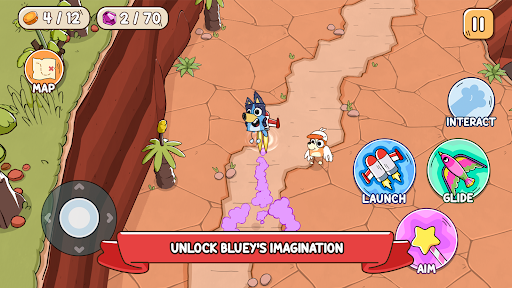
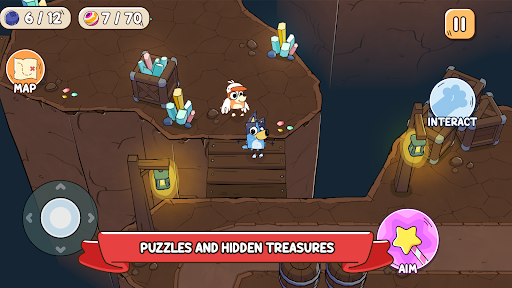
*TRY BEFORE YOU BUY* Pre-register now and be the first to play the free experience, then unlock the whole game with one payment and no ads.
A world-first collaboration with the original Bluey creator — pre-register Bluey's Quest for The Gold Pen now!
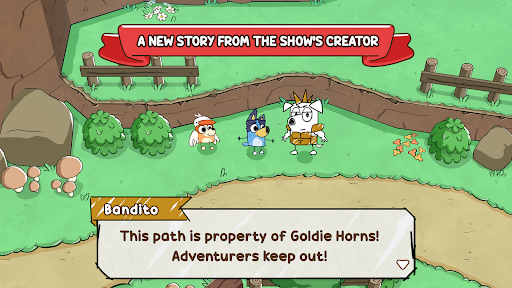
Experience the world of Bluey as you never have before in this story-driven adventure game that only Bluey’s imagination can make possible!
Join Bluey on her epic new quest across hand-drawn imaginary lands to retrieve the Gold Pen. Explore exciting worlds, complete fun challenges and trifficult puzzles, all as you embark on Bluey's Quest for The Gold Pen.
A NEW BLUEY STORY
Dive into an adventure game fueled by a brand-new story from the show's creator! Discover the humor and warmth Bluey brings in this fun new game for the family, with story by Joe Brumm.
EMBARK ON A HEART-WARMING ADVENTURE
Bluey is drawing her imaginary world when Dad suddenly yoinks the Gold Pen she needs! Transported into Bluey's hand-drawn imagination, Mum designs the imaginary lands, Dad rocks up on his cool bike as self-declared King Goldie Horns, and Bingo transforms into her honk-happy alter ego — Bingoose! Away they go on an exciting quest to retrieve the Gold Pen - and have heaps of fun along the way.
GO ON FUN-FILLED QUESTS
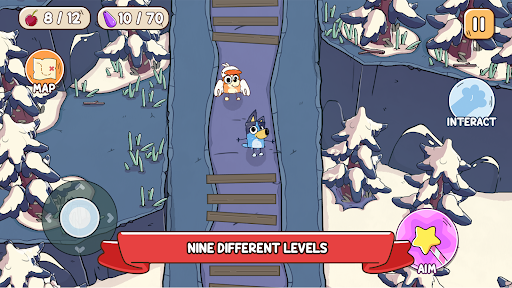
Uncover hidden treasures, solve puzzles, and discover playful mini quests as you glide, fly, and skate your way around all kinds of challenges and quests!
DISCOVER IMAGINARY HAND-DRAWN WORLDS
Explore nine levels brimming with snowy mountains, dreamy golden beaches, lush green forests, and discover the Australian outback!
FUN FOR EVERYONE
Just like the animated series, Bluey's Quest for The Gold Pen will spark laughter and encourage players of all ages to think and explore through play.
About Bluey
Bluey is a loveable, inexhaustible six year-old Blue Heeler, who loves to turn everyday family life into boundless, playful adventures, developing her imagination and resilience as she goes.
About Ludo Studio
Ludo Studio is a BAFTA, multi-Emmy® and Logie award-winning Australian studio that creates and produces original scripted drama, animation and digital stories that are authored by incredible local talent, distributed globally and loved by audiences everywhere. ludostudio.com.au
BLUEY TM and BLUEY character logos TM & © Ludo Studio Pty Ltd 2018. Licensed by BBC Studios. BBC logo TM & © BBC 1996
****************************************
View our privacy policy at https://www.halfbrick.com/blueys-quest-privacy-policy
View our terms of service at https://www.halfbrick.com/blueys-quest-terms-of-service
Show more

1. Download MEmu installer and finish the setup

2. Start MEmu then open Google Play on the desktop

3. Search Bluey's Quest for The Gold Pen in Google Play
Install
4. Download and Install Bluey's Quest for The Gold Pen
5. On install completion click the icon to start

6. Enjoy playing Bluey's Quest for The Gold Pen on PC with MEmu
MEmu Play is the best Android emulator and 100 million people already enjoy its superb Android gaming experience. The MEmu virtualization technology empowers you to play thousands of Android games smoothly on your PC, even the most graphic-intensive ones.
Bigger screen with better graphics; Long duration, without limitation of battery or mobile data.
Full Keymapping support for precise control of keyboard and mouse or gamepad.
Multiple game accounts or tasks on single PC at one time with Multi-Instance manager.
Play Bluey's Quest for The Gold Pen on PC by following steps: