Bus Crowd - Traffic Jam
Updated
Current Version
1.2.2
Offered By

With your passion for Bus Crowd - Traffic Jam, you shouldn’t have to limit yourself to the small screen of a phone. Play like a pro and take full control of the game using a keyboard and mouse. MEmu gives you everything you’re looking for. Download and play Bus Crowd - Traffic Jam on PC. Play as long as you want — no more worries about battery life, mobile data, or unexpected calls. The all-new MEmu 9 is the best way to play Bus Crowd - Traffic Jam on PC. With our expertly designed keymapping system, Bus Crowd - Traffic Jam feels just like a real PC game. The MEmu multi-instance manager lets you run two or more accounts on the same device at the same time. Most importantly, our exclusive emulation engine unlocks your PC’s full potential, delivering smooth and seamless performance.
Show more
Download Bus Crowd - Traffic Jam on PC with MEmu Android Emulator. Enjoy playing on big screen. Welcome to Bus Crowd, a colorful bus puzzle game built around traffic jam strategy, passenger matching, and smart parking choices.
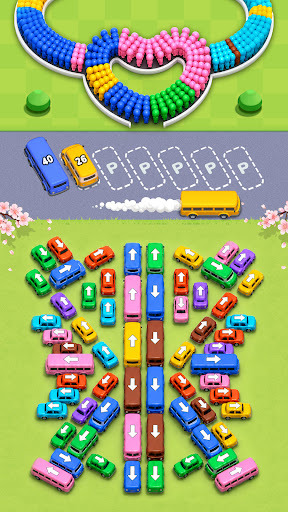
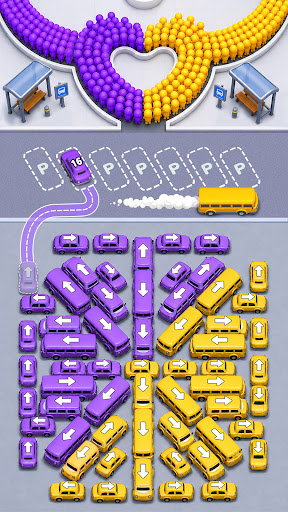
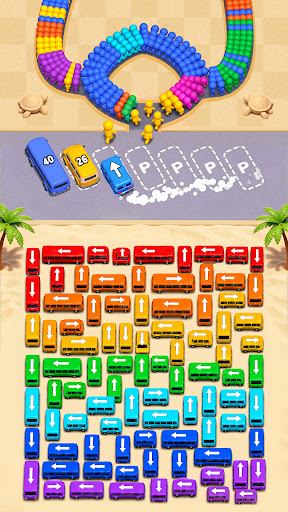
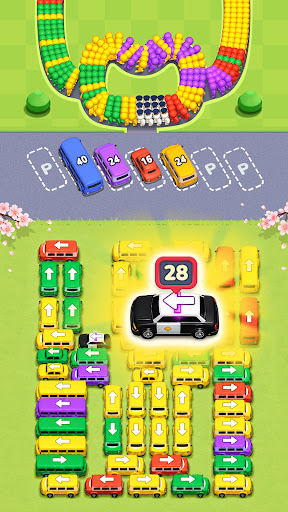
Welcome to Bus Crowd, a colorful bus puzzle game built around traffic jam strategy, passenger matching, and smart parking choices. Clear the traffic jam one parking slot at a time, and play the whole bus game offline.
A crowded station is full of waiting passengers, and buses with different colors and seat capacities are ready to roll. Check the crowd, choose the right bus, then move it into an available parking slot for boarding. Fill every seat to release that slot, avoid a parking jam, and keep the bus crowd under control.
How to Play
- Match Colors and Seats: Empty buses enter the boarding slots to pick up waiting passengers of the same color. Each vehicle has its own capacity, so compare the crowd before making a move.
- Follow the Arrows: Move buses from the station into parking slots. Each vehicle can only drive in its arrow direction, so blocked paths need careful observation.
- Fill Buses to Open Slots: A full vehicle departs and opens its parking space for another move. Avoid leaving buses that are not fully filled in the slots for too long.
- Solve the Jam with Strategy: Use color sort logic and car parking style planning to handle every traffic jam puzzle.
- Use Boosters When Stuck: Helpful boosters can adjust buses, guide passengers, or open paths when a tricky jam blocks your progress.
Game Features
- Bus Jam Puzzle Fun: Mix color matching, passenger boarding, parking slots, and traffic jam choices in a bus puzzle that feels easy to start and satisfying to solve.
- Offline Bus Game: Take this bus jam with you. The offline bus game needs no connection, so you can play it anywhere.
- Crowded Station: Study the arrows, send the right buses out of crowded lanes, and enjoy the moment when a blocked station finally starts moving.
- Car Parking Puzzle: Work through layouts like a car jam, under real bus parking pressure. Watch the crowd, then choose a move instead of tapping at random.
- Brain Teaser Levels: Count seats, compare passengers, and use smart strategy to solve each puzzle game with a real sense of progress.
- Passenger Matching Flow: Watch large crowds stream into colorful buses, see vehicles depart one by one, and turn chaos into a smooth boarding flow.
- Diverse Boosters: Use different tools for buses and passengers, then decide which option gives the value when the station gets tricky.
- Bright 3D Station Scenes: Enjoy vivid buses, lively passengers, smooth boarding animations, and relaxing traffic flow.
Bus Crowd is made for players who enjoy bus, parking, and car games, plus color sort puzzles, traffic jam games, and clever car jam challenges. Match passengers, fill buses, open parking slots, and solve each bus game with satisfying flow. Download Bus Crowd today and master the jam offline.
Contact us via: fingerrush.customerservice@outlook.com
Privacy Policy:https://sites.google.com/view/fingerrushofpp/home
Terms of Service:https://sites.google.com/view/finger-rush-of-eula/home
Phone: +85259962997
Show more

1. Download MEmu installer and finish the setup

2. Start MEmu then open Google Play on the desktop

3. Search Bus Crowd - Traffic Jam in Google Play
Install
4. Download and Install Bus Crowd - Traffic Jam
5. On install completion click the icon to start

6. Enjoy playing Bus Crowd - Traffic Jam on PC with MEmu
MEmu Play is the best Android emulator and 100 million people already enjoy its superb Android gaming experience. The MEmu virtualization technology empowers you to play thousands of Android games smoothly on your PC, even the most graphic-intensive ones.
Bigger screen with better graphics; Long duration, without limitation of battery or mobile data.
Full Keymapping support for precise control of keyboard and mouse or gamepad.
Multiple game accounts or tasks on single PC at one time with Multi-Instance manager.
Play Bus Crowd - Traffic Jam on PC by following steps: