Clutch Master
Updated
Current Version
0.38.40
Offered By

With your passion for Clutch Master, you shouldn’t have to limit yourself to the small screen of a phone. Play like a pro and take full control of the game using a keyboard and mouse. MEmu gives you everything you’re looking for. Download and play Clutch Master on PC. Play as long as you want — no more worries about battery life, mobile data, or unexpected calls. The all-new MEmu 9 is the best way to play Clutch Master on PC. With our expertly designed keymapping system, Clutch Master feels just like a real PC game. The MEmu multi-instance manager lets you run two or more accounts on the same device at the same time. Most importantly, our exclusive emulation engine unlocks your PC’s full potential, delivering smooth and seamless performance.
Show more
Download Clutch Master on PC with MEmu Android Emulator. Enjoy playing on big screen. PRESS THE CLUTCH, SLAM THE GEAR, LAUNCH ON GREEN!
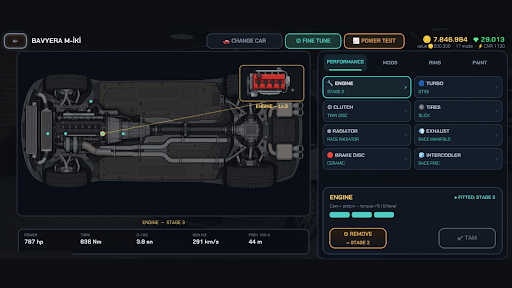
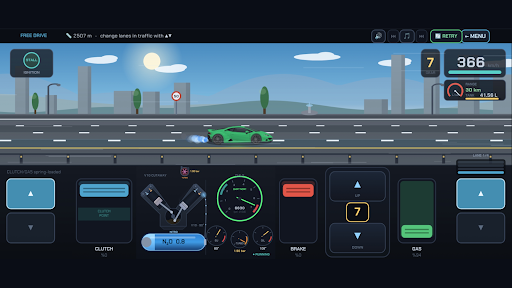
PRESS THE CLUTCH, SLAM THE GEAR, LAUNCH ON GREEN!
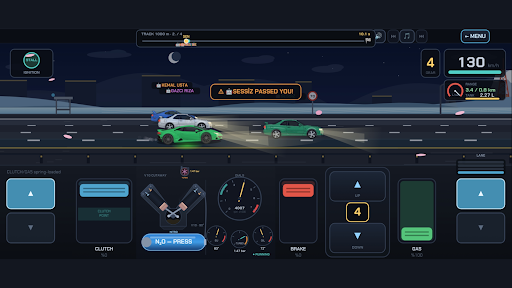
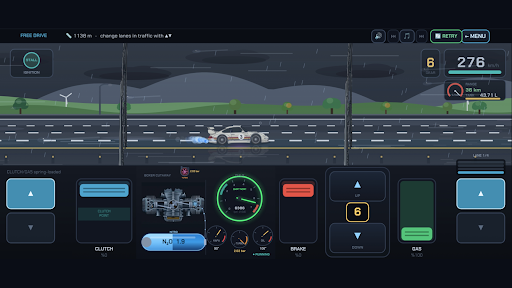
Clutch Master is a realistic car driving simulator and racing game that brings REAL manual-transmission feel to your phone. Gears won't engage without the clutch fully pressed, you launch on the biting point, and dumping it too fast stalls the engine. Nail the sweet spot on the tacho and earn a PERFECT SHIFT boost — watch for the green LED!
REAL MECHANICS — A TRUE CAR SIMULATOR
• H-pattern shifter (drag & slot) or PADDLE ▲▼ mode — your choice
• Separate clutch, throttle and brake pedals, all analog
• Engine heat, brake fade, engine damage, turbo boost and fuel — all simulated
• Live engine cutaway: pistons, valves and the turbo wheel spin before your eyes
A FULL SINGLE-PLAYER CAREER — 17 CHAPTERS
Start at the Driving Academy, then master city traffic, VIP passenger rides, the maneuvering park, mountain passes, snow and ice, the storm line, breakdown mode, a taxi career, race week, the drag strip, lane mastery (mind the speed cameras!), street racing, police pursuits, long hauls, the MASTER DRIVER gauntlet and a 100-race CHAMPIONSHIP. New to stick shift? The tutorial coach guides you step by step — or skip it with one tap.
GARAGE & TUNING
Six cars, from a humble hatchback to legendary sports coupés. Engine, turbo, clutch, tires, brakes, intercooler, 6-speed box… Swap body panels, paint, underglow neon, fine-tune individual gear ratios — then strap your build onto the DYNO and read its power/torque curve. Every build gets one power number: CMR (Clutch Master Rating) — a 370 stock runabout or a 1000 monster?
MULTIPLAYER WITH FRIENDS (2-4 PLAYERS)
• Host a room, share a 4-letter code — the start lights fire for EVERYONE at once
• QUICK MATCH: find an opponent near your CMR
• Drag (500/1000/2000 m) and ROLL RACE (from 60 or 100 km/h rolling starts)
• ELIMINATION: 5 or 8 km, time gates, weaving through traffic, reflex nitro — miss a gate and you're out, then spectate from the leader's camera
• Best-of-3 series, 3-leg TOURNAMENTS and instant rematches
• GHOST RACING: no opponent online? Race other players' record runs — or beat your own shadow
• WEEKLY LEAGUE: score points all week, top 3 take the prize
• Practice against bots while you wait
EARN, INVEST, DOMINATE
Clear chapters, rack up free-ride kilometers, drive taxi fares, win online — then pour it all into the garage and enter bigger races with faster builds.
Built for fans of car simulation, drag racing and stick-shift driving.
Feel the clutch. Slot the gear. Become the master.
Show more

1. Download MEmu installer and finish the setup

2. Start MEmu then open Google Play on the desktop

3. Search Clutch Master in Google Play
Install
4. Download and Install Clutch Master
5. On install completion click the icon to start

6. Enjoy playing Clutch Master on PC with MEmu
MEmu Play is the best Android emulator and 100 million people already enjoy its superb Android gaming experience. The MEmu virtualization technology empowers you to play thousands of Android games smoothly on your PC, even the most graphic-intensive ones.
Bigger screen with better graphics; Long duration, without limitation of battery or mobile data.
Full Keymapping support for precise control of keyboard and mouse or gamepad.
Multiple game accounts or tasks on single PC at one time with Multi-Instance manager.
Play Clutch Master on PC by following steps: