루미마스터
Updated
Current Version
Offered By

With your passion for 루미마스터, you shouldn’t have to limit yourself to the small screen of a phone. Play like a pro and take full control of the game using a keyboard and mouse. MEmu gives you everything you’re looking for. Download and play 루미마스터 on PC. Play as long as you want — no more worries about battery life, mobile data, or unexpected calls. The all-new MEmu 9 is the best way to play 루미마스터 on PC. With our expertly designed keymapping system, 루미마스터 feels just like a real PC game. The MEmu multi-instance manager lets you run two or more accounts on the same device at the same time. Most importantly, our exclusive emulation engine unlocks your PC’s full potential, delivering smooth and seamless performance.
Show more
Download 루미마스터 on PC with MEmu Android Emulator. Enjoy playing on big screen. 루미마스터 는 힐링 감성의 캐주얼 몬스터 테이밍 게임으로, 동화 같은 세계에서 수백 종의 루미와 함께 수집의 즐러움과 설레는 모험을 시작해 보세요!
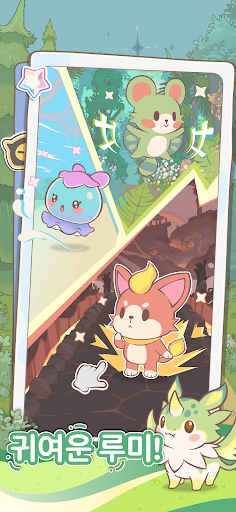
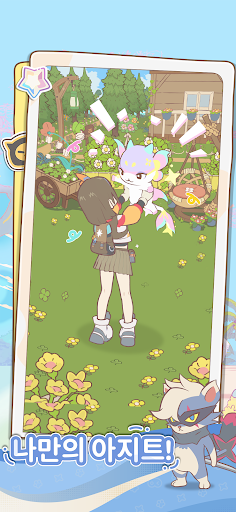
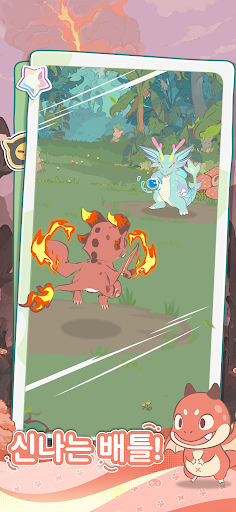

루미마스터 는 힐링 감성의 캐주얼 몬스터 테이밍 게임으로, 동화 같은 세계에서 수백 종의 루미와 함께 수집의 즐러움과 설레는 모험을 시작해 보세요!
[귀여운 루미와의 첫 만남]
가볍게 터치하는 순간, 모험이 시작된다!
간단한 포획 시스템과 풍부한 도감으로, 수집의 즐거움이 두배로!
정글, 사막, 화산 등 다양한 지역을 자유롭게 탐험하며 개성 넘치는 루미들을 만나보세요!
[간편한 마을 생산 시스템]
루미와 함께라면 성장은 더 쉽고 빠르게!
루미들은 든든한 파트너가 되어 자동으로 생산과 관리를 도와줍니다.
접속하지 않아도 이어지는 성장 속에서, 부담 없이 즐기는 편안한 플레이를 즐겨보세요!
[가볍지만 짜릿한 전략 전투]
루미의 다양한 조합으로 승리하자!
복잡한 조작 혹은 전투력 경쟁 없이, 나만의 최강의 팀을 구성하고
가볍고 즐거운 대전 속에서 오직 루미와의 팀워크로 승리하는 재미를 경험해 보세요!
[하늑한 나만의 마을 꾸미기]
자유롭게 상상하고, 마음대로 배치하자!
자신만의 마을에서 자유롭게 건물을 배치해 원하는 대로 공간을 꾸며
나만의 동화 속 마을을 만들어 보세요!
팔로우하기]
게임 공식 사이트: https://lumi.biligames.com/kr
공식 라운지: https://game.naver.com/lounge/lumimaster/home
공식 유튜브: https://www.youtube.com/@lumimasterkr
공식 X(구 트위터): https://x.com/lumimasterkr
공식 인스타그램: https://www.instagram.com/lumimasterkr/
공식 디스코드: https://discord.gg/JF86YUP8tu
Show more

1. Download MEmu installer and finish the setup

2. Start MEmu then open Google Play on the desktop

3. Search 루미마스터 in Google Play
Install
4. Download and Install 루미마스터
5. On install completion click the icon to start

6. Enjoy playing 루미마스터 on PC with MEmu
MEmu Play is the best Android emulator and 100 million people already enjoy its superb Android gaming experience. The MEmu virtualization technology empowers you to play thousands of Android games smoothly on your PC, even the most graphic-intensive ones.
Bigger screen with better graphics; Long duration, without limitation of battery or mobile data.
Full Keymapping support for precise control of keyboard and mouse or gamepad.
Multiple game accounts or tasks on single PC at one time with Multi-Instance manager.
Play 루미마스터 on PC by following steps: