BanG Dream! Our Notes
Updated
Current Version
1.0.1
Offered By

With your passion for BanG Dream! Our Notes, you shouldn’t have to limit yourself to the small screen of a phone. Play like a pro and take full control of the game using a keyboard and mouse. MEmu gives you everything you’re looking for. Download and play BanG Dream! Our Notes on PC. Play as long as you want — no more worries about battery life, mobile data, or unexpected calls. The all-new MEmu 9 is the best way to play BanG Dream! Our Notes on PC. With our expertly designed keymapping system, BanG Dream! Our Notes feels just like a real PC game. The MEmu multi-instance manager lets you run two or more accounts on the same device at the same time. Most importantly, our exclusive emulation engine unlocks your PC’s full potential, delivering smooth and seamless performance.
Show more
Download BanG Dream! Our Notes on PC with MEmu Android Emulator. Enjoy playing on big screen. Presenting BanG Dream!
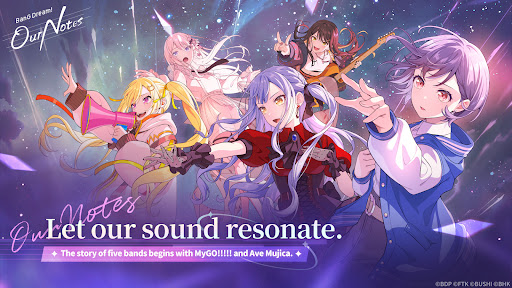

Presenting BanG Dream! Our Notes, a brand-new rhythm game adventure from BanG Dream! Project!
Enjoy a wide variety of songs from five bands and discover a rich new story waiting to unfold.
◆New Rhythm Game System: “GEKISO LIVE”◆
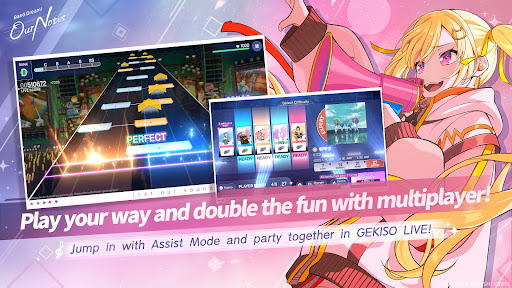
Special GEKISO sections will now appear during rhythm gameplay!
Combos, timing precision, and even luck—put your rhythm game skills to the ultimate challenge in an exciting new gameplay experience!
Feel the excitement and immersion of a real BanG Dream! live performance and enjoy the party-style rhythm gameplay with up to five players!
Our Notes also features an exclusive new system: Assist Mode!
Whether you're new to rhythm games or just looking for a more relaxed experience, Assist Mode lets everyone enjoy the performance and improve at their own pace.
◆From Original Songs to the Latest Hit Covers◆
From iconic original songs featured in the BanG Dream! anime—including tracks by MyGO!!!!! and Ave Mujica—to a wide range of popular cover songs, the lineup is packed with music to enjoy!
Play your favorite songs, from the latest hits to beloved classics.
You can also watch a variety of performance scenes and music videos from the BanG Dream! anime series.
Plus, the latest tracks from fan-favorite bands MyGO!!!!! and Ave Mujica will be available first in Our Notes!
【BanG Dream! Songs】
・Mayoiuta / MyGO!!!!!
・KiLLKiSS / Ave Mujica
・Haruhikage (MyGO!!!!! ver.) / MyGO!!!!!
・MUGEN MY WORLD / Mugendai MewType
・Kishi Kaisen / millsage
・Homie’s Tie!! / Ikka Dumb Rock!
...and many more
More cover songs will be coming up soon!
◆New Stories Woven by Five Bands◆
Alongside MyGO!!!!!, Ave Mujica, and Mugendai MewType, millsage and Ikka Dumb Rock! also join the stage!
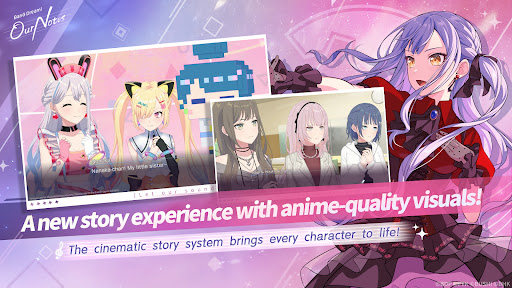
With the Cinematic Story System, characters move vividly with rich expressions, just like in a movie or anime.
Special scenes also feature animated sequences, including all-new cuts.
A wide range of visual effects and illustrated scenes come together to deliver a spectacularly renewed story experience.
Relive the familiar anime stories of MyGO!!!!!, Ave Mujica, and Mugendai MewType from the game-exclusive perspective. You can also enjoy special episodes that continue the anime stories, available exclusively in Our Notes. Meanwhile, millsage and Ikka Dumb Rock! will unfold completely original stories from the very beginning.
Experience vibrant stories woven by five distinctive bands and a total of 25 unique members.
◆Official Website◆
https://bdon.biligames.com/?lang=en-us
©BanG Dream! Project ©FROMTOKYO ©Bushiroad. Published by BILIBILI HK LIMITED
Show more

1. Download MEmu installer and finish the setup

2. Start MEmu then open Google Play on the desktop

3. Search BanG Dream! Our Notes in Google Play
Install
4. Download and Install BanG Dream! Our Notes
5. On install completion click the icon to start

6. Enjoy playing BanG Dream! Our Notes on PC with MEmu
MEmu Play is the best Android emulator and 100 million people already enjoy its superb Android gaming experience. The MEmu virtualization technology empowers you to play thousands of Android games smoothly on your PC, even the most graphic-intensive ones.
Bigger screen with better graphics; Long duration, without limitation of battery or mobile data.
Full Keymapping support for precise control of keyboard and mouse or gamepad.
Multiple game accounts or tasks on single PC at one time with Multi-Instance manager.
Play BanG Dream! Our Notes on PC by following steps: