EA SPORTS FC™ EMPIRES
Updated
Current Version
1733394199
Offered By

With your passion for EA SPORTS FC™ EMPIRES, you shouldn’t have to limit yourself to the small screen of a phone. Play like a pro and take full control of the game using a keyboard and mouse. MEmu gives you everything you’re looking for. Download and play EA SPORTS FC™ EMPIRES on PC. Play as long as you want — no more worries about battery life, mobile data, or unexpected calls. The all-new MEmu 9 is the best way to play EA SPORTS FC™ EMPIRES on PC. With our expertly designed keymapping system, EA SPORTS FC™ EMPIRES feels just like a real PC game. The MEmu multi-instance manager lets you run two or more accounts on the same device at the same time. Most importantly, our exclusive emulation engine unlocks your PC’s full potential, delivering smooth and seamless performance.
Show more
Download EA SPORTS FC™ EMPIRES on PC with MEmu Android Emulator. Enjoy playing on big screen. Get ready to embark on an exciting journey to the top of the football world with EA SPORTS FC™ EMPIRES!

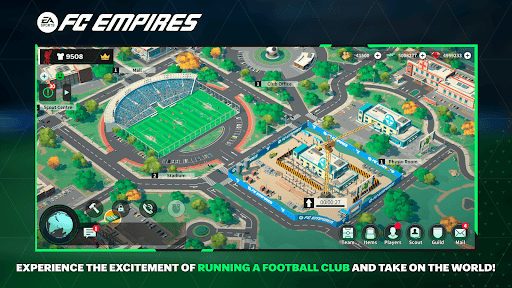
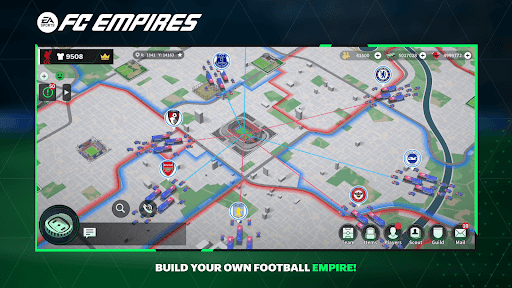
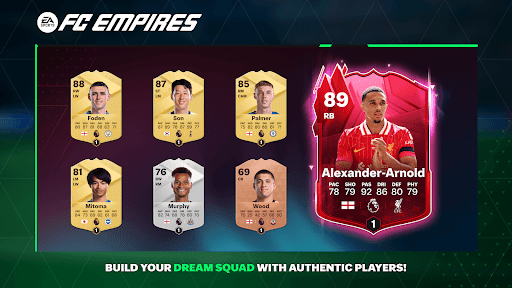
Get ready to embark on an exciting journey to the top of the football world with EA SPORTS FC™ EMPIRES! With over 4,000 authentic football stars from the Premier League, La Liga, Ligue 1, Serie A and Bundesliga 1, you can build your dream squad and manage a football club to become the world's most beloved football club. Compete with other players from around the world and join a guild with other players to cement your place in the world of football.
EA SPORTS FC™ EMPIRES offers a new football experience where you can control every aspect of your football club.
Build the club’s infrastructure, scout better players, manage your team, gather your guild members together and challenge guilds from around the world.
Authenticity - Play the World's game with over 4,000 authentic footballers and 98 authentic clubs from the Premier League, Bundesliga, LALIGA EA SPORTS, Serie A Made in Italy and Ligue 1 McDonald's
Football Club Management - Create your dream squad with world-class footballers, including Jude Bellingham, Phil Foden, Cole Palmer and many more. You're in control of every aspect of your club's growth and development. Manage club, including scouting and training players, team lineups and tactics, club facilities, and much more.
Immersive Match Experience - Experience the thrill of winning trophies with diverse playable options: PvE stadium competition, PvP duels, Guild competitions that offer an immersive football experience, including exciting match replays.
Social Football Competition - Compete with players from around the world to become a champion. Join forces with other players, share resources, and communicate in-game to build the world's strongest football club.
Download today.
This app: Requires acceptance of EA's Privacy & Cookie Policy and User Agreement. For a smooth gameplay experience, the game requires a persistent internet connection (network fees may apply). Collect data through third-party analytics technology (see Privacy & Cookie Policy for details). Contains direct links to the internet. EA may retire online features after 30 days' notice posted on ea.com/service-updates.
Show more

1. Download MEmu installer and finish the setup

2. Start MEmu then open Google Play on the desktop

3. Search EA SPORTS FC™ EMPIRES in Google Play
Install
4. Download and Install EA SPORTS FC™ EMPIRES
5. On install completion click the icon to start

6. Enjoy playing EA SPORTS FC™ EMPIRES on PC with MEmu
MEmu Play is the best Android emulator and 100 million people already enjoy its superb Android gaming experience. The MEmu virtualization technology empowers you to play thousands of Android games smoothly on your PC, even the most graphic-intensive ones.
Bigger screen with better graphics; Long duration, without limitation of battery or mobile data.
Full Keymapping support for precise control of keyboard and mouse or gamepad.
Multiple game accounts or tasks on single PC at one time with Multi-Instance manager.
Play EA SPORTS FC™ EMPIRES on PC by following steps: