
ドットアビス
Updated
Current Version
1.1.2
Offered By

With your passion for ドットアビス, you shouldn’t have to limit yourself to the small screen of a phone. Play like a pro and take full control of the game using a keyboard and mouse. MEmu gives you everything you’re looking for. Download and play ドットアビス on PC. Play as long as you want — no more worries about battery life, mobile data, or unexpected calls. The all-new MEmu 9 is the best way to play ドットアビス on PC. With our expertly designed keymapping system, ドットアビス feels just like a real PC game. The MEmu multi-instance manager lets you run two or more accounts on the same device at the same time. Most importantly, our exclusive emulation engine unlocks your PC’s full potential, delivering smooth and seamless performance.
Show more
Download ドットアビス on PC with MEmu Android Emulator. Enjoy playing on big screen. 滑らかに動くドットアニメーションと、美少女キャラクターが融合した.

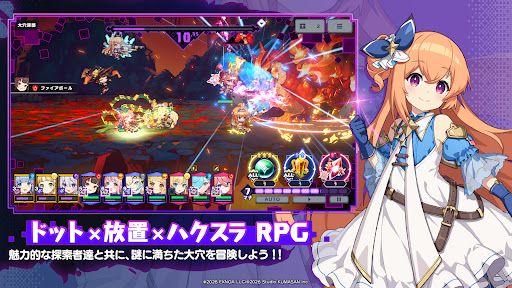
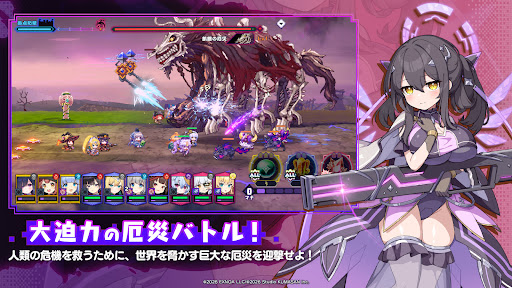
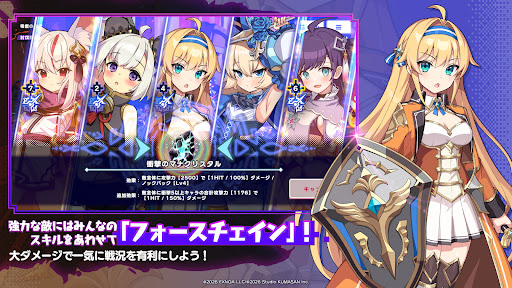
滑らかに動くドットアニメーションと、美少女キャラクターが融合した
「ドット×放置×ハクスラRPG」!
個性豊かなキャラクターを育成し、装備を厳選しながら
司令官として美少女たちを率い、画面を埋め尽くす巨大な敵、"厄災"に立ち向かい、深淵の「大穴」を探索しよう!
放置で成長し、編成と戦略で攻略する
シンプルながら奥深いバトルが楽しめます。
ドット再評価の時代に贈る、ドットアニメーションとダークな世界観が融合した新しいRPG体験!
■ ストーリー
巨大な「大穴」を巡る物語。
副官アリシアの導きにより、"貴方"は「大穴」の謎見挑む司令官へと就任する。
絶望の底に眠るのは、果たして希望かそれとも―。
■ 「前線基地」での探索と「酒場」での休息
戦いの後は、拠点となる前線基地でひと息。
仲間になった美少女キャラを、基地内の「酒場」で働かせ、彼女たちの”可能性”を開花させて強力スキルを習得させよう!
■ 10体編成のオートバトル
巨大な厄災の脅威から前線基地を守る、大迫力の防衛バトルはドットアニメーションで描かれる、最大10体のキャラクターを編成し戦うオートバトル。
キャラクターの役割やスキルの組み合わせによって戦況が大きく変化します。
複雑な操作が無く、お手軽にダンジョン探索を楽しめるのが特徴。
滑らかなドット絵アニメーションで描かれるド派手な戦闘を堪能しよう!
■ 放置×ハクスラ
放置機能でキャラクターを探索へ送り出し、装備や素材を収集。
放置で集めた素材で、キャラクターを育成・強化してより深い階層へ挑戦しましょう!
■ クリエイティブチーム くまさんが贈る「ドット×放置×ハクスラ」の美少女RPG
はせPを筆頭としたDMM GAMESデザイナーを中心に発足したクリエイティブチーム くまさん。
本作はその第1号作品として、「酒場」という大人なテーマをハイクオリティなアニメーションでお送りします!
■ こんな方におすすめ
・美少女キャラクターが登場するRPGが好き
・ドット絵やドットアニメーションが好き
・放置ゲームや育成ゲームを楽しみたい
・装備を集めるハクスラ要素が好き
・編成や戦略を考えるRPGを遊びたい
・短い時間でも遊べるゲームを探している
Show more

1. Download MEmu installer and finish the setup

2. Start MEmu then open Google Play on the desktop

3. Search ドットアビス in Google Play
Install
4. Download and Install ドットアビス
5. On install completion click the icon to start

6. Enjoy playing ドットアビス on PC with MEmu
MEmu Play is the best Android emulator and 100 million people already enjoy its superb Android gaming experience. The MEmu virtualization technology empowers you to play thousands of Android games smoothly on your PC, even the most graphic-intensive ones.
Bigger screen with better graphics; Long duration, without limitation of battery or mobile data.
Full Keymapping support for precise control of keyboard and mouse or gamepad.
Multiple game accounts or tasks on single PC at one time with Multi-Instance manager.
Play ドットアビス on PC by following steps: