
ハイキュー!!FLY HIGH
Updated
Current Version
1.3.0
Offered By

With your passion for ハイキュー!!FLY HIGH, you shouldn’t have to limit yourself to the small screen of a phone. Play like a pro and take full control of the game using a keyboard and mouse. MEmu gives you everything you’re looking for. Download and play ハイキュー!!FLY HIGH on PC. Play as long as you want — no more worries about battery life, mobile data, or unexpected calls. The all-new MEmu 9 is the best way to play ハイキュー!!FLY HIGH on PC. With our expertly designed keymapping system, ハイキュー!!FLY HIGH feels just like a real PC game. The MEmu multi-instance manager lets you run two or more accounts on the same device at the same time. Most importantly, our exclusive emulation engine unlocks your PC’s full potential, delivering smooth and seamless performance.
Show more
Download ハイキュー!!FLY HIGH on PC with MEmu Android Emulator. Enjoy playing on big screen. 飛べ!



飛べ!新しい頂へ。
大人気アニメ『ハイキュー!!』を題材として新たに開発されたスマホゲーム『ハイキュー!!FLY HIGH』(略して『ハイフラ』)が登場!
コレクションと育成を楽しみながら、最強のチームを編成しよう!!
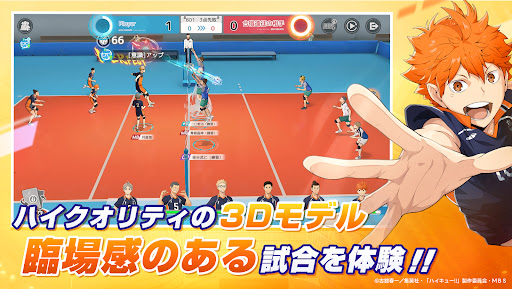
■ハイクオリティ3Dで試合を再現
3Dモデルのキャラがコートを駆け巡り、手軽に操作できるオートシステムも搭載!
熱い試合でバレーボールの楽しさを体験しよう!
■華麗なスキル演出
ストップモーションだけではなく、試合中のハイライトを華麗な動画で再現。
臨場感あふれるメンバーの姿と迫力満点な必殺技に注目!
■チーム編成は自由自在
本作では、原作に登場する40名以上(今後も追加予定)のメンバーが選べます。組み合わせは自由自在!
自分だけの最強チームを作り上げ、頂点を目指して勝利を掴みとろう!
■原作ストーリーを追体験
原作の名シーン、名セリフをフルボイスでリアルに再現。
あの熱い青春をもう一度思い出そう!
■多種多様なコンテンツ
デイリークイズ、サークル、合宿地など、多種多様なコンテンツがたくさん体験できます。
いろいろな遊び方で『ハイフラ』を楽しもう!
Show more

1. Download MEmu installer and finish the setup

2. Start MEmu then open Google Play on the desktop

3. Search ハイキュー!!FLY HIGH in Google Play
Install
4. Download and Install ハイキュー!!FLY HIGH
5. On install completion click the icon to start

6. Enjoy playing ハイキュー!!FLY HIGH on PC with MEmu
MEmu Play is the best Android emulator and 100 million people already enjoy its superb Android gaming experience. The MEmu virtualization technology empowers you to play thousands of Android games smoothly on your PC, even the most graphic-intensive ones.
Bigger screen with better graphics; Long duration, without limitation of battery or mobile data.
Full Keymapping support for precise control of keyboard and mouse or gamepad.
Multiple game accounts or tasks on single PC at one time with Multi-Instance manager.
Play ハイキュー!!FLY HIGH on PC by following steps: