Tetris® Block Party
Updated
Current Version
1.7.0
Offered By

With your passion for Tetris® Block Party, you shouldn’t have to limit yourself to the small screen of a phone. Play like a pro and take full control of the game using a keyboard and mouse. MEmu gives you everything you’re looking for. Download and play Tetris® Block Party on PC. Play as long as you want — no more worries about battery life, mobile data, or unexpected calls. The all-new MEmu 9 is the best way to play Tetris® Block Party on PC. With our expertly designed keymapping system, Tetris® Block Party feels just like a real PC game. The MEmu multi-instance manager lets you run two or more accounts on the same device at the same time. Most importantly, our exclusive emulation engine unlocks your PC’s full potential, delivering smooth and seamless performance.
Show more
Download Tetris® Block Party on PC with MEmu Android Emulator. Enjoy playing on big screen. Tetris® Block Party — Build, Attack & Steal with Friends in This Block Puzzle Game.
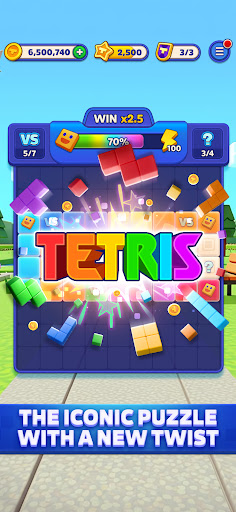
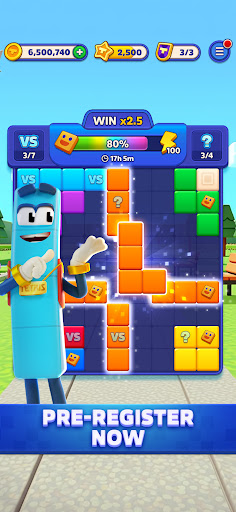
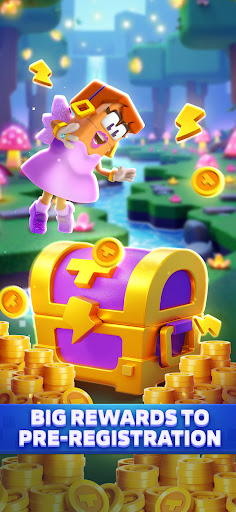
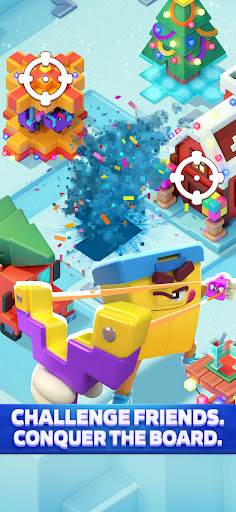
Tetris® Block Party — Build, Attack & Steal with Friends in This Block Puzzle Game
The block puzzle game where your friends are the competition.
Build your party scene, attack friends to slow their progress, and steal their coins and resources — all driven by classic Tetris-style block puzzle gameplay.
WHO IT'S FOR
Players who want more than just a solo puzzle game. If you enjoy games with social rivalry, raiding mechanics, and ongoing progression — Tetris Block Party is built around that loop. Works beautifully for casual players and competitive puzzle fans alike, across all ages.
HOW IT PLAYS
Clear blocks to earn resources. Use those resources to build and upgrade your custom party scene. Then, launch attacks against friends or global players to steal their coins and set back their progress — or defend against attacks heading your way. The puzzle is the engine. The social rivalry is the game.
SOCIAL CORE: BUILD, ATTACK, STEAL
Build: Construct and decorate your party scene using rewards earned from active puzzle gameplay.
Attack: Launch dedicated attacks against friends or random global players to sabotage their builds and steal resources.
Steal: Raid currency directly from other players' active stashes to fund your next upgrade.
Defend: Protect your party scene and hard-earned resources from incoming enemy attacks.
24/7 Social Loop: The rivalry never sleeps — attacks and steals can happen even when you’re offline!
WHAT MAKES IT DIFFERENT FROM OTHER BLOCK PUZZLES?
The Social Raiding Loop: Attack and steal from real friends and global players — not just anonymous leaderboard avatars.
A Persistent World: Your custom party scene grows, gets targeted, and requires active protection over time.
Monthly Card Albums: Collect beautiful themed cards through natural gameplay and complete entire albums for massive rewards.
Authentic Tetris Brand: Experience true Tetris DNA — this is not a clone. Enjoy fully licensed, precision-tuned mechanics.
True Offline Mode: Play the core block puzzle levels anywhere, anytime, with zero internet connection required.
KEY FEATURES
Tetris-Style Mechanics: Addictive block puzzle gameplay powers your social progression.
Dedicated Atacking Actions: Target specific players to halt their progress and loot their vaults.
Active Progression Goals: Customize your party scene as your central home base.
Real-Time PvP Duels: Take a break from raiding to face off in head-to-head puzzle matches.
Monthly Seasonal Albums: Earn cards by completing daily challenges, winning PvP duels, and passing levels. Finish the album to unlock exclusive boosters and currency!
Current Theme — Time Travel: Collect era cards from Ancient Egypt all the way to the Far Future.
Daily Challenges: Tackle unique puzzle layouts every day with targeted reward tracks.
100% Free to Play!
SEASONAL ALBUM: TIME TRAVEL
A brand-new themed card album launches every single month.
This month: Time Travel!
Collect detailed era cards (from Ancient Egypt to the Far Future) by playing puzzle levels, completing daily challenges, and winning intense PvP duels. Fill your collectors' album before the month expires to unlock powerful exclusive boosters and high-value in-game currency. Every single card is earnable through normal gameplay — absolutely no purchase required.
PERFECT FOR FANS OF:
"Games like Coin Master" — A block puzzle variation of the classic build, attack, and steal system.
"Games like Tetris" — Authentic, precision-engineered block-clearing DNA.
"Puzzle games with social features" — High-stakes raiding and interaction with real friends.
"Games with raiding mechanics" — Dedicated attack actions with real stakes and progression.
"Offline puzzle games" — Core gameplay is fully functional without internet or Wi-Fi.
"Family puzzle games" — High-energy gameplay appropriate and fun for all ages.
Download Tetris® Block Party and start building — before your friends steal it all!
Show more

1. Download MEmu installer and finish the setup

2. Start MEmu then open Google Play on the desktop

3. Search Tetris® Block Party in Google Play
Install
4. Download and Install Tetris® Block Party
5. On install completion click the icon to start

6. Enjoy playing Tetris® Block Party on PC with MEmu
MEmu Play is the best Android emulator and 100 million people already enjoy its superb Android gaming experience. The MEmu virtualization technology empowers you to play thousands of Android games smoothly on your PC, even the most graphic-intensive ones.
Bigger screen with better graphics; Long duration, without limitation of battery or mobile data.
Full Keymapping support for precise control of keyboard and mouse or gamepad.
Multiple game accounts or tasks on single PC at one time with Multi-Instance manager.
Play Tetris® Block Party on PC by following steps: