三國志・戰棋版
Updated
Current Version
Offered By

With your passion for 三國志・戰棋版, you shouldn’t have to limit yourself to the small screen of a phone. Play like a pro and take full control of the game using a keyboard and mouse. MEmu gives you everything you’re looking for. Download and play 三國志・戰棋版 on PC. Play as long as you want — no more worries about battery life, mobile data, or unexpected calls. The all-new MEmu 9 is the best way to play 三國志・戰棋版 on PC. With our expertly designed keymapping system, 三國志・戰棋版 feels just like a real PC game. The MEmu multi-instance manager lets you run two or more accounts on the same device at the same time. Most importantly, our exclusive emulation engine unlocks your PC’s full potential, delivering smooth and seamless performance.
Show more
Download 三國志・戰棋版 on PC with MEmu Android Emulator. Enjoy playing on big screen. 三國志,這次由你親手操控。
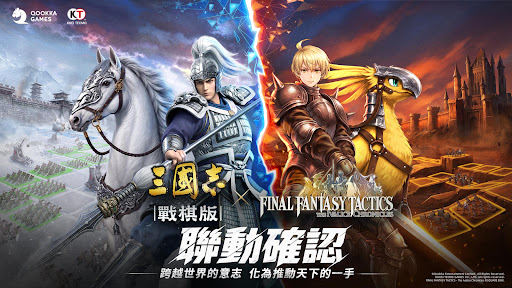

三國志,這次由你親手操控。
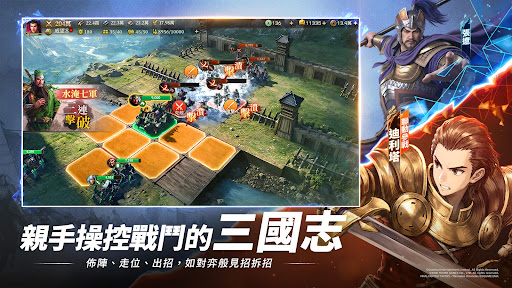
『三國志・戰棋版』獲得日本光榮特庫摩《三國志14》官方授權,是由Qookka Games開發的SRPG×SLG革新之作。親手布陣、走位、出招,觀察敵陣、預判路線,每一步操作都可能改變戰局。
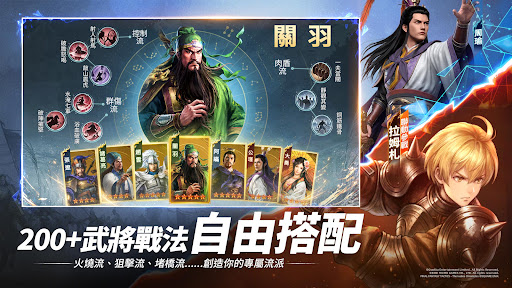
5人上陣,200+武將與戰法自由搭配。依對手調整武將、站位與戰法組合,打出灼熱、狙擊、爆發等多種戰術。陣容沒有固定答案,勝負取決於你搭配的將領與操作。
同盟戰無需鋪路,攻城可以提前預約,不設鬧鐘也能準時參戰。減少重複操作,把時間留給集結時機、進攻路線與戰術配合。
親手操控的三國志,配出你的陣容,爭奪你的霸業。
【別只看戰報,親手操控三國志】
告別碰一下就等結果。親手布陣、走位、出招,觀察敵方陣型,預判進攻路線,抓準時機釋放戰法。正面突破還是繞後突襲,由你操作,也由你改寫勝負。
【5人上陣,配將決定打法】
從200+武將與戰法中自由搭配,組成你的5人陣容。武將定位、出手順序與戰法組合彼此聯動,同一位武將也能搭配出不同戰術。
【同盟大戰,策略隨戰局而變】
同盟戰不只比人數,更要判斷集結時機、進攻路線與兵力運用。集中突破還是分兵牽制,與盟友隨戰況調整戰術,靠配合拿下關鍵戰局。
【輕鬆發育,暢快攻城】
不用打地鋪路,礦點一鍵直達,武將等級共享,換將不用從頭練,攻城一鍵預約,告別深夜鬧鐘。
【多途徑得橙將,輕鬆擴充陣容】
探索三國大地圖,觸發奇遇可獲橙將;發展內政、派遣尋訪,也能招攬名將。邊玩邊收集,配將選擇更豐富。
▼事前預約福利
在應用程式商店預約即可獲得橙將貂蟬。
透過信箱或手機預約,可得名刺×10、銅幣×8888,還有機會抽中DJI Pocket 4 Pro Vlog套裝、Nintendo Switch 2、Sony WH-1000XM5 降噪耳機、MyCard禮品卡等豪華獎品。
事先預約數達成獎勵一覽:
10萬達成:名刺×10
20萬達成:名刺×15
30萬達成:名刺×20、銅幣×8888
40萬達成:名刺×20、金銖×200
60萬達成:名刺×25、預約頭像框×1
※事前預約福利將在遊戲正式上線後發放。
※端內預約獎勵需主線章節任務達到第8章後才能領取,敬請諒解。
▼官方訊息
官方網站:https://sangokushi-senkiban.qookkagames.com/
官方FB:https://www.facebook.com/sgs.senkiban.tw
官方YouTube:https://www.youtube.com/@sgs_senkiban_tw
Show more

1. Download MEmu installer and finish the setup

2. Start MEmu then open Google Play on the desktop

3. Search 三國志・戰棋版 in Google Play
Install
4. Download and Install 三國志・戰棋版
5. On install completion click the icon to start

6. Enjoy playing 三國志・戰棋版 on PC with MEmu
MEmu Play is the best Android emulator and 100 million people already enjoy its superb Android gaming experience. The MEmu virtualization technology empowers you to play thousands of Android games smoothly on your PC, even the most graphic-intensive ones.
Bigger screen with better graphics; Long duration, without limitation of battery or mobile data.
Full Keymapping support for precise control of keyboard and mouse or gamepad.
Multiple game accounts or tasks on single PC at one time with Multi-Instance manager.
Play 三國志・戰棋版 on PC by following steps: