FashionVerse: Fashion Your Way
Updated
Current Version
0.15.1
Offered By

With your passion for FashionVerse: Fashion Your Way, you shouldn’t have to limit yourself to the small screen of a phone. Play like a pro and take full control of the game using a keyboard and mouse. MEmu gives you everything you’re looking for. Download and play FashionVerse: Fashion Your Way on PC. Play as long as you want — no more worries about battery life, mobile data, or unexpected calls. The all-new MEmu 9 is the best way to play FashionVerse: Fashion Your Way on PC. With our expertly designed keymapping system, FashionVerse: Fashion Your Way feels just like a real PC game. The MEmu multi-instance manager lets you run two or more accounts on the same device at the same time. Most importantly, our exclusive emulation engine unlocks your PC’s full potential, delivering smooth and seamless performance.
Show more
Download FashionVerse: Fashion Your Way on PC with MEmu Android Emulator. Enjoy playing on big screen. Step into the shoes of a talented stylist in FashionVerse: Fashion Your Way.
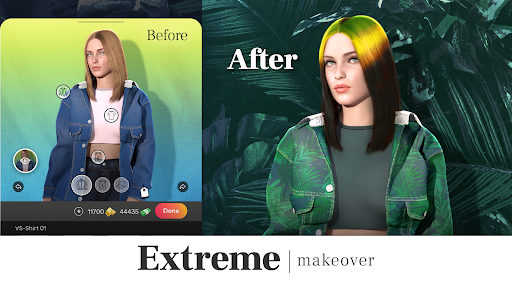
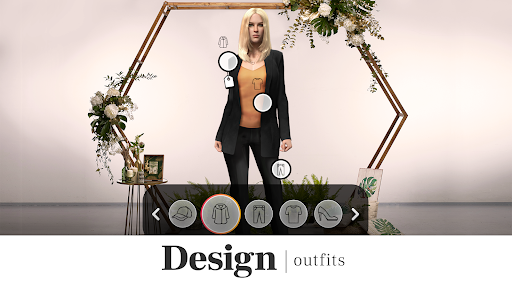
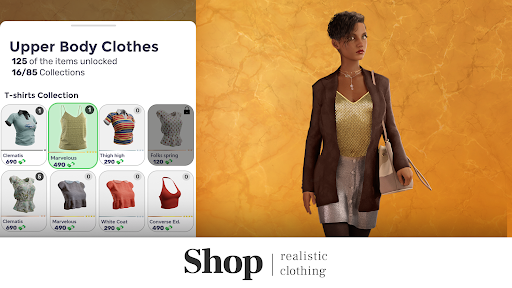
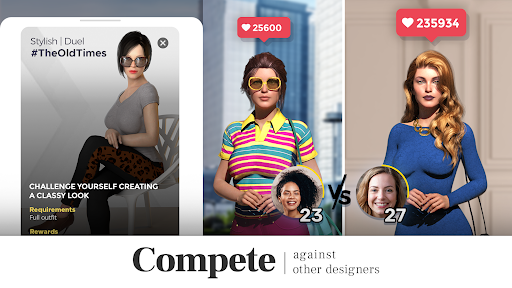
Step into the shoes of a talented stylist in FashionVerse: Fashion Your Way. You can create and style your own fashion to become a trendsetter. Dress your model in trendy outfits; design your dream closet with unique clothing; create your own designs and submit them to compete against other players in glamorous competitions; pick up challenges, and vote on different designs. Earn rewards for your fashion style and makeovers!
FashionVerse: Fashion Your Way is a social styling game with 3D customization that allows you to create stunning looks and fashion in your own way, design backgrounds, shop for great virtual looks, and get recognized for your stylish makeovers with incredible in-game rewards!
How to Play FashionVerse:
Two Game modes: Choose your fashion challenge from the Stylist game mode, in which you must create your best designs using a carefully curated list of clothing, accessories, and backgrounds. The Trendsetter game mode allows you to let your imagination run wild by creating mood boards featuring your favorite outfits.
Challenge of the day: Participate in competitions where you're in control of everything: killer clothing, shoes, and backgrounds, to fill your missions and get the results of your vote; Level up in the season pass and unlock the season's content; advance in your career title and complete your collection! New fashion staples are added frequently, with a diverse and inclusive collection of in-game models FashionVerse is welcoming to everyone.
Compete and Vote: As a social game, you get to play and vote on who wore it best! Look for themed competitions and let other players vote on your design. Whatever your taste, FashionVerse allows you to do it in style while also being a part of an inspiring community.
Gain rewards! Receive amazing gifts as a reward for your creativity and talent!
Main Features:
Makeover your virtual model with fabulous fashion clothing and hundreds of different styles and become a trendsetter!
A wide range of fashion challenges, with new ones appearing every day.
Unique social features and a fantastic fashion community: Follow your friends and show them your best outfits.
The community compares and judges all of the designs. To get the highest ratings, do your best and choose the most inspiring pieces.
Realistic 3D: Unique 3D graphics and realistic design.
Embrace diversity: The original game gives you an infinite number of models to dress and includes models of all sizes and poses. Models of all sizes, shapes, ethnicities, ages, and more are featured.
Play FashionVerse to immerse yourself in the world of fashion and looks, connect with an incredible community, and become a trendsetter!
Show more

1. Download MEmu installer and finish the setup

2. Start MEmu then open Google Play on the desktop

3. Search FashionVerse: Fashion Your Way in Google Play
Install
4. Download and Install FashionVerse: Fashion Your Way
5. On install completion click the icon to start

6. Enjoy playing FashionVerse: Fashion Your Way on PC with MEmu
MEmu Play is the best Android emulator and 100 million people already enjoy its superb Android gaming experience. The MEmu virtualization technology empowers you to play thousands of Android games smoothly on your PC, even the most graphic-intensive ones.
Bigger screen with better graphics; Long duration, without limitation of battery or mobile data.
Full Keymapping support for precise control of keyboard and mouse or gamepad.
Multiple game accounts or tasks on single PC at one time with Multi-Instance manager.
Play FashionVerse: Fashion Your Way on PC by following steps: