Country Balls: Power Protocol
Updated
Current Version
0.2.1
Offered By

With your passion for Country Balls: Power Protocol, you shouldn’t have to limit yourself to the small screen of a phone. Play like a pro and take full control of the game using a keyboard and mouse. MEmu gives you everything you’re looking for. Download and play Country Balls: Power Protocol on PC. Play as long as you want — no more worries about battery life, mobile data, or unexpected calls. The all-new MEmu 9 is the best way to play Country Balls: Power Protocol on PC. With our expertly designed keymapping system, Country Balls: Power Protocol feels just like a real PC game. The MEmu multi-instance manager lets you run two or more accounts on the same device at the same time. Most importantly, our exclusive emulation engine unlocks your PC’s full potential, delivering smooth and seamless performance.
Show more
Download Country Balls: Power Protocol on PC with MEmu Android Emulator. Enjoy playing on big screen. Global Domination – Ball-Style.
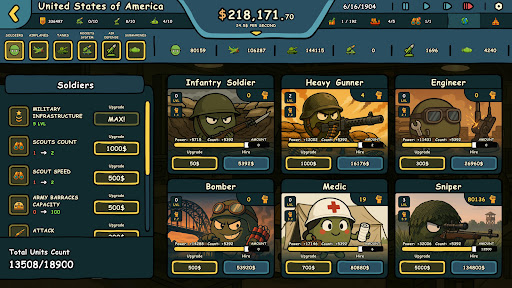
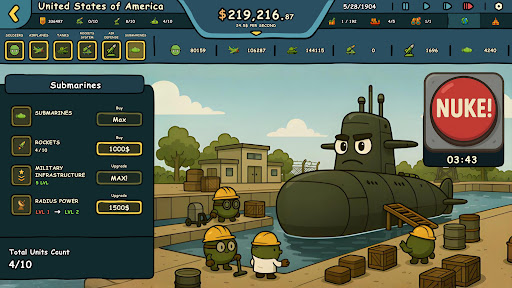
Global Domination – Ball-Style
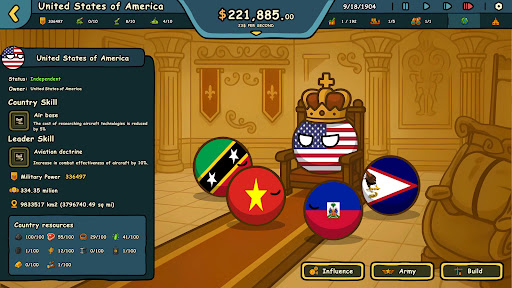
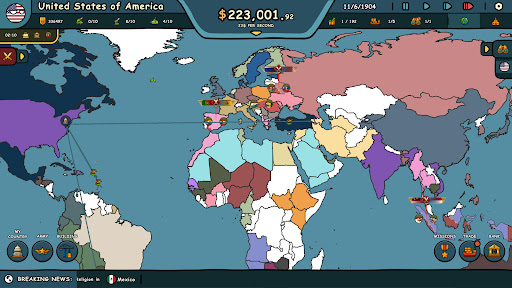
The world is divided, and it's up to you to redraw the map. Step into the round shoes of your favorite Countryball and embark on the ultimate mission: conquer and unify all 195 countries. Whether through brute force or slick diplomacy, it's time to roll your way to victory.
Income Per Second – Build Your Power
In Countryballs: Power Protocol, time is literally money. Your income grows every second. Upgrade your industries, boost trade, and manage global assets to fuel your expansion. The more countries you control, the more your economy explodes. Smart decisions lead to total domination.
War or Influence – You Decide
There’s more than one way to rule the world:
Conquer with Force
Train cartoony armies, deploy tanks, jets, submarines, and missile systems—and when diplomacy fails, drop the nukes. Dominate the battlefield with over-the-top firepower, all wrapped in classic Countryball humor.
Control with Influence
Spread your faith across borders and watch nations fall under your spiritual charm. Use religion as a tool of power—win hearts, shift ideologies, and unify the world without firing a single shot.
Your Goal: Total World Control
No peace treaties. No second chances. Only one Countryball can become the supreme global ruler. Will you win by fear, friendship, or sheer strategy?
A Strategy Game That Doesn’t Take Itself Too Seriously
Countryballs: Power Protocol blends grand strategy with idle mechanics, packed with humor, history, and global absurdity. It's world conquest where even the smallest Countryball can redraw the map—with enough upgrades and audacity.
Features:
Control over 195 unique Countryballs
Upgrade your real-time income and economy
Balance war, influence, and diplomacy
Each Countryball has a distinct look and national personality—no customization needed
Laugh (or cry) as global events spiral into madness
Built for strategy fans and meme lovers alike
Add Countryballs: Power Protocol to your Wishlist and get ready to take over the world—diplomacy optional!
Show more

1. Download MEmu installer and finish the setup

2. Start MEmu then open Google Play on the desktop

3. Search Country Balls: Power Protocol in Google Play
Install
4. Download and Install Country Balls: Power Protocol
5. On install completion click the icon to start

6. Enjoy playing Country Balls: Power Protocol on PC with MEmu
MEmu Play is the best Android emulator and 100 million people already enjoy its superb Android gaming experience. The MEmu virtualization technology empowers you to play thousands of Android games smoothly on your PC, even the most graphic-intensive ones.
Bigger screen with better graphics; Long duration, without limitation of battery or mobile data.
Full Keymapping support for precise control of keyboard and mouse or gamepad.
Multiple game accounts or tasks on single PC at one time with Multi-Instance manager.
Play Country Balls: Power Protocol on PC by following steps: