Cube Solver 2x2 PC

Download Cube Solver 2x2 on PC

Cube Solver 2x2 PC

Cube Solver 2x2

  • Updated

  • Current Version

    2.1.0

  • Offered By

    Cube Solver 2x2 PC

Features of Cube Solver 2x2 on PC

With your passion for Cube Solver 2x2, you shouldn’t have to limit yourself to the small screen of a phone. Play like a pro and take full control of the game using a keyboard and mouse. MEmu gives you everything you’re looking for. Download and play Cube Solver 2x2 on PC. Play as long as you want — no more worries about battery life, mobile data, or unexpected calls. The all-new MEmu 9 is the best way to play Cube Solver 2x2 on PC. With our expertly designed keymapping system, Cube Solver 2x2 feels just like a real PC game. The MEmu multi-instance manager lets you run two or more accounts on the same device at the same time. Most importantly, our exclusive emulation engine unlocks your PC’s full potential, delivering smooth and seamless performance.

Show more

Screenshots & Video of Cube Solver 2x2 PC

Download Cube Solver 2x2 on PC with MEmu Android Emulator. Enjoy playing on big screen. Your Ultimate Cubes Master Tool — Solve Smarter with the Cube Solver 2x2 App!
Game Info

Your Ultimate Cubes Master Tool — Solve Smarter with the Cube Solver 2x2 App!
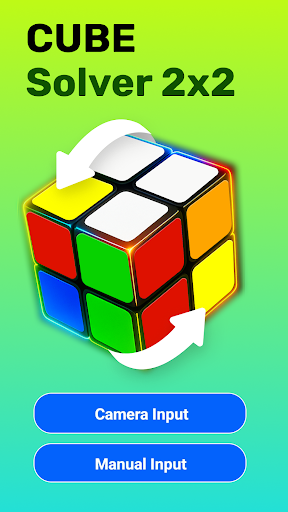
Struggling with your 2x2 cubes? Don’t worry — the cube solver 2x2 app is here to make your life easier, faster, and a whole lot more fun. Whether you're just learning or already collecting cubes in every color, Cube Solver 3d Free is the ultimate companion to crack every twist.

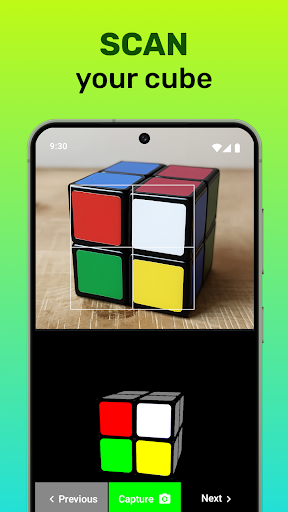
Say goodbye to guesswork and hello to instant solutions! With advanced visual modeling and intuitive camera input, our 2x2 cube solver app with camera makes it effortless to scan your cubes, analyze the colors, and see step-by-step how to bring it back to a solved state.

⭐ Why Choose this 2 by 2 Cube Solver App?

We built the cube solver 2x2 app to give enthusiasts a genuinely enjoyable and frustration-free solving experience. Whether you’re curious about trying how to solve cube app or just want to race your friends, this cube solver easy app empowers you with cutting-edge tools and a realistic interface that feels like the real thing!

2x2 Cube Solver App with Camera – No manual entry needed! Just point and scan with our super-accurate recognition technology.
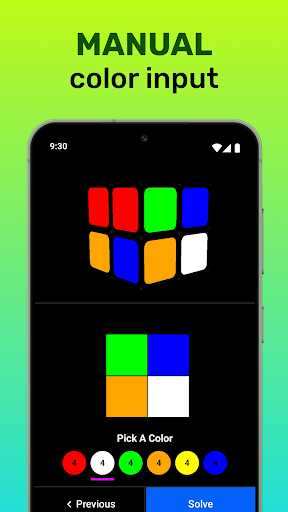
Manual Mode – Prefer the classic way? Easily input each face manually.
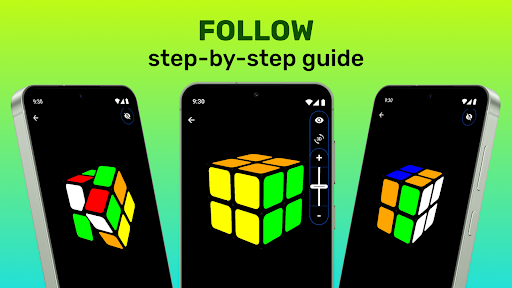
Realistic 3D Cubes' Model – Visually stunning and user-friendly 3D model with adjustable zoom, pan, and full 3-axis rotation.
Control Animation Speed – Watch at your own pace as the cube solves itself!
Available in 28 Languages – Learn and solve no matter where you are in the world.

Explore the 3D Magic of Cube Solver 2x2 App

When you launch the cube solver 3d free interface, you'll feel like you're actually holding the cubes in your hands. The 3D simulation allows you to rotate, zoom, and inspect every corner with ease. How to solve cube app is more than a tool — it’s a digital playground for its fans.

Want something that’s simple and friendly? Then you’ll love our cube solver easy app. It’s crafted for all levels — from young beginners to speed-solving experts — giving you a personalized journey every step of the way.

Scan & Solve – It’s That Simple

Thanks to its smart vision system, the 2x2 cube solver app with camera makes scanning quick and fun. Don’t waste time entering colors manually — let the camera detect the cubes layout instantly. Using cube solver 3d free is like having a cubes genius in your pocket! So, hurry up and try out this amazing how to solve cube app now!

Designed for Everyone

From curious learners to experienced cubers, the 2 by 2 cube solver app is intuitive, responsive, and made to delight. Use it to race your friends, teach your kids, or just to practice on the go. It's also the perfect reference for cubes collectors looking to keep their collections neatly solved.

Still wondering which tool is the best choice? The cube solver 2x2 app combines innovation, accuracy, and entertainment all in one sleek design. Once you try 2 by 2 cube solver app, you’ll never want to go back.

Ready to Get Solving?

Download the cube solver 3d free today and experience the most satisfying way to solve your cubes anytime, anywhere. Whether you prefer camera input or manual control, our 2x2 cube solver app with camera guides you clearly and effectively.

Make sure to recommend this how to solve cube app to fellow fans! It's more than just a cube solver easy app — it’s a full solving experience. So if you’ve ever searched for a how to solve cube app that doesn’t overwhelm or underdeliver, this 2 by 2 cube solver app is for you. With powerful scanning, smart animations, and beautiful 3D control, our 2x2 cube solver app with camera redefines how fast and fun solving cubes can be. Get started with the most trusted and versatile 2 by 2 cube solver app on the market.

Don't miss your chance to master the cubes with ease and flair — download the cube solver 3d free now!

Show more

How to Download Cube Solver 2x2 on PC

  • Cube Solver 2x2 PC

    1. Download MEmu installer and finish the setup

  • Cube Solver 2x2 PC

    2. Start MEmu then open Google Play on the desktop

  • Cube Solver 2x2 PC

    3. Search Cube Solver 2x2 in Google Play

  • Cube Solver 2x2 PC Install

    4. Download and Install Cube Solver 2x2

  • Cube Solver 2x2 PC

    5. On install completion click the icon to start

  • Cube Solver 2x2 PC
    Cube Solver 2x2 PC Cube Solver 2x2 PC

    6. Enjoy playing Cube Solver 2x2 on PC with MEmu

Why Use MEmu for Cube Solver 2x2

MEmu Play is the best Android emulator and 100 million people already enjoy its superb Android gaming experience. The MEmu virtualization technology empowers you to play thousands of Android games smoothly on your PC, even the most graphic-intensive ones.

  • Bigger screen with better graphics; Long duration, without limitation of battery or mobile data.

  • Full Keymapping support for precise control of keyboard and mouse or gamepad.

  • Multiple game accounts or tasks on single PC at one time with Multi-Instance manager.

Ready to Play?

Hot Topics

Cube Solver 2x2 - FAQs

  • How to play Cube Solver 2x2 on PC?

    Play Cube Solver 2x2 on PC by following steps:

    • Download MEmu, then install and launch it
    • Login to Google Play Store, install the game
    • Enjoy playing the game on PC with MEmu
  • What are the minimum system requirements to run Cube Solver 2x2 on PC?
    • Intel or AMD Processor
    • Microsoft Windows 7 and above
    • 2GB of memory
    • 5GB of free disk space
    • Hardware Virtualization Technology
lyzs
lyzs