Cube Solver Scanner: 3x3 Cube PC

Download Cube Solver Scanner: 3x3 Cube on PC

Cube Solver Scanner: 3x3 Cube PC

Cube Solver Scanner: 3x3 Cube

  • Updated

  • Current Version

    7.0.2

  • Offered By

    Cube Solver Scanner: 3x3 Cube PC

Features of Cube Solver Scanner: 3x3 Cube on PC

With your passion for Cube Solver Scanner: 3x3 Cube, you shouldn’t have to limit yourself to the small screen of a phone. Play like a pro and take full control of the game using a keyboard and mouse. MEmu gives you everything you’re looking for. Download and play Cube Solver Scanner: 3x3 Cube on PC. Play as long as you want — no more worries about battery life, mobile data, or unexpected calls. The all-new MEmu 9 is the best way to play Cube Solver Scanner: 3x3 Cube on PC. With our expertly designed keymapping system, Cube Solver Scanner: 3x3 Cube feels just like a real PC game. The MEmu multi-instance manager lets you run two or more accounts on the same device at the same time. Most importantly, our exclusive emulation engine unlocks your PC’s full potential, delivering smooth and seamless performance.

Show more

Screenshots & Video of Cube Solver Scanner: 3x3 Cube PC

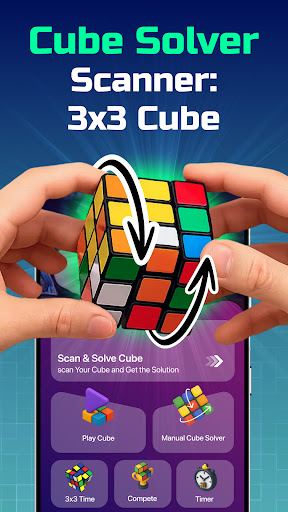
Download Cube Solver Scanner: 3x3 Cube on PC with MEmu Android Emulator. Enjoy playing on big screen. Ultimate Cube Solver Scanner: 3x3 Cube - Download and get easy solutions in this cube scanner and solver app!
Game Info

Ultimate Cube Solver Scanner: 3x3 Cube - Download and get easy solutions in this cube scanner and solver app!


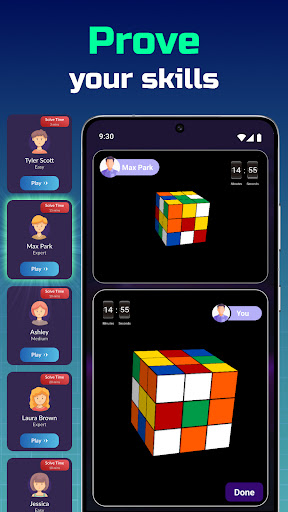
What are you waiting for? Unlock the secrets of the Cube Solver Scanner: 3x3 Cube today! Our app offers a powerful and intuitive way to solve 3x3 cubes. You can also play with classic 2x2, 3x3 up to 15x15 cubes using our realistic 3D model. Whether you're a beginner or a seasoned cuber, this cube solver scanner app has something for everyone. So, hurry up, and explore a whole new level of puzzle-solving with the powerful and intuitive cube solver 3d app designed for all ages. Instantly scan your cubes using the cube solver app with camera and get the fastest solution in seconds.

Key Features of Cube Solver Scanner: 3x3 Cube:

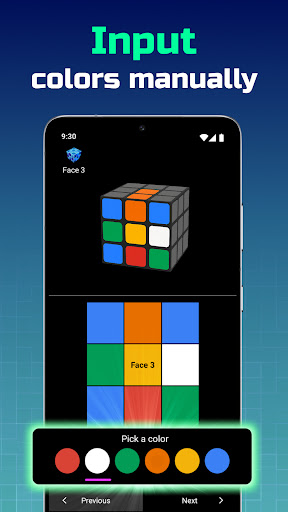
- Manual Input: Easily input colors using our intuitive color picker for precise solving.
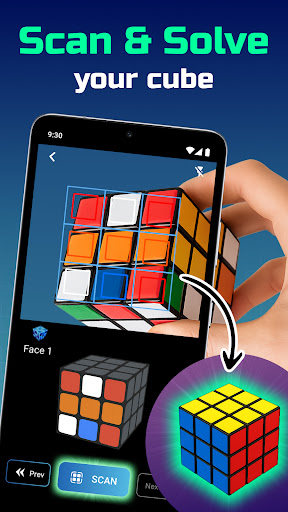
Scan Cube (Camera Input): Use your camera to scan and capture the color state for quick and accurate solving.
Play 3D Cube: Solve and play with cubes from 2x2 to 15x15 using our realistic 3D model.
⏱ Cubes Solution Timer: Track your solving speed and improve your times with our built-in timer.
Realistic 3D Graphics and Animation: Enjoy stunning visuals and smooth animations for a truly immersive experience with cube solver 3d app.
Simple and Handy Controls: Navigate and manipulate the cubes effortlessly with user-friendly controls.
Easy Cubes Rotation in All Axes: Rotate the cubes freely to inspect and solve from any angle.

Additional Features of Cube Solver Scanner: 3x3 Cube:

- Virtual Cube: Solve a realistic 3D model of the cube for enhanced learning and practice. With the cube solver scanner free, solving a 3x3 cube is now as simple as scanning and following the steps.
- Zoom/Pan: Zoom in and pan for a closer look at specific sections.
- Reorient to Initial State: Easily reset to its initial state for repeated practice.

Capture, scan, and solve effortlessly with the innovative cube solver app with camera feature. Whether you're a beginner or a seasoned cuber, the cube solver 3d app offers realistic animations and step-by-step instructions. No need to input colors manually—just use the cube solver app with camera for an accurate real-time scan. Download this cube solver scanner free and enjoy quick, easy cube solutions!

Discover the most effective way to solve with Cube Solver Scanner: 3x3 Cube. Whether you scan your cubes using the camera or input the colors manually, our app provides the fastest and easiest solutions. Dive into the fascinating world of cube puzzles and sharpen your problem-solving skills with Cube Solver Scanner App! The cube solver scanner free app is perfect for cubes lovers who want a fast, reliable, and easy-to-use solving tool.

Disclaimer:
All product names, logos, brands, trademarks, and registered trademarks are the property of their respective owners. Use of these names, trademarks, and brands does not imply endorsement. Cube Solver is independently owned and operated and is not affiliated with any other apps or companies.

Show more

How to Download Cube Solver Scanner: 3x3 Cube on PC

  • Cube Solver Scanner: 3x3 Cube PC

    1. Download MEmu installer and finish the setup

  • Cube Solver Scanner: 3x3 Cube PC

    2. Start MEmu then open Google Play on the desktop

  • Cube Solver Scanner: 3x3 Cube PC

    3. Search Cube Solver Scanner: 3x3 Cube in Google Play

  • Cube Solver Scanner: 3x3 Cube PC Install

    4. Download and Install Cube Solver Scanner: 3x3 Cube

  • Cube Solver Scanner: 3x3 Cube PC

    5. On install completion click the icon to start

  • Cube Solver Scanner: 3x3 Cube PC
    Cube Solver Scanner: 3x3 Cube PC Cube Solver Scanner: 3x3 Cube PC

    6. Enjoy playing Cube Solver Scanner: 3x3 Cube on PC with MEmu

Why Use MEmu for Cube Solver Scanner: 3x3 Cube

MEmu Play is the best Android emulator and 100 million people already enjoy its superb Android gaming experience. The MEmu virtualization technology empowers you to play thousands of Android games smoothly on your PC, even the most graphic-intensive ones.

  • Bigger screen with better graphics; Long duration, without limitation of battery or mobile data.

  • Full Keymapping support for precise control of keyboard and mouse or gamepad.

  • Multiple game accounts or tasks on single PC at one time with Multi-Instance manager.

Ready to Play?

More From Pipi Chick Studio

Hot Topics

Cube Solver Scanner: 3x3 Cube - FAQs

  • How to play Cube Solver Scanner: 3x3 Cube on PC?

    Play Cube Solver Scanner: 3x3 Cube on PC by following steps:

    • Download MEmu, then install and launch it
    • Login to Google Play Store, install the game
    • Enjoy playing the game on PC with MEmu
  • What are the minimum system requirements to run Cube Solver Scanner: 3x3 Cube on PC?

    • Intel or AMD Processor
    • Microsoft Windows 7 and above
    • 2GB of memory
    • 5GB of free disk space
    • Hardware Virtualization Technology
lyzs
lyzs