CubeX PC

Download CubeX on PC

CubeX PC
  • Updated

  • Current Version

    4.1.1

  • Offered By

    CubeX PC

Features of CubeX on PC

With your passion for CubeX, you shouldn’t have to limit yourself to the small screen of a phone. Play like a pro and take full control of the game using a keyboard and mouse. MEmu gives you everything you’re looking for. Download and play CubeX on PC. Play as long as you want — no more worries about battery life, mobile data, or unexpected calls. The all-new MEmu 9 is the best way to play CubeX on PC. With our expertly designed keymapping system, CubeX feels just like a real PC game. The MEmu multi-instance manager lets you run two or more accounts on the same device at the same time. Most importantly, our exclusive emulation engine unlocks your PC’s full potential, delivering smooth and seamless performance.

Show more

Screenshots & Video of CubeX PC

Download CubeX on PC with MEmu Android Emulator. Enjoy playing on big screen. Master the Cube with CubeX!
Game Info

Master the Cube with CubeX!


Are you ready to conquer the Cube challenge? Look no further than CubeX - the ultimate cube solver app that will transform you into a cube-solving master! Whether you're a beginner or a seasoned player, this app has everything you need to solve the Cube in no time.

Play and Win with Cube Solve Game!


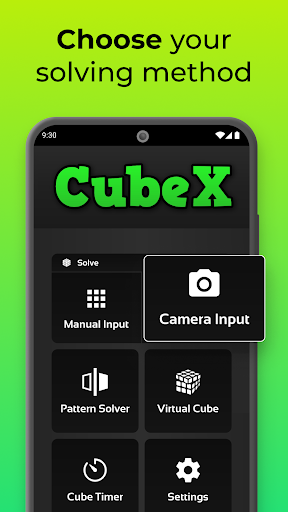
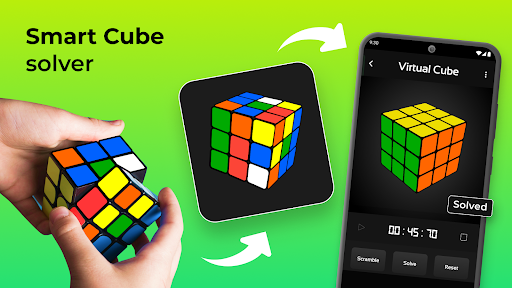
Simply enter your state manually or scan it using your camera. CubeX, the cubex fastest cube solver, will then guide you through each step to solve your Game in just minutes! This powerful Cube solver offers both the Fridrich Solver and the Advanced Solver, ensuring you get the shortest and most efficient solution every time.

Challenge Yourself with Cube Solve Game!


Fridrich Solver:
Solve your Game with the popular Fridrich Method (or CFOP Method). Perfect for those who want to learn and master this classic technique.
Advanced Solver:
Generate the shortest possible solution in seconds! This solver uses Herbert Kociemba's Two-Phase Algorithm to solve any valid 3x3 Cube with no more than 20 moves.
Pattern Solver:
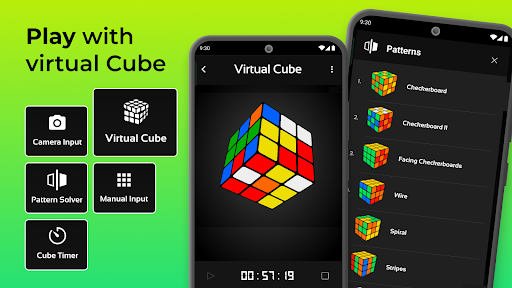
Achieve any valid pattern on your puzzle from any starting pattern with the fewest number of turns.
Virtual Solver:
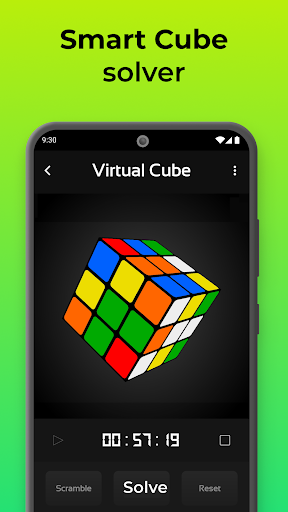
Play, learn, and solve. Apply custom patterns, practice your algorithms, and use the Fridrich or Advanced Solver directly on the Virtual feature.
Solve Timer:
Simulate professional timing to track and improve your solve times. Perfect for practicing and preparing for competitions!

Cube Solving App for Endless Fun!


This is more than just a Cube solver app. It's a complete cube solving app that works offline and for free.

Discover Fun with Cube Solve Game!


- Solver 3D: Enjoy a 3D experience.
- Cube App: Solve your Cube anytime, anywhere.
- Solve Game: Turn solving the Cube into a fun and engaging game.
- Fastest Solver: Get the shortest solutions quickly and efficiently.

Cube Solver by Cube X: Solve with Ease!


Get started with this amazing Cube solver app that makes solving your puzzle a breeze. Whether you're learning how to solve the Cube for the first time or looking to improve your speed and efficiency, our app is the perfect solving app for you.

Solve Cube Fast with Cube X Solver!


Join thousands of cubers who have transformed their problem-solving skills with our app. Embrace the challenge and excitement of solving the Cube with the best cube solver app available. Dive into the world of cubing with confidence and fun!

Get Cube X to Solve Cube Instantly!


Download our app today and experience the power of the cube solver designed to make you a cubing pro. From beginners to experts, Our app is the Cube solver app that brings the magic of solving right to your fingertips. Ready, set, solve!

This Puzzle Game is your one-stop solution for everything Cube! This cube solver app provides the shortest solutions and offers a range of features to enhance your cubing experience. Explore the world of cubing with our app and become a master of the Cube today!

Unlock the power of the ultimate Cube solver! With our app, you can solve Cube puzzles effortlessly. Our Cube solver provides the quickest solutions, making solving Cube challenges easy. Experience the magic of the Game and become a pro at solving!

Show more

How to Download CubeX on PC

  • CubeX PC

    1. Download MEmu installer and finish the setup

  • CubeX PC

    2. Start MEmu then open Google Play on the desktop

  • CubeX PC

    3. Search CubeX in Google Play

  • CubeX PC Install

    4. Download and Install CubeX

  • CubeX PC

    5. On install completion click the icon to start

  • CubeX PC
    CubeX PC CubeX PC

    6. Enjoy playing CubeX on PC with MEmu

Why Use MEmu for CubeX

MEmu Play is the best Android emulator and 100 million people already enjoy its superb Android gaming experience. The MEmu virtualization technology empowers you to play thousands of Android games smoothly on your PC, even the most graphic-intensive ones.

  • Bigger screen with better graphics; Long duration, without limitation of battery or mobile data.

  • Full Keymapping support for precise control of keyboard and mouse or gamepad.

  • Multiple game accounts or tasks on single PC at one time with Multi-Instance manager.

Ready to Play?

More From Pipi Chick Studio

Hot Topics

CubeX - FAQs

  • How to play CubeX on PC?

    Play CubeX on PC by following steps:

    • Download MEmu, then install and launch it
    • Login to Google Play Store, install the game
    • Enjoy playing the game on PC with MEmu
  • What are the minimum system requirements to run CubeX on PC?
    • Intel or AMD Processor
    • Microsoft Windows 7 and above
    • 2GB of memory
    • 5GB of free disk space
    • Hardware Virtualization Technology
lyzs
lyzs