Dark Tap Dice
Updated
Current Version
2.1.2
Offered By

With your passion for Dark Tap Dice, you shouldn’t have to limit yourself to the small screen of a phone. Play like a pro and take full control of the game using a keyboard and mouse. MEmu gives you everything you’re looking for. Download and play Dark Tap Dice on PC. Play as long as you want — no more worries about battery life, mobile data, or unexpected calls. The all-new MEmu 9 is the best way to play Dark Tap Dice on PC. With our expertly designed keymapping system, Dark Tap Dice feels just like a real PC game. The MEmu multi-instance manager lets you run two or more accounts on the same device at the same time. Most importantly, our exclusive emulation engine unlocks your PC’s full potential, delivering smooth and seamless performance.
Show more
Download Dark Tap Dice on PC with MEmu Android Emulator. Enjoy playing on big screen. DARK TAP IS BACK!
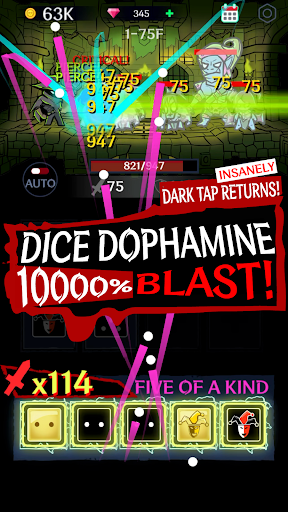
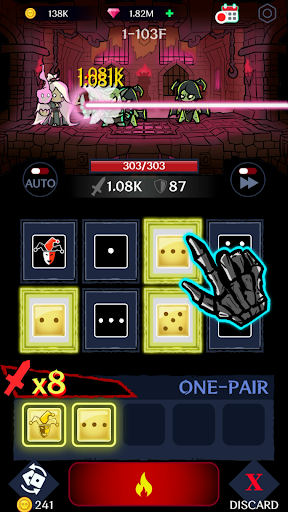
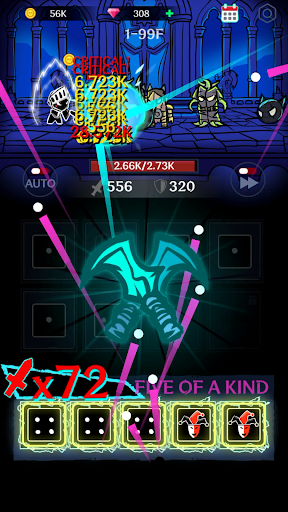
DARK TAP IS BACK! THIS TIME, IT'S POKER AND DICE.
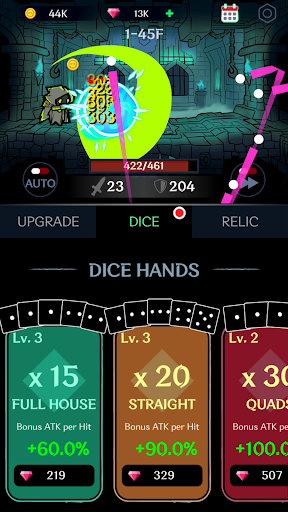
Get ready for a pure dopamine rush. The next evolution of the Dark Tap series has arrived. Building on the iconic dark aesthetic of the original, Dark Tap Dice introduces a brand-new combat system built around poker hands and dice strategy.
Slot your dice, complete powerful hands, and unleash overwhelming attacks.
Experience the dark vibes you loved—now evolved into a faster, deeper, and more addictive RPG.
■ SLOT, COMBINE, AND BLAST!
- Tactical Dice Slotting
Drag and place your dice directly into slots to complete powerful poker-style hands.
- Combo Storm
From One Pair to Five-of-a-Kind—unleash hundreds, even thousands of rapid-fire hits in a single turn. Feel the explosive moment when luck meets strategy.
■ PURE DOPAMINE: GOLDEN DICE & JOKERS
- Golden Dice
Slot them in and watch your damage skyrocket. Multipliers stack as numbers explode across the screen.
- The Joker
Your ultimate wildcard. Instantly complete any hand and turn the tide of battle.
- Double Cast
Double the hands. Double the Golden Dice. Double the destruction.
■ IDLE PROGRESS × STRATEGIC CONTROL
- Idle Growth
Your shadow continues to grow even while you're away. Return stronger and claim your rewards.
- Hybrid RPG Gameplay
Enjoy the convenience of idle progression combined with the strategic depth of poker-based combat.
■ THE LEGACY CONTINUES
- Embrace Your Shadow
Dive deeper into the dark world within. The hero others fear may be the true hero hidden inside you.
- Signature Dark Style
The iconic visual style of Dark Tap returns—now paired with a faster and more addictive combat system.
Roll the dice.
The true hero within is waiting.
[Language Support]
English, Korean, Japanese
[Data & Restore]
- Offline Play
This game stores data locally on your device. Deleting the app may result in data loss.
- Restore Purchases
Except for consumable currency, all purchases can be restored using the [Restore] button in the settings.
[Bug Reports & Feedback]
snowgames0629@gmail.com
Show more

1. Download MEmu installer and finish the setup

2. Start MEmu then open Google Play on the desktop

3. Search Dark Tap Dice in Google Play
Install
4. Download and Install Dark Tap Dice
5. On install completion click the icon to start

6. Enjoy playing Dark Tap Dice on PC with MEmu
MEmu Play is the best Android emulator and 100 million people already enjoy its superb Android gaming experience. The MEmu virtualization technology empowers you to play thousands of Android games smoothly on your PC, even the most graphic-intensive ones.
Bigger screen with better graphics; Long duration, without limitation of battery or mobile data.
Full Keymapping support for precise control of keyboard and mouse or gamepad.
Multiple game accounts or tasks on single PC at one time with Multi-Instance manager.
Play Dark Tap Dice on PC by following steps: