Dungeon Clawler
Updated
Current Version
1.1.106
Offered By

With your passion for Dungeon Clawler, you shouldn’t have to limit yourself to the small screen of a phone. Play like a pro and take full control of the game using a keyboard and mouse. MEmu gives you everything you’re looking for. Download and play Dungeon Clawler on PC. Play as long as you want — no more worries about battery life, mobile data, or unexpected calls. The all-new MEmu 9 is the best way to play Dungeon Clawler on PC. With our expertly designed keymapping system, Dungeon Clawler feels just like a real PC game. The MEmu multi-instance manager lets you run two or more accounts on the same device at the same time. Most importantly, our exclusive emulation engine unlocks your PC’s full potential, delivering smooth and seamless performance.
Show more
Download Dungeon Clawler on PC with MEmu Android Emulator. Enjoy playing on big screen. Use a claw machine to grab weapons, shields, and items as you navigate the dungeon packed with enemies and treasures.
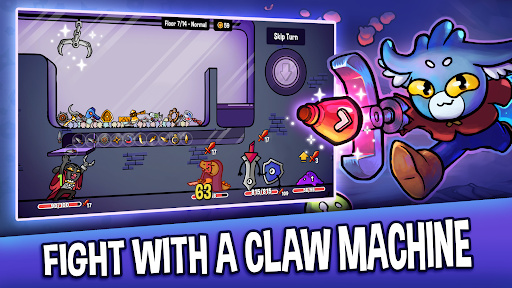
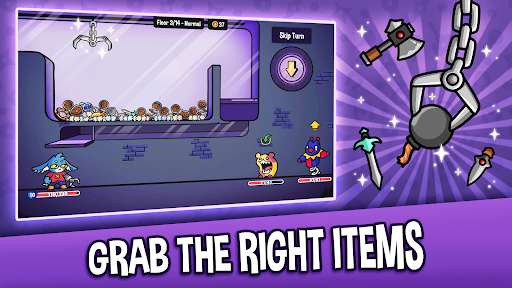
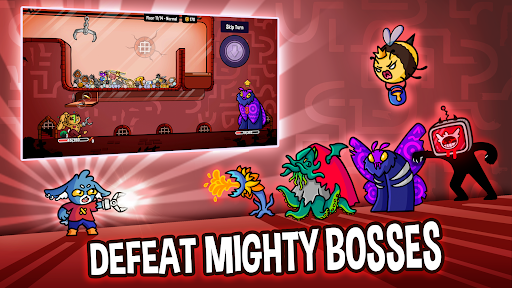
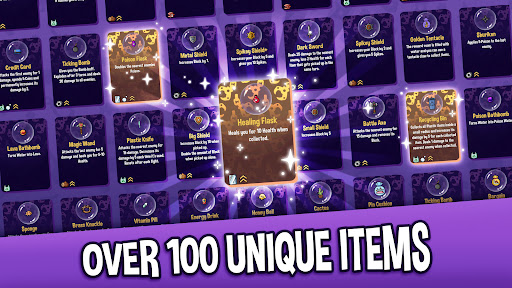
Use a claw machine to grab weapons, shields, and items as you navigate the dungeon packed with enemies and treasures. Get ready for a thrilling journey where your strategy and skill will be tested!
FEATURES:
- Unique Claw Machine Mechanic: Control a real-time claw machine to snatch weapons, shields, and items from the claw machine. Every grab counts, so plan your strategy and defeat enemies with precision.
- Roguelike Dungeon Exploration: Traverse procedurally generated dungeons that change with every run, offering new challenges, enemies, and treasures every time you play.
- Innovative Deckbuilding Strategy: Collect and upgrade your item pool with powerful weapons, items, and trinkets. With countless combinations, create your ultimate strategy to conquer the dungeons.
- Epic Boss Battles: Engage in intense boss battles and unlock special perks aka paws with every victory.
- Endless mode: Even after beating the dungeon boss, the run doesn’t end, but can go on forever. How deep into the dungeon can you venture?
- 4 Difficulty Modes: Beat the dungeon in normal, hard, harder and nightmare mode.
- Unique Characters: Choose from multiple heroes, each with their own unique abilities and playstyles. Discover the best combinations to suit your dungeon-crawling strategy.
- Engaging Storyline: The evil dungeon lord has stolen your rabbit paw and replaced it with a rusty claw. Fight your way through the dungeon to reclaim your lost limb and fortune!
- Stunning Art & Sound: Immerse yourself in the colorful, hand-drawn world of Dungeon Clawler with its dynamic soundtrack and beautifully crafted visuals.
WHY PLAY DUNGEON CLAWLER?
Dungeon Clawler brings together the strategic depth of deckbuilders with the thrilling unpredictability of roguelike dungeon crawlers and the fun of a claw machine mechanic. Each run offers something new, with endless strategies to discover and enemies to defeat. If you're seeking a fresh deck-builder gameplay with infinite replayability, this is the game for you.
EARLY ACCESS: HELP SHAPE THE FUTURE!
Dungeon Clawler is currently in Early Access, and we're committed to making it even better with your feedback! Expect frequent updates, new content, and improvements as we continue to enhance the game. By joining now, you can help shape the future of Dungeon Clawler and be part of our growing community.
JOIN THE ADVENTURE TODAY!
Download Dungeon Clawler now and begin your journey through ever-changing dungeons. Can you master the claw and reclaim your paw? The dungeon awaits!
ABOUT STRAY FAWN
We are an indie game development studio from Zurich, Switzerland. Dungeon Clawler is our fourth game and highly appreciate your support!
Show more

1. Download MEmu installer and finish the setup

2. Start MEmu then open Google Play on the desktop

3. Search Dungeon Clawler in Google Play
Install
4. Download and Install Dungeon Clawler
5. On install completion click the icon to start

6. Enjoy playing Dungeon Clawler on PC with MEmu
MEmu Play is the best Android emulator and 100 million people already enjoy its superb Android gaming experience. The MEmu virtualization technology empowers you to play thousands of Android games smoothly on your PC, even the most graphic-intensive ones.
Bigger screen with better graphics; Long duration, without limitation of battery or mobile data.
Full Keymapping support for precise control of keyboard and mouse or gamepad.
Multiple game accounts or tasks on single PC at one time with Multi-Instance manager.
Play Dungeon Clawler on PC by following steps: