Eternal Tower Saga
Updated
Current Version
3.04.0
Offered By

With your passion for Eternal Tower Saga, you shouldn’t have to limit yourself to the small screen of a phone. Play like a pro and take full control of the game using a keyboard and mouse. MEmu gives you everything you’re looking for. Download and play Eternal Tower Saga on PC. Play as long as you want — no more worries about battery life, mobile data, or unexpected calls. The all-new MEmu 9 is the best way to play Eternal Tower Saga on PC. With our expertly designed keymapping system, Eternal Tower Saga feels just like a real PC game. The MEmu multi-instance manager lets you run two or more accounts on the same device at the same time. Most importantly, our exclusive emulation engine unlocks your PC’s full potential, delivering smooth and seamless performance.
Show more
Download Eternal Tower Saga on PC with MEmu Android Emulator. Enjoy playing on big screen. Eternal Tower Saga (ETS).
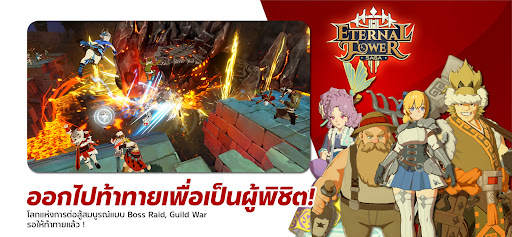
Eternal Tower Saga (ETS)
Break every MMORPG rule you’ve ever known! Experience a new world in Eternal Tower Saga (ETS), where "Lifestyle" meets "MMORPG" in perfect harmony. “Change your weapon, change the game. From player to game master.”
Eternal Tower Saga (ETS) is an adventure MMORPG centered around conquering mysterious towers that have appeared across the globe. By blending social lifestyle elements with classic MMORPG progression, the game offers limitless enjoyment and unparalleled freedom, shattering the constraints of traditional role-playing games through its unique features.
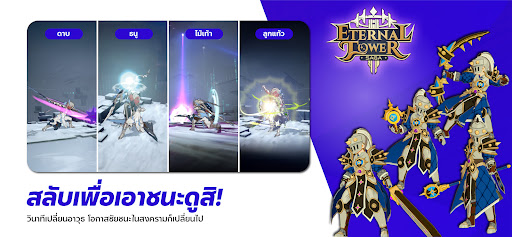
Freely choose your class: Swap Anytime
Switch your role instantly based on the weapon you hold. Each weapon type features a distinct skill tree that can be reset and upgraded freely. Choose from four primary weapons:
Sword: A melee powerhouse excelling in close-quarters combat and Crowd Control (CC). With a vast array of debuff skills, the Sword user is the ultimate front-line disruptor for any party.
Bow: A long-range physical weapon specialized in high-speed, high-damage strikes. Equipped with HP recovery buffs and tactical traps, it is a versatile choice for any encounter.
Staff: A magical weapon boasting the highest damage output and the widest Area of Effect (AoE) in the game. It also features unique mobility skills to help players escape sticky situations.
Magic Orb: A dedicated support weapon. It focuses on healing the party and providing protective shields, making it an essential role for conquering high-level dungeons.
Pro Tip: Assign different weapons to your Shortcut Bar to swap instantly mid-combat, allowing for fluid strategies and dynamic turnarounds.
Infinite Paths: Play Your Way
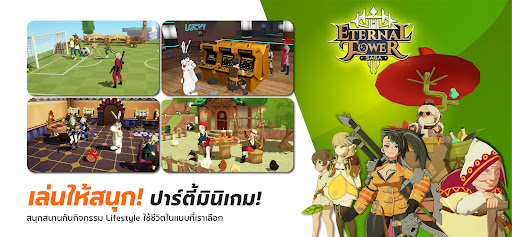
Break free from the "endless grind." While leveling up is important, ETS offers a rich lifestyle system where you can build houses, farm, socialize with friends, and complete various collections. Every action you take contributes to your character’s overall strength.
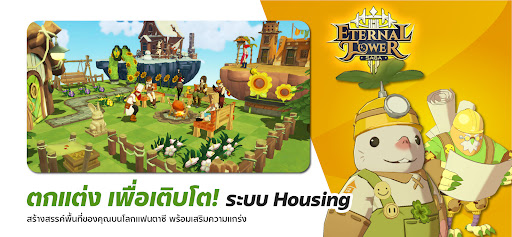
Create freely with the “Garden System”
Express yourself through the Garden System, a personal housing plot where you can build freely.
50+ House Blueprints to choose from.
1,000+ Furniture and Decorative Items. Design a "My Garden" that is uniquely yours.
Adventure with Powerful "Partners"
You don’t have to journey alone. Collect and team up with over 100 types of Partners.
Partners can be equipped with weapons and gear, functioning like a second player.
Evolve their Star Level and skills to create a powerful ally that can turn the tide of battle.
Unleash your inner fashionista with over 200 fashion sets
With over 200 full outfits and 1,000 individual fashion pieces, the customization possibilities are endless. Mix and match to find your signature style—and best of all, fashion items provide stat bonuses to boost your power.
Conquer the towers and challenge over 100 bosses
Challenge yourself in diverse dungeons and climb the floors of the Eternal Towers. Face off against over 100 unique bosses, each featuring complex Mechanical Attacks that require precision and skill to dodge. Defeat them to claim ultra-rare loot.
Diverse Combat Systems: Prove Your Strength
For the hardcore competitive players, ETS offers a full suite of combat modes:
PvP & Real-time Duels
Large-scale Warfare
Guild Wars
Battlegrounds & PK (Player Kill) zones Test your skills against players worldwide in real-time combat.
Show more

1. Download MEmu installer and finish the setup

2. Start MEmu then open Google Play on the desktop

3. Search Eternal Tower Saga in Google Play
Install
4. Download and Install Eternal Tower Saga
5. On install completion click the icon to start

6. Enjoy playing Eternal Tower Saga on PC with MEmu
MEmu Play is the best Android emulator and 100 million people already enjoy its superb Android gaming experience. The MEmu virtualization technology empowers you to play thousands of Android games smoothly on your PC, even the most graphic-intensive ones.
Bigger screen with better graphics; Long duration, without limitation of battery or mobile data.
Full Keymapping support for precise control of keyboard and mouse or gamepad.
Multiple game accounts or tasks on single PC at one time with Multi-Instance manager.
Play Eternal Tower Saga on PC by following steps:
















































