Glide Rush
Updated
Current Version
1.0.1
Offered By

With your passion for Glide Rush, you shouldn’t have to limit yourself to the small screen of a phone. Play like a pro and take full control of the game using a keyboard and mouse. MEmu gives you everything you’re looking for. Download and play Glide Rush on PC. Play as long as you want — no more worries about battery life, mobile data, or unexpected calls. The all-new MEmu 9 is the best way to play Glide Rush on PC. With our expertly designed keymapping system, Glide Rush feels just like a real PC game. The MEmu multi-instance manager lets you run two or more accounts on the same device at the same time. Most importantly, our exclusive emulation engine unlocks your PC’s full potential, delivering smooth and seamless performance.
Show more
Download Glide Rush on PC with MEmu Android Emulator. Enjoy playing on big screen. Glide Rush is a fast-paced one-swipe arcade game set high in the sky.
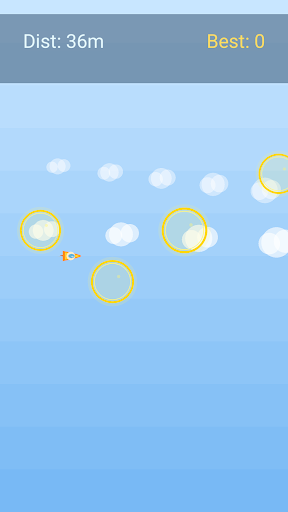
Glide Rush is a fast-paced one-swipe arcade game set high in the sky. Strap on your hang glider and soar through drifting cloudscapes, collecting golden rings while dodging dark storm clouds and jagged lightning bolts.
Swipe up and down on the screen to steer your glider — the controls are instant and precise. Glide through a glowing ring to score and build your combo. The more rings you chain together, the higher your multiplier climbs. Chain ten rings in a row and trigger Wind Rush — a rainbow-colored boost that makes you temporarily invincible and faster than ever.
But the sky is full of danger. Dark storm clouds drift in your path, crackling with lightning flashes. A single collision ends your flight instantly. Miss a ring and your combo resets — so every ring counts.
Three escalating phases keep the pressure building. Early on, the pace is relaxed with big rings and wide gaps — plenty of room to find your rhythm. As distance grows, rings shrink, clouds thicken, and speed ramps up. In the final stretch, obstacles come thick and fast, and only the most precise pilots survive.
Features:
- One-swipe vertical controls — instant response, no inertia
- Golden glowing rings with pulse animation and burst particles
- Dark storm clouds with flashing lightning effects
- Jagged lightning bolt obstacles in later phases
- Combo multiplier that grows with consecutive rings
- Wind Rush mode at 10 combo — rainbow trail, speed boost, temporary invincibility
- Three difficulty phases with increasing speed and obstacle density
- Bright sky background with parallax cloud layers
- Near-miss feedback with screen shake and danger flash
- Persistent best score and best distance tracking
- Game over panel with instant retry
Glide far, combo deep, and outrun the storm.
Show more

1. Download MEmu installer and finish the setup

2. Start MEmu then open Google Play on the desktop

3. Search Glide Rush in Google Play
Install
4. Download and Install Glide Rush
5. On install completion click the icon to start

6. Enjoy playing Glide Rush on PC with MEmu
MEmu Play is the best Android emulator and 100 million people already enjoy its superb Android gaming experience. The MEmu virtualization technology empowers you to play thousands of Android games smoothly on your PC, even the most graphic-intensive ones.
Bigger screen with better graphics; Long duration, without limitation of battery or mobile data.
Full Keymapping support for precise control of keyboard and mouse or gamepad.
Multiple game accounts or tasks on single PC at one time with Multi-Instance manager.
Play Glide Rush on PC by following steps: