Just Desserts: Revenge & Merge
Updated
Current Version
1.14.2
Offered By

With your passion for Just Desserts: Revenge & Merge, you shouldn’t have to limit yourself to the small screen of a phone. Play like a pro and take full control of the game using a keyboard and mouse. MEmu gives you everything you’re looking for. Download and play Just Desserts: Revenge & Merge on PC. Play as long as you want — no more worries about battery life, mobile data, or unexpected calls. The all-new MEmu 9 is the best way to play Just Desserts: Revenge & Merge on PC. With our expertly designed keymapping system, Just Desserts: Revenge & Merge feels just like a real PC game. The MEmu multi-instance manager lets you run two or more accounts on the same device at the same time. Most importantly, our exclusive emulation engine unlocks your PC’s full potential, delivering smooth and seamless performance.
Show more
Download Just Desserts: Revenge & Merge on PC with MEmu Android Emulator. Enjoy playing on big screen. Step into the enchanting town of Frostvale, where sweetness masks dark secrets!


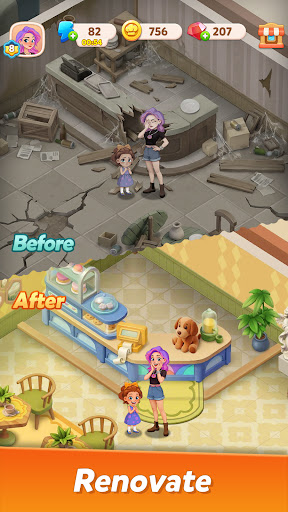

Step into the enchanting town of Frostvale, where sweetness masks dark secrets! Join talented pastry chef Ella as she returns to her hometown to uncover the truth behind a mysterious fire. Merge desserts to restore your family’s beloved pastry shop and dig past the icing to reveal long-buried truths.
Make Desserts
Merge ingredients like powdered sugar and butter to whip up delicious cookies! Upgrade your recipes to unlock exquisite delights, including the elegant Swan Cake. The more you create, the more delectable treats you'll discover!
Rebuild the Pastry Shop
Transform your family’s charred shop into a magnificent dream space! Choose vintage tiles, glowing neon signs, and exquisite furniture to design a shop that reflects your style. Each area you rebuild unveils new plot clues.
Reconnect with the Past
Reunite with Edward, your former lover. Is he your unexpected savior or an accomplice to the arson? As rivals appear, what schemes lie behind their charming smiles? Explore your mother’s mysterious recipe and the secrets of that fateful night!
Uncover the Truth
Gather clues from the night of the fire through decorating and merging! Piece together charred photographs, shattered ledgers, and cryptic notes. Can you unravel the family secret that someone is desperate to keep hidden?
Warning: In this small town, the sweetest smiles often hide the deadliest lies.
Show more

1. Download MEmu installer and finish the setup

2. Start MEmu then open Google Play on the desktop

3. Search Just Desserts: Revenge & Merge in Google Play
Install
4. Download and Install Just Desserts: Revenge & Merge
5. On install completion click the icon to start

6. Enjoy playing Just Desserts: Revenge & Merge on PC with MEmu
MEmu Play is the best Android emulator and 100 million people already enjoy its superb Android gaming experience. The MEmu virtualization technology empowers you to play thousands of Android games smoothly on your PC, even the most graphic-intensive ones.
Bigger screen with better graphics; Long duration, without limitation of battery or mobile data.
Full Keymapping support for precise control of keyboard and mouse or gamepad.
Multiple game accounts or tasks on single PC at one time with Multi-Instance manager.
Play Just Desserts: Revenge & Merge on PC by following steps: