Looking for Aliens
Updated
Current Version
1.0.59
Offered By

With your passion for Looking for Aliens, you shouldn’t have to limit yourself to the small screen of a phone. Play like a pro and take full control of the game using a keyboard and mouse. MEmu gives you everything you’re looking for. Download and play Looking for Aliens on PC. Play as long as you want — no more worries about battery life, mobile data, or unexpected calls. The all-new MEmu 9 is the best way to play Looking for Aliens on PC. With our expertly designed keymapping system, Looking for Aliens feels just like a real PC game. The MEmu multi-instance manager lets you run two or more accounts on the same device at the same time. Most importantly, our exclusive emulation engine unlocks your PC’s full potential, delivering smooth and seamless performance.
Show more
Download Looking for Aliens on PC with MEmu Android Emulator. Enjoy playing on big screen. Curious about how aliens view our world?
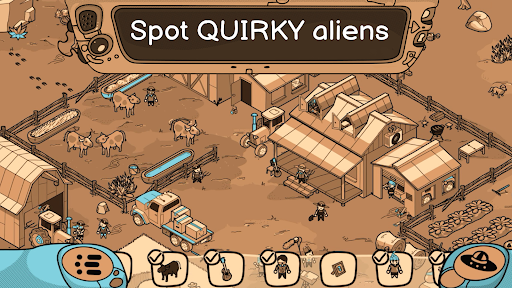

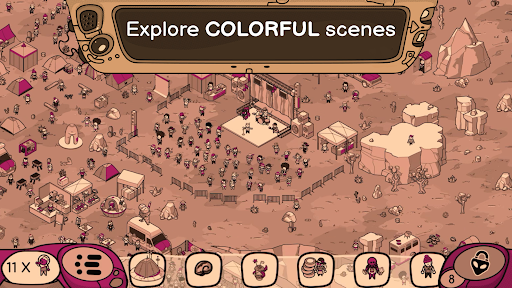

Curious about how aliens view our world? Looking for Aliens takes you on an unforgettable journey where you uncover the strange, funny, and sometimes absurd truth about life on Earth—all through extraterrestrial eyes. Explore colorful scenes packed with surprises, humor, and easy puzzles in this hidden-object game.
From secret alien outposts to bustling human cities, each level invites you to explore a world where nothing is quite as it seems. With over 25 hand-drawn locations and hundreds of quirky objects to find, the game’s colorful art style and creative settings will keep you hooked for hours.
Explore each scene at your own pace, hunting for objects and uncovering hidden surprises. Need help? Use the built-in hints system to keep moving without losing the thrill of discovery.
Key Features
• Interactive Gameplay: Dive into richly animated scenes where every tap unveils a surprise or a fun detail.
• Lighthearted Humor: Laugh along with clever insights into how aliens might interpret Earth’s oddities.
• Beautiful Artwork: Lose yourself in bright, intricate visuals designed to captivate players of all ages.
• Accessible Design: Whether you’re a beginner or a hidden-object pro, the game’s intuitive controls and flexible difficulty settings make it easy to enjoy.
• Plenty of Extras: Beyond the main objectives, there are side quests and scattered surprises waiting to be discovered.
Over 250 unique items to find in diverse locations.
A mix of challenging puzzles and lighthearted gameplay.
25 hand-drawn locations
Perfect for all kind of players
Embark on a journey like no other, filled with laughs, surprises, and endless fun. Download Looking for Aliens now and discover why this quirky hidden-object game is out of this world!
Looking for Aliens was developed by Yustas Game Studio.
Show more

1. Download MEmu installer and finish the setup

2. Start MEmu then open Google Play on the desktop

3. Search Looking for Aliens in Google Play
Install
4. Download and Install Looking for Aliens
5. On install completion click the icon to start

6. Enjoy playing Looking for Aliens on PC with MEmu
MEmu Play is the best Android emulator and 100 million people already enjoy its superb Android gaming experience. The MEmu virtualization technology empowers you to play thousands of Android games smoothly on your PC, even the most graphic-intensive ones.
Bigger screen with better graphics; Long duration, without limitation of battery or mobile data.
Full Keymapping support for precise control of keyboard and mouse or gamepad.
Multiple game accounts or tasks on single PC at one time with Multi-Instance manager.
Play Looking for Aliens on PC by following steps: