Meadowfell
Updated
Current Version
2.4
Offered By

With your passion for Meadowfell, you shouldn’t have to limit yourself to the small screen of a phone. Play like a pro and take full control of the game using a keyboard and mouse. MEmu gives you everything you’re looking for. Download and play Meadowfell on PC. Play as long as you want — no more worries about battery life, mobile data, or unexpected calls. The all-new MEmu 9 is the best way to play Meadowfell on PC. With our expertly designed keymapping system, Meadowfell feels just like a real PC game. The MEmu multi-instance manager lets you run two or more accounts on the same device at the same time. Most importantly, our exclusive emulation engine unlocks your PC’s full potential, delivering smooth and seamless performance.
Show more
Download Meadowfell on PC with MEmu Android Emulator. Enjoy playing on big screen. "Meadowfell offers plenty to do and explore that'll keep you engaged, and relaxed.
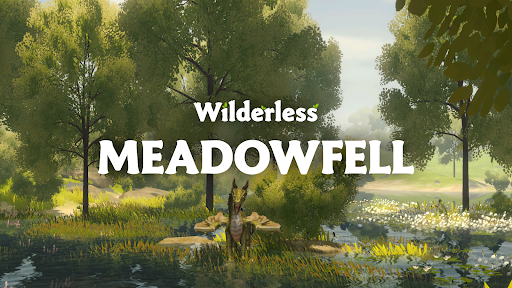
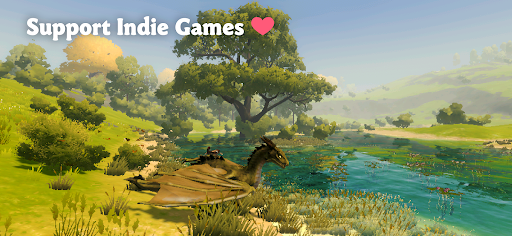
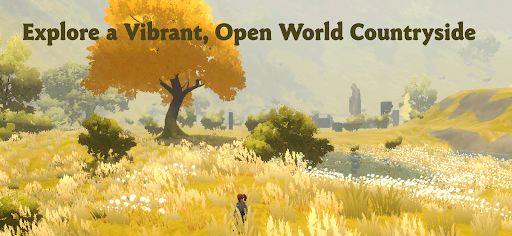
"Meadowfell offers plenty to do and explore that'll keep you engaged, and relaxed." — Pocket Gamer
Unplug and unwind in a relaxing world where nature, animals, and exploration are all you need. Explore a peaceful, non-combat open world with no pressure.
Welcome to Meadowfell, the newest addition to the Wilderless series. This is a cozy open world game crafted for those who seek to explore at their own pace. Immerse yourself in a serene, untamed wilderness designed for relaxation and creativity. It is perfect for players who enjoy non-violent exploration and cozy escapes.
A VIVID, UNTAMED WORLD
● Serene Landscapes: Explore pastoral lands filled with gentle rivers, peaceful lakes, rolling hills, and lush forests.
● Living World: Experience dynamic weather and a day-night cycle that makes every journey feel unique.
● Natural Beauty: Wander through a procedurally generated landscape filled with the "messy" beauty of real wilderness. Dust, light, and natural imperfections bring the world to life.
NO ENEMIES, NO QUESTS
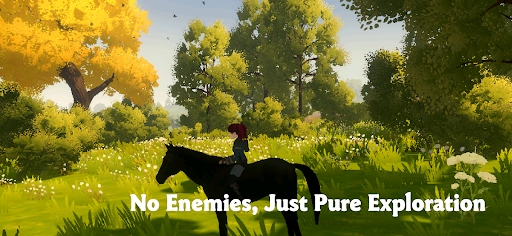
● Pure Relaxation: With no enemies and no quests, Meadowfell is about taking in the beauty around you.
● Zero Pressure: Explore at your own pace, free from the stress of combat or missions.
● Family Friendly: Ideal for cozy gamers and families who enjoy calm, peaceful experiences.
A CALMING ESCAPE
● Multiple Ways to Travel: Hike through hills, fly as a dragon over majestic cliffs, or swim in crystal-clear lakes.
● Savor the Moment: Immerse yourself in a world designed for quiet moments and peaceful discovery.
CREATE AND CAPTURE
● Immersive Photo Mode: Capture beautiful moments in nature. Adjust the time of day, field of view, and depth of field for the perfect shot.
● Garden Building: Manually place plants, trees, benches, and stone ruins. Design your own peaceful spaces anywhere in the world.
A PREMIUM EXPERIENCE
● No Interruptions: No ads, no microtransactions, and no hidden fees. This is a complete gaming experience.
● Offline Play: Enjoy the wilderness without needing an internet connection.
● Complete Control: Optimize your gameplay with extensive quality settings and benchmarking options.
A SOLO DEVELOPER PASSION PROJECT
Wilderless: Meadowfell is a labor of love created by a solo indie developer committed to crafting peaceful, nature-inspired worlds. Every detail reflects a love for the outdoors and was designed with input from the community.
Support & Feedback
Questions or ideas? Feel free to reach out: robert@protopop.com
Your feedback helps me improve Meadowfell. You can share your thoughts through the in-app review feature. Your support is greatly appreciated!
Follow me
• Website: NimianLegends.com
• Instagram: @protopopgames
• Twitter: @protopop
• YouTube: Protopop Games
• Facebook: Protopop Games
Share the Adventure
Feel free to share footage of Wilderless: Meadowfell on YouTube or other platforms. Retweets, shares, and reposts are also greatly appreciated and help others discover the peaceful world of Meadowfell.
Show more

1. Download MEmu installer and finish the setup

2. Start MEmu then open Google Play on the desktop

3. Search Meadowfell in Google Play
Install
4. Download and Install Meadowfell
5. On install completion click the icon to start

6. Enjoy playing Meadowfell on PC with MEmu
MEmu Play is the best Android emulator and 100 million people already enjoy its superb Android gaming experience. The MEmu virtualization technology empowers you to play thousands of Android games smoothly on your PC, even the most graphic-intensive ones.
Bigger screen with better graphics; Long duration, without limitation of battery or mobile data.
Full Keymapping support for precise control of keyboard and mouse or gamepad.
Multiple game accounts or tasks on single PC at one time with Multi-Instance manager.
Play Meadowfell on PC by following steps: