Total War: NAPOLEON
Updated
Current Version
1.3.4RC2
Offered By

With your passion for Total War: NAPOLEON, you shouldn’t have to limit yourself to the small screen of a phone. Play like a pro and take full control of the game using a keyboard and mouse. MEmu gives you everything you’re looking for. Download and play Total War: NAPOLEON on PC. Play as long as you want — no more worries about battery life, mobile data, or unexpected calls. The all-new MEmu 9 is the best way to play Total War: NAPOLEON on PC. With our expertly designed keymapping system, Total War: NAPOLEON feels just like a real PC game. The MEmu multi-instance manager lets you run two or more accounts on the same device at the same time. Most importantly, our exclusive emulation engine unlocks your PC’s full potential, delivering smooth and seamless performance.
Show more
Download Total War: NAPOLEON on PC with MEmu Android Emulator. Enjoy playing on big screen. Take command of history in two turbulent decades that redrew the map of Europe.
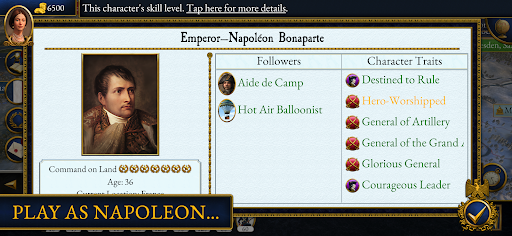
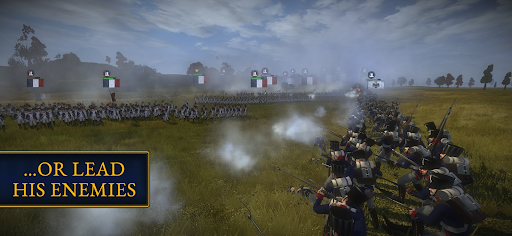
Take command of history in two turbulent decades that redrew the map of Europe.
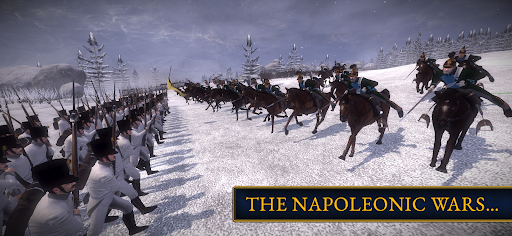
Amid the cannonfire and smoke of spectacular real-time battles on land and sea, Total War: NAPOLEON charts ‘the little Corporal’s’ astonishing rise and dramatic fall.
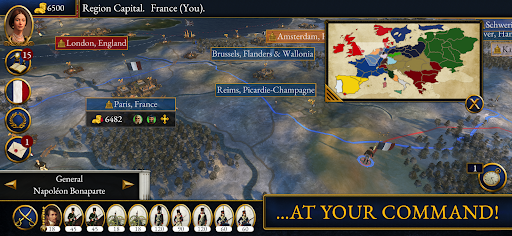
Redesigned user interfaces and extensive quality-of-life improvements put the complete desktop experience in the palm of your hand, and invite you to humble your rivals through Total War’s signature mix of conquest, trade, diplomacy and subterfuge.
New particle effects and modern firepower make NAPOLEON the most explosive and visually impressive mobile Total War to date. All the DLC of the desktop game is included; 27 additional units, the Iberian Campaign of the Peninsula War, and the 1807 Battle of Friedland, Prussia.
And — exclusive to mobile — Spain, Portugal, Denmark and the Ottoman Empire are now all playable.
FEARED BY MANY, EQUALLED BY NONE
Recreate Napoleon’s extraordinary military career, from early success in Alpine Italy and Egypt, to his European conquests and the creation of the First French Empire.
MASTER THE BATTLEFIELD
Direct thousands of troops in colossal 3D clashes on land and sea, in your own campaigns or in Historical Battles. Mastermind Napoleon’s victory over Austria and Russia at Austerlitz, rewrite the defeats of his navy at the Nile and Trafalgar, and fight as Britain or France in the final showdown at Waterloo.
COMMAND THE COALITION
Lead Austria, Great Britain, Prussia or Russia against France and Napoleon, its self-crowned Emperor, in a campaign to thwart his aggressive expansionism.
GUERRILLA WARFARE
Liberate Iberia from French occupation, either as Spanish irregulars with guerrilla tactics and rabble-rousing Agents, or as their steadfast British allies, in the Peninsular War.
FOUR ADDITIONAL FACTIONS
Exclusively on mobile, seasoned campaigners looking for new challenges may now also play as Spain, Portugal, Denmark or the Ottoman Empire in the Coalition Campaign.
GRAND STRATEGY ON THE GO
Intuitive touchscreen controls and quality-of-life improvements make NAPOLEON tailored for mobile. Or, for the familiar desktop experience, connect an Android-compatible mouse & keyboard.
===
Total War: NAPOLEON requires Android 13 or later.
To avoid disappointment, we aim to block users from purchasing a game if their device is not capable of running it. If you are able to purchase this game on your device then we expect it to run well in most cases.
However, we are aware of rare instances where users are able to purchase the game on unsupported devices. This can occur when a device is not correctly identified by the Google Play Store, and therefore cannot be blocked from purchasing. For full details on the supported chipsets for this game, plus a list of tested and verified devices, we recommend that you visit:
https://feral.in/napoleon-android-devices
===
Supported Languages: English, Čeština, Deutsch, Español, Français, Italiano, 日本語, Polski, Pусский
===
© 2009–2025 The Creative Assembly Limited. Originally developed by The Creative Assembly Limited. Originally published by SEGA. Creative Assembly, the Creative Assembly logo, Total War, Total War: NAPOLEON and the Total War logo are either trademarks or registered trademarks of The Creative Assembly Limited. SEGA and the SEGA logo are registered trademarks or trademarks of SEGA Corporation. Developed for and published on Android by Feral Interactive. Android is a trademark of Google LLC. Feral and the Feral logo are trademarks of Feral Interactive Ltd. All other trademarks, logos and copyrights are property of their respective owners. All rights reserved.
Show more

1. Download MEmu installer and finish the setup

2. Start MEmu then open Google Play on the desktop

3. Search Total War: NAPOLEON in Google Play
Install
4. Download and Install Total War: NAPOLEON
5. On install completion click the icon to start

6. Enjoy playing Total War: NAPOLEON on PC with MEmu
MEmu Play is the best Android emulator and 100 million people already enjoy its superb Android gaming experience. The MEmu virtualization technology empowers you to play thousands of Android games smoothly on your PC, even the most graphic-intensive ones.
Bigger screen with better graphics; Long duration, without limitation of battery or mobile data.
Full Keymapping support for precise control of keyboard and mouse or gamepad.
Multiple game accounts or tasks on single PC at one time with Multi-Instance manager.
Play Total War: NAPOLEON on PC by following steps: