Veterum
Updated
Current Version
Offered By

With your passion for Veterum, you shouldn’t have to limit yourself to the small screen of a phone. Play like a pro and take full control of the game using a keyboard and mouse. MEmu gives you everything you’re looking for. Download and play Veterum on PC. Play as long as you want — no more worries about battery life, mobile data, or unexpected calls. The all-new MEmu 9 is the best way to play Veterum on PC. With our expertly designed keymapping system, Veterum feels just like a real PC game. The MEmu multi-instance manager lets you run two or more accounts on the same device at the same time. Most importantly, our exclusive emulation engine unlocks your PC’s full potential, delivering smooth and seamless performance.
Show more
Download Veterum on PC with MEmu Android Emulator. Enjoy playing on big screen. Veterum is designed for players who want to lead an army through a troubled fantasy world where each campaign can develop differently.
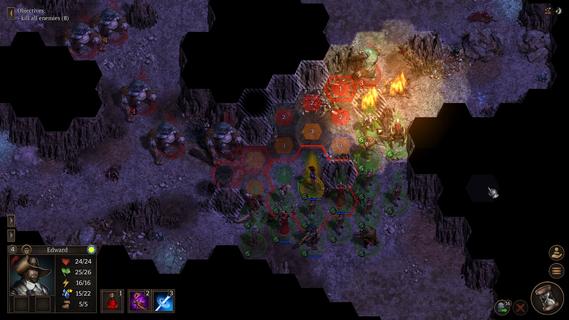
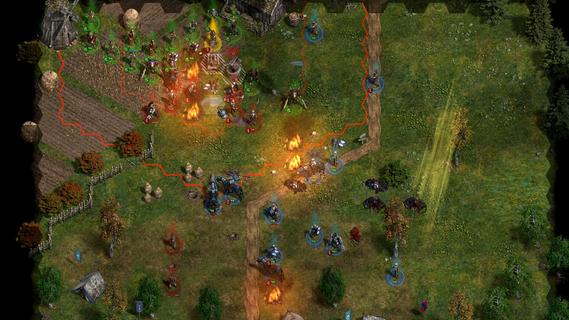
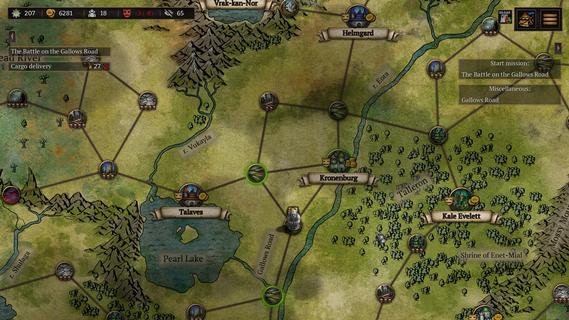
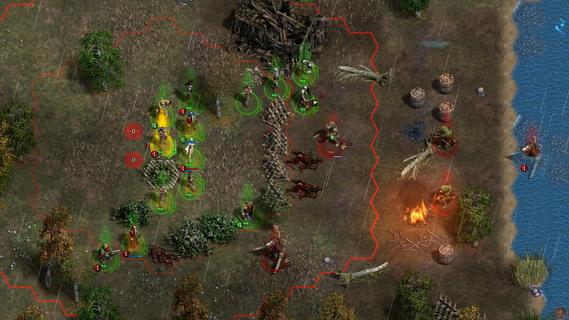
Veterum is designed for players who want to lead an army through a troubled fantasy world where each campaign can develop differently. You command the remaining Order of the Gatekeepers while facing blood cults, ancient wilderness, and a growing apocalypse. Rather than following one fixed storyline, the game focuses on choices made during travel, preparation, and combat. The Veterum APK is suited to players who prefer slower tactical decisions over quick action.Battle and campaign systemsHex grid battlesVeterum uses hex-based battlefields where unit placement affects each turn. You need to consider which way a unit faces, what it can see, and whether allies can support it. Line of sight can limit attacks, while poor positioning can leave soldiers exposed.Conditions that affect each fightVeterum tracks morale and fatigue during combat, so a unit’s condition matters as much as its basic strength. Weather, darkness, illumination, and terrain can also change how a battle develops. For example, visibility may affect your plan when fighting in dark areas or difficult ground.Change the battlefieldYou can alter parts of the map instead of only moving around existing obstacles. Veterum allows actions such as building barricades, digging ditches, chopping trees, freezing rivers, and using fire to light dark locations. These changes can create new paths, slow enemy movement, or help protect a position.Choose routes across the worldVeterum lets you travel through an open-world campaign and decide which routes to follow. Along the way, you can take quests, encounter enemies, search for artifacts, and find resources. Because encounters and campaign conditions can vary, the same route may not always lead to the same situation.Manage soldiers from different factionsYou can recruit humans, dwarves, elvers, and turans into the same army. Each group has its own loyalties, and tensions can affect cohesion, reliability, and performance in battle. Soldiers can also gain improved stats, active skills, and passive abilities, while artifacts can change how a squad is used.Prepare battles with scroll effectsBefore combat, you can use the pre-battle scroll system to change the conditions of an upcoming fight. Available effects can include rain, poison, or catapults. This gives you another decision to make before units are placed on the map.What to consider before playing VeterumVeterum is built around systems that can affect one another during long campaigns. A battle result may depend on troop condition, faction cohesion, map conditions, and earlier choices, so it may suit players who are comfortable reviewing several factors before ending a turn. The game also includes adjustable difficulty and combat settings for changing campaign conditions.For continued play, Veterum includes procedural quests, encounters, and city goods. You can also use unit and map editors to create custom missions and scenarios. Player-made content can offer different maps and battle setups beyond the main campaign structure.How to play Veterum on AndroidVeterum starts with building an army for the Order of the Gatekeepers and choosing how to move through the campaign world. In the Veterum latest version, each stage of play connects travel decisions with the condition of your troops before battle. Take time to review the situation before committing soldiers to a fight.Start a campaign and review the available routes, quests, and nearby encounters before moving your army across the world map.Recruit units from the available factions, then watch their loyalty and cohesion as the army grows.When preparing for combat, check the map conditions and select any useful pre-battle scroll effects that are available.During each turn, move units carefully on the hex grid while considering facing, line of sight, terrain, morale, fatigue, weather, and light.Use battlefield actions when needed, then develop surviving soldiers and equip artifacts to adjust the squad’s tactics for later encounters.Start a Veterum campaignVeterum combines an open-world campaign with detailed turn-based battles where terrain and troop condition can change with each decision. Players looking to download Veterum can expect tactical combat, faction management, changing campaign events, and tools for custom scenarios. Once the package is available, you can download Veterum APK from APKPure.
Show more

1. Download MEmu installer and finish the setup

2. Start MEmu then open Google Play on the desktop

3. Search Veterum in Google Play
Install
4. Download and Install Veterum
5. On install completion click the icon to start

6. Enjoy playing Veterum on PC with MEmu
MEmu Play is the best Android emulator and 100 million people already enjoy its superb Android gaming experience. The MEmu virtualization technology empowers you to play thousands of Android games smoothly on your PC, even the most graphic-intensive ones.
Bigger screen with better graphics; Long duration, without limitation of battery or mobile data.
Full Keymapping support for precise control of keyboard and mouse or gamepad.
Multiple game accounts or tasks on single PC at one time with Multi-Instance manager.
Play Veterum on PC by following steps: