Volley Girls: HS Volleyball
Updated
Current Version
1.9.3
Offered By

With your passion for Volley Girls: HS Volleyball, you shouldn’t have to limit yourself to the small screen of a phone. Play like a pro and take full control of the game using a keyboard and mouse. MEmu gives you everything you’re looking for. Download and play Volley Girls: HS Volleyball on PC. Play as long as you want — no more worries about battery life, mobile data, or unexpected calls. The all-new MEmu 9 is the best way to play Volley Girls: HS Volleyball on PC. With our expertly designed keymapping system, Volley Girls: HS Volleyball feels just like a real PC game. The MEmu multi-instance manager lets you run two or more accounts on the same device at the same time. Most importantly, our exclusive emulation engine unlocks your PC’s full potential, delivering smooth and seamless performance.
Show more
Download Volley Girls: HS Volleyball on PC with MEmu Android Emulator. Enjoy playing on big screen. ▶ Offline Mode Added ◀.

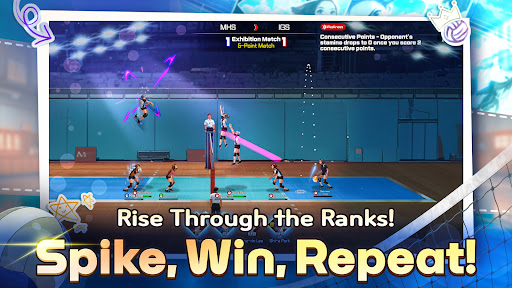
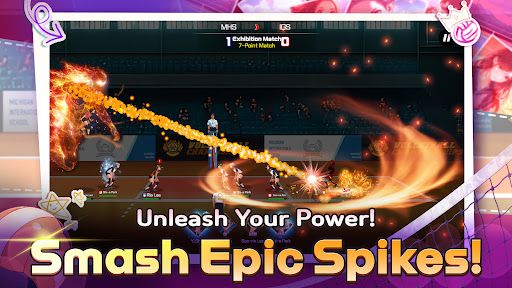
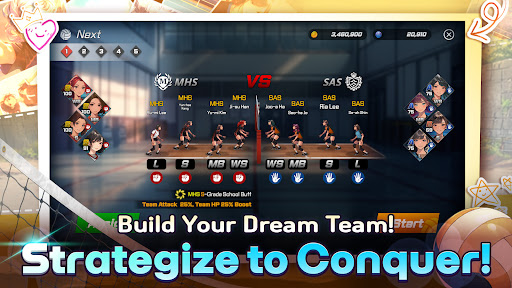
▶ Offline Mode Added ◀
A new offline play mode has been added, allowing you to play without a network connection!
In offline play mode, you can freely enjoy Practice Matches against all schools from C to S rank.
Join the community!
https://discord.com/invite/jqUKG7bFxV
Smash your limits in VolleyGirls, the high-energy volleyball game where every rally counts.
Lead an all-girl roster from school gymnasiums to national championships, sharpen their signature moves, and feel the thrill of real-time play-by-play commentary that keeps every spike, block, and dig electric.
Key Features
Intense 4-on-4 Volleyball Action
Take full control of all 4 positions: Wing Spiker, Middle Blocker, Setter, and Libero!
Experience the thrill of real volleyball with responsive button controls for serving, setting, and spiking.
Lead the game with quick-attack tosses and pinpoint spike targeting using precision aim guides.
Build Your Dream Team
Scout uniquely skilled players from multiple schools, collect position-based card packs, and trigger powerful School Buffs when you field four teammates from the same alma mater.
Story, League & Tournament Modes
Experience the journey of first-year Ji-su Han as she discovers her passion for volleyball and rallies a team of rookies into contenders. Climb seasonal leagues, fight through high-stakes playoffs, and conquer knockout tournaments to earn exclusive rewards.
Dynamic Skill System
Master flaming spikes, lightning serves, iron-wall blocks, and more than a dozen elemental techniques that can double damage, extend combos, or drain opponents with damage-over-time effects.
Accessible for All Skill Levels
Choose from Normal or Pro control modes. Whether you’re a casual fan or a competitive player, VolleyGirls has the gameplay for you.
Live Commentary & Broadcast Atmosphere
A professional announcer and color-commentator react to every play, while unique gym intros set the stage for each match.
Train, Customize, Dominate
Boost player stats, customize ball skins and lobby backgrounds,
and outsmart tough rivals with strategic attribute combinations.
More Than a Game: A Story of Friendship & Growth
Follow Ji-su and her teammates as they forge bonds, overcome obstacles, and chase championship glory together.
Step onto the court with VolleyGirls and discover how high you can soar.
Show more

1. Download MEmu installer and finish the setup

2. Start MEmu then open Google Play on the desktop

3. Search Volley Girls: HS Volleyball in Google Play
Install
4. Download and Install Volley Girls: HS Volleyball
5. On install completion click the icon to start

6. Enjoy playing Volley Girls: HS Volleyball on PC with MEmu
MEmu Play is the best Android emulator and 100 million people already enjoy its superb Android gaming experience. The MEmu virtualization technology empowers you to play thousands of Android games smoothly on your PC, even the most graphic-intensive ones.
Bigger screen with better graphics; Long duration, without limitation of battery or mobile data.
Full Keymapping support for precise control of keyboard and mouse or gamepad.
Multiple game accounts or tasks on single PC at one time with Multi-Instance manager.
Play Volley Girls: HS Volleyball on PC by following steps: