Whisper Castle: Merge & Story
Updated
Current Version
1.19.0
Offered By

With your passion for Whisper Castle: Merge & Story, you shouldn’t have to limit yourself to the small screen of a phone. Play like a pro and take full control of the game using a keyboard and mouse. MEmu gives you everything you’re looking for. Download and play Whisper Castle: Merge & Story on PC. Play as long as you want — no more worries about battery life, mobile data, or unexpected calls. The all-new MEmu 9 is the best way to play Whisper Castle: Merge & Story on PC. With our expertly designed keymapping system, Whisper Castle: Merge & Story feels just like a real PC game. The MEmu multi-instance manager lets you run two or more accounts on the same device at the same time. Most importantly, our exclusive emulation engine unlocks your PC’s full potential, delivering smooth and seamless performance.
Show more
Download Whisper Castle: Merge & Story on PC with MEmu Android Emulator. Enjoy playing on big screen. Welcome to the Whisper Castle .



Welcome to the Whisper Castle
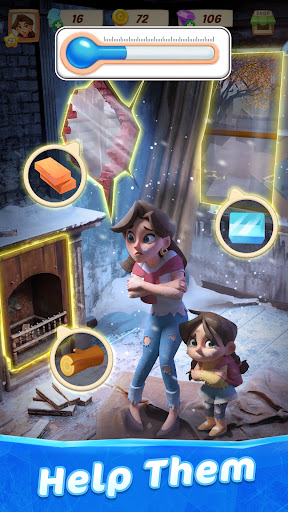
Help Christine and her daughter, Sammy, make a new life for themselves at a once grand castle nestled high in the mountains. Make no mistake – though it may look like a fairy tale, their new beginning is anything but. The castle is in ruins, the neighbors are hiding things, and long-buried secrets whisper through every corridor. Can Christine rebuild their lives and uncover the truth before it’s too late?
Renovate the Castle
Live out your home renovation fantasies one room at a time! Pick furniture, wallpaper, and other décor to bring each space to life. The more you play, the more styles, stories, and secrets you’ll unlock.
Build Relationships
Meet the cute, quirky, and sometimes conniving residents of the castle’s picturesque mountain town. Help with their projects, uncover their secrets, and maybe even find love – if you can tell who’s being honest.
Find Clues
Use the coins you earn to unlock new areas of the castle. Explore forgotten rooms, hidden passageways, and mysterious heirlooms as you uncover the castle’s tangled history... and Christine’s.
Solve Mysteries
The castle – and the town – are full of long forgotten mysteries that many of the residents think should remain forgotten. As you decorate and explore, you'll uncover old clues and cold trails. Solve the mysteries to help Christine piece together her family’s past and make a better future.
Need help? Contact us by sending an email to cow-service@microfun.com
We're here to help you!
Privacy Policy: https://www.microfun.com/privacy_EN.html
Terms of Service: https://www.microfun.com/userAgreementEN.html
Show more

1. Download MEmu installer and finish the setup

2. Start MEmu then open Google Play on the desktop

3. Search Whisper Castle: Merge & Story in Google Play
Install
4. Download and Install Whisper Castle: Merge & Story
5. On install completion click the icon to start

6. Enjoy playing Whisper Castle: Merge & Story on PC with MEmu
MEmu Play is the best Android emulator and 100 million people already enjoy its superb Android gaming experience. The MEmu virtualization technology empowers you to play thousands of Android games smoothly on your PC, even the most graphic-intensive ones.
Bigger screen with better graphics; Long duration, without limitation of battery or mobile data.
Full Keymapping support for precise control of keyboard and mouse or gamepad.
Multiple game accounts or tasks on single PC at one time with Multi-Instance manager.
Play Whisper Castle: Merge & Story on PC by following steps: