Yulgang W
Updated
Current Version
1.0.17.0
Offered By

With your passion for Yulgang W, you shouldn’t have to limit yourself to the small screen of a phone. Play like a pro and take full control of the game using a keyboard and mouse. MEmu gives you everything you’re looking for. Download and play Yulgang W on PC. Play as long as you want — no more worries about battery life, mobile data, or unexpected calls. The all-new MEmu 9 is the best way to play Yulgang W on PC. With our expertly designed keymapping system, Yulgang W feels just like a real PC game. The MEmu multi-instance manager lets you run two or more accounts on the same device at the same time. Most importantly, our exclusive emulation engine unlocks your PC’s full potential, delivering smooth and seamless performance.
Show more
Download Yulgang W on PC with MEmu Android Emulator. Enjoy playing on big screen. Yulgang W is officially live!
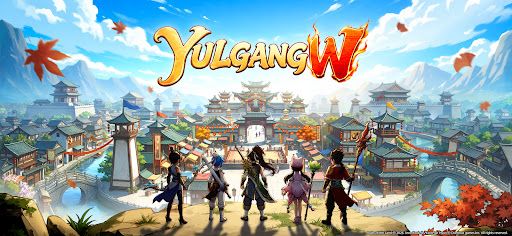

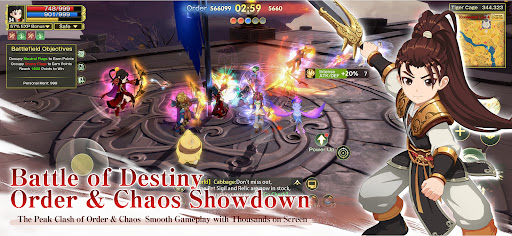
Yulgang W is officially live! A special collaboration with the classic IP Apaimanee Saga is also underway, bringing new surprises to your Murim journey!
As the officially licensed world-class official mobile game of the Yulgang IP, Yulgang W delivers a fully upgraded classic Murim experience, powered by cutting-edge technology that reimagines the murim world! Core features—including free PvP, Order & Chaos clashes, global battles, and massive multiplayer battles—are now live! Enjoy seamless cross-platform progression between PC and mobile for an even more thrilling Battle experience! Download Yulgang W now and step into the thrilling world of Yulgang! Here, every clash is a test of Strength, and every victory shapes your standing in the Murim!
【Game Features】
【Competitive for All, Thrilling PK】
In the true Murim, peace never lasts—only strength decides victory! The conflict between Order & Chaos is in full swing. Whether you uphold the ideals of Order or embrace the path of Chaos, you'll face the ultimate Peak Fight. Experience a full range of PvP content, including open-world PK, House War, Global battles, and World Boss encounters. Fight alongside thousands of players, claim glory through your strength, and rise as the one true champion of the Murim!
【Cross-Platform, Global Domination】
Play seamlessly across PC and mobile with shared progress, and jump into the battlefield anytime, anywhere! Global competition is now open, where you'll face elite warriors from around the world in epic Peak Fights. From massive GvG and guild battles to 100-player battles, every PvP mode is powered by next-generation optimization for smooth, stable combat. Even massive multiplayer battles on the same screen run flawlessly. Defeat powerful rivals, climb the rankings, and become the true ruler of the Murim!
【The Official Classic, A New Murim Begins】
The officially licensed Yulgang IP returns, rebuilt with cutting-edge technology. The five iconic classes reunite at Hyeon-bal House, while a next-generation engine brings legendary locations such as Hyeon-bal House and the Ice Palace back to life in stunning detail. Join Han Bi-kwang and Dam Hwa-rin, wield your Godforge, and begin a new chapter in your Murim legend!
【Apaimanee Collab: A Brand-New Adventure】
The tides of the Murim are shifting! Yulgang W teams up with the classic IP Apaimanee Saga for an exciting crossover, bringing new content and an extraordinary adventure to the Murim. Familiar heroes meet an exotic legend—endless surprises await. Are you ready for a new chapter?
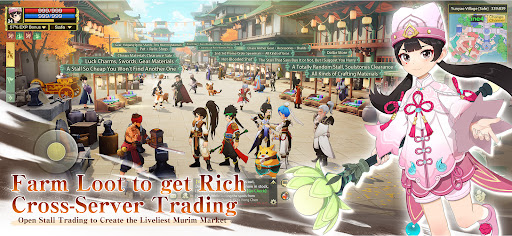
【Get Rich Through Loot, Trade Across Servers】
Challenge powerful enemies and explore hidden realms to earn rare Gear and valuable materials through battle! Loot, craft, enhance, and grow stronger—obtaining +15 Red Gear is no longer just a dream. Forge your own legendary Godforge and dominate the battlefield! Build your fortune through Stall Trading with a fair and stable player-driven economy, protected by an AI-powered market monitoring system. Turn every rare drop into valuable Murim wealth and grow both your power and fortune together.
【Pet Awakening, Greater Power】
Discover rare beasts hidden throughout the Murim and raise your own loyal Pet companions! Every Pet features unique skills and combat roles, allowing you to freely combine healing, crowd control, and damage capabilities. Whether in PvP, Team Battles, or Dungeons, they'll provide invaluable support. With the Pet Awakening and growth systems, you'll unlock even more strategic possibilities in every battle.
【A Murim of Brotherhood and Romance】
The Murim is more than endless battles—it's a place where friendships and bonds are forged. Create your own House, meet trusted companions, and find the one destined to journey beside you. Fight, explore, and grow stronger together as your relationships deepen through every adventure. No matter how the Murim changes, true allies will always stand by your side as you write your own legendary story.
Show more

1. Download MEmu installer and finish the setup

2. Start MEmu then open Google Play on the desktop

3. Search Yulgang W in Google Play
Install
4. Download and Install Yulgang W
5. On install completion click the icon to start

6. Enjoy playing Yulgang W on PC with MEmu
MEmu Play is the best Android emulator and 100 million people already enjoy its superb Android gaming experience. The MEmu virtualization technology empowers you to play thousands of Android games smoothly on your PC, even the most graphic-intensive ones.
Bigger screen with better graphics; Long duration, without limitation of battery or mobile data.
Full Keymapping support for precise control of keyboard and mouse or gamepad.
Multiple game accounts or tasks on single PC at one time with Multi-Instance manager.
Play Yulgang W on PC by following steps: