
Castie Ultimate - DLNA, Roku,
Updated
Current Version
9.79.549c
Offered By

Stop worrying about high battery drain when using Castie Ultimate - DLNA, Roku, on your phone. Free yourself from the tiny screen and enjoy the app on a much larger display. From now on, get a full-screen experience of your app with the convenience of a keyboard and mouse. MEmu offers you all the surprising features you’d expect: quick installation and easy setup, intuitive controls, and no more worries about battery life, mobile data, or unexpected calls. The all-new MEmu 9 is the choice for using Castie Ultimate - DLNA, Roku, on your computer. With the MEmu multi-instance manager, you can run two or more accounts at the same time. Most importantly, our exclusive emulation engine unlocks your PC’s full potential, delivering smooth and enjoyable performance.
Show more
Enjoy superb experience of using Castie Ultimate - DLNA, Roku, on PC with MEMU App Player. It's a powerful free Android emulator which provides you with thousands of android apps for their desktop version. Enjoy connecting with friends and polishing your work with higher efficiency! Upgrade your DLNA, UPNP, OS, Roku, FireTV, SmartTV, ChromeCast or GoogleCast, and all other Devices Castie supports to watch webvideos, online movies, livestreams, live-tv shows, and music and images directly on your computer or connected TV screen with Castie.
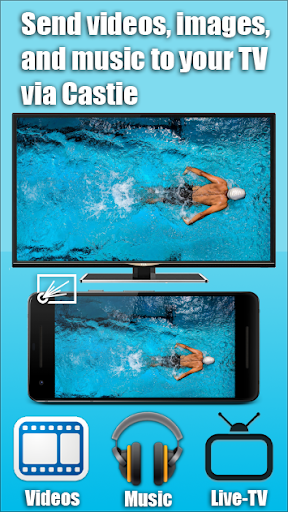
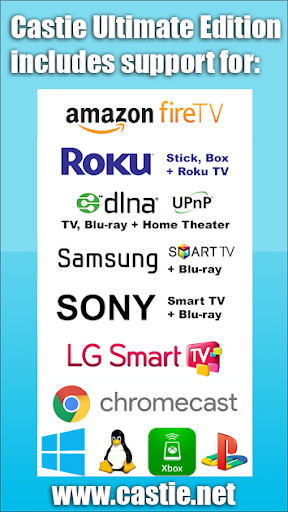
Upgrade your DLNA, UPNP, OS, Roku, FireTV, SmartTV, ChromeCast or GoogleCast, and all other Devices Castie supports to watch webvideos, online movies, livestreams, live-tv shows, and music and images directly on your computer or connected TV screen with Castie. Mkv, Mp4, m3u8, hls livestreams, video, music, and images over https and of course Full HD are supported.
*** This app includes support for all Castie versions in one package ***
*** Please see other Castie versions for device-specific support only ***
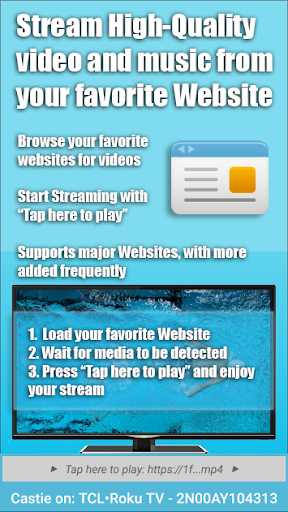
With Castie you may browse the web and stream any video or music you desire directly to any device Castie supports. Simply navigate to your favorite website and "tap here to play" the detected media. You may also use your local networks DLNA / Upnp or Samba folders to stream.
--> IMPORTANT NOTES, PLEASE READ
* SUPPORTED Devices: All Castie Device versions in one package (the ultimate Castie version).
* NOT SUPPORTED MEDIA: Google Play movies, Netflix, Amazon Prime, HULU, HBO and other (DRM protected videos web-videos, flash, online-movies, livestreams and live-tv shows).
* Please try before you buy. The Free editions of Castie allow up to 10 minutes of playback per item so you may see Castie working.
* If the media isn't being detected, please try tapping on the media play icon or button if you see one on the webpage or try another source, like Source #2, or Version #2.
* When in doubt, check the Support-FAQ page!
* If a specific media file, web-video, online-movie, livestream or live-tv show does not start, please check our built-in FAQ-Support or send the website and media link to support by using the email link from Settings - About in Castie. We update Castie regularly and value user-feedback. Please give us an opportunity to help you prior to leaving any negative feedback.
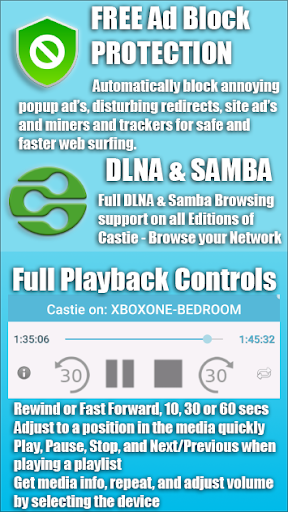
* Security Note: For your safety Castie includes a FREE built-in AD Blocker and uses minimal Android permissions unlike other applications that charge for AD blocking, or require many un-needed permissions. Please beware of other apps that access too many permissions or charge for features that keep you safe.
* Refunds: Only within 24 hours after purchase. Please submit the Google Purchase ID / Order #.
--> QUICK START GUIDE
1. Load Castie and give it a few moments to detect your devices and then select one. Make sure you are connected to the same local WiFi that the device you are attempting to connect to is.
2. a. Use the built-in Castie Web-Browser to find a WWW media file and press "Tap here to play" once media is detected.
2. b. Use the built-in DLNA / UPNP / SAMBA support to browse your local network to find media to play.
2. c. Use the built-in Local device support to browse your local device to find media to play.
3. After testing, consider upgrading if Castie is working for you using Settings - Premium.
4. If in doubt, read the FAQ!
--> CORE FEATURES
1. Support for all media formats the device you are connected to supports, including subtitles.
2. Built in DLNA / UPNP / SAMBA local networking.
3. Built in Local device browsing.
4. Support for major video websites and livestreams.
5. FREE AD Blocking.
6. FREE Playback controls and multiple device remote-control.
--> PREMIUM
1. Unlimited playback time.
2. Ability to add bookmarks to your favorite websites or media files.
3. Ability to download media files to your local device for future playback.
4. Download or Stream cast torrents.
5. All other premium features.
--> A MESSAGE FROM THE DEVELOPERS
Please contact support if you have any issues or suggestions with Castie. We love to hear from our users and will help ASAP.
If you enjoy Castie, consider giving us a 5-star rating on Google Play. Thank you for all of your support!
Disclaimer: This app is not affiliated with Samsung, Sony, LG, Roku, Google, Microsoft, Linux, Apple, or any other trademark mentioned here.
Show more

1. Download MEmu installer and finish the setup

2. Start MEmu then open Google Play on the desktop

3. Search Castie Ultimate - DLNA, Roku, in Google Play
Install
4. Download and Install Castie Ultimate - DLNA, Roku,
5. On install completion click the icon to start

6. Enjoy using Castie Ultimate - DLNA, Roku, on PC with MEmu
MEmu Play is the best Android emulator, and 100 million users already enjoy its superb Android app experience. Powered by advanced virtualization technology, it lets you enjoy thousands of Android apps smoothly on your PC—including the most graphics-intensive ones.
Bigger screen with better graphics; Long duration, without limitation of battery or mobile data.
Full Keymapping support for precise control of keyboard and mouse or gamepad.
Multiple game accounts or tasks on single PC at one time with Multi-Instance manager.
Use Castie Ultimate - DLNA, Roku, on PC by following steps:































