WarnWetter
Updated
Current Version
1692179344
Offered By

Stop worrying about high battery drain when using WarnWetter on your phone. Free yourself from the tiny screen and enjoy the app on a much larger display. From now on, get a full-screen experience of your app with the convenience of a keyboard and mouse. MEmu offers you all the surprising features you’d expect: quick installation and easy setup, intuitive controls, and no more worries about battery life, mobile data, or unexpected calls. The all-new MEmu 9 is the choice for using WarnWetter on your computer. With the MEmu multi-instance manager, you can run two or more accounts at the same time. Most importantly, our exclusive emulation engine unlocks your PC’s full potential, delivering smooth and enjoyable performance.
Show more
Enjoy superb experience of using WarnWetter on PC with MEMU App Player. It's a powerful free Android emulator which provides you with thousands of android apps for their desktop version. Enjoy connecting with friends and polishing your work with higher efficiency! WarnWetter App, DWD National Meteorological Service of Germany.
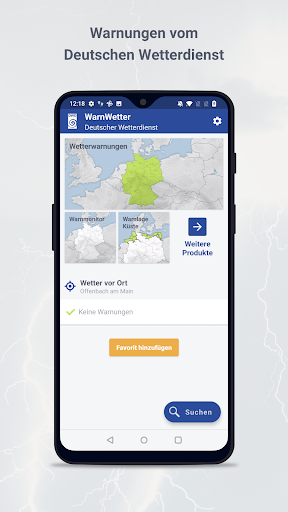
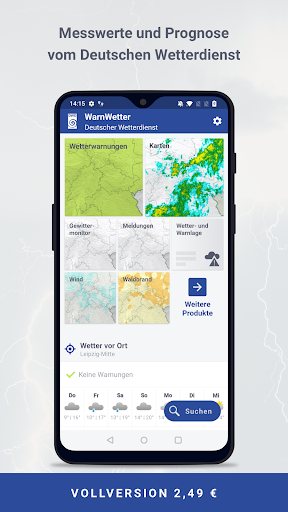
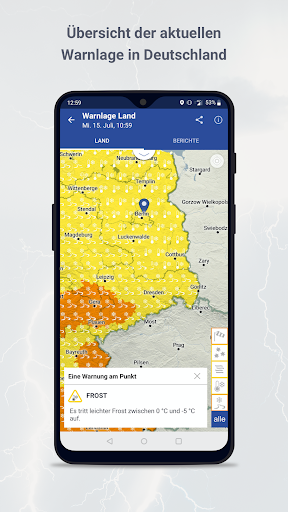
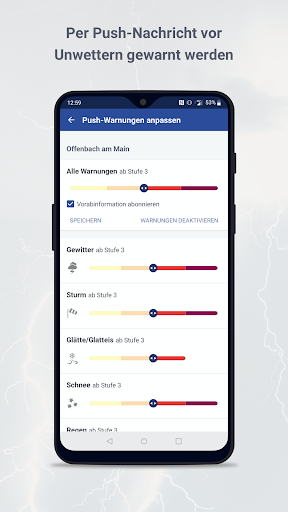
WarnWetter App, DWD National Meteorological Service of Germany
The WarnWetter App offers the following functions (in the free version):
• Current warning situation for Germany down to municipal level
• Favorites function for on-site (GPS required) and selected locations
• detailed information on the warning situation
• configurable warning elements and warning levels
• configurable alarm function (push)
• Social media sharing function for sharing information from the WarnWetter App e.g. via Facebook, Twitter or e-mail.
• Warnings about natural hazards (floods, storm surges and avalanches).
• Predicted trajectories of thunderstorm cells.
• Coast warnings and lake warnings for Bavarian lake and Lake Constance.
• Video information in case of severe weather situations.
• Features such as configurable widgets, different wind speed units, light/dark design, etc.
• Customizable start page for your favorite products
For a one-time fee (in-app purchase) the WarnWetter App can be expanded to a full version including the following functions:
• Map function to display the current weather situation and a forecast up to 7 days in advance.
• Precipitation differentiated into rain, snow, sleet and hail (radar, model forecasts).
• Clouds (satellite data, model forecasts).
• Lightning (lightning location, forecasts).
• Wind (model forecasts).
• Temperatures (model forecasts).
• Seamless time control from past to future
• Combination of weather elements (precipitation, clouds, temperature, wind...) possible
• additional measured data and forecasts from weather stations and other points (weather conditions, temperature, wind, precipitation)
• Extended favorites function for on-site (GPS required) and selected locations
• Measured data and forecasts up to 7 days in advance
• Temperature, precipitation, dew point, humidity, wind, air pressure, sunshine duration, probability of precipitation
• Rise and set times for the sun and moon
• Text reports for the federal states, the German coast and sea areas, as well as the Alps and Lake Constance (only in German)
• Forest fire hazards and Grasland fire Index
• Thunderstorm monitor with extended functions (current thunderstorm cells, lightning, etc.)
• Road weather
• Information on thermal sensitivity and increased UV intensity.
• Model forecasts for warning-relevant events such as storm, persisting or heavy precipitation.
• User reports of observations for various weather events (thunderstorms, wind, tornadoes, etc.) as well as for certain plants stages including input of own messages and photos
Note: The in-app purchase can be used on multiple devices with the same account. The range of functions differs in older versions of the WarnWetter App.
Show more

1. Download MEmu installer and finish the setup

2. Start MEmu then open Google Play on the desktop

3. Search WarnWetter in Google Play
Install
4. Download and Install WarnWetter
5. On install completion click the icon to start

6. Enjoy using WarnWetter on PC with MEmu
MEmu Play is the best Android emulator, and 100 million users already enjoy its superb Android app experience. Powered by advanced virtualization technology, it lets you enjoy thousands of Android apps smoothly on your PC—including the most graphics-intensive ones.
Bigger screen with better graphics; Long duration, without limitation of battery or mobile data.
Full Keymapping support for precise control of keyboard and mouse or gamepad.
Multiple game accounts or tasks on single PC at one time with Multi-Instance manager.
Use WarnWetter on PC by following steps: