
EMEETSTREAM
Updated
Current Version
1.1.1
Offered By

Stop worrying about high battery drain when using EMEETSTREAM on your phone. Free yourself from the tiny screen and enjoy the app on a much larger display. From now on, get a full-screen experience of your app with the convenience of a keyboard and mouse. MEmu offers you all the surprising features you’d expect: quick installation and easy setup, intuitive controls, and no more worries about battery life, mobile data, or unexpected calls. The all-new MEmu 9 is the choice for using EMEETSTREAM on your computer. With the MEmu multi-instance manager, you can run two or more accounts at the same time. Most importantly, our exclusive emulation engine unlocks your PC’s full potential, delivering smooth and enjoyable performance.
Show more
Enjoy superb experience of using EMEETSTREAM on PC with MEMU App Player. It's a powerful free Android emulator which provides you with thousands of android apps for their desktop version. Enjoy connecting with friends and polishing your work with higher efficiency! EMEETSTREAM is a free, multi-functional live streaming assistant tool that boasts many convenient and practical features, as well as excellent compatibility.
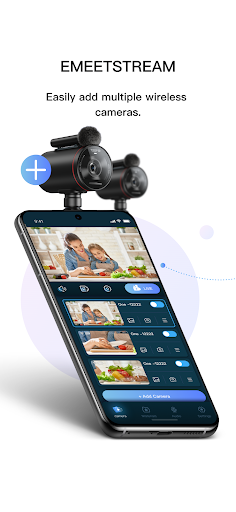
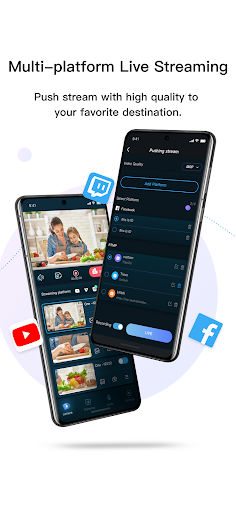
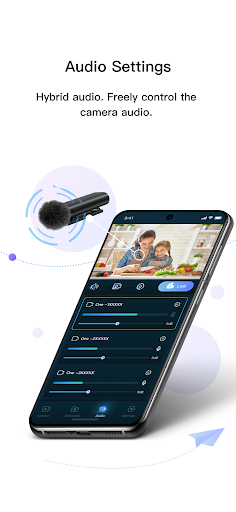
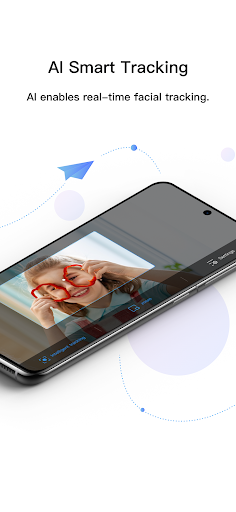
EMEETSTREAM is a free, multi-functional live streaming assistant tool that boasts many convenient and practical features, as well as excellent compatibility. Users can easily connect multiple devices and simultaneously broadcast on multiple platforms, achieving an efficient live streaming experience. Special features include multi-camera switching, picture-in-picture, face tracking, mixing, adding materials, etc., which enhance the production of audio and video, making your live broadcast more vivid, rich, and diversified.
Wireless multi-camera connection
With the wireless multi-camera connection function, you can easily connect multiple cameras or devices together to achieve multi-angle and multi-perspective live streaming.
Camera switching
Through the wireless connection of multiple devices with EMEETSTREAM, camera switching can seamlessly display multiple angles, and both manual and automatic switching modes are supported. With flexible control of the camera angles, the viewing experience can be improved.
One-Click Multi-Platform Streaming
Users can simultaneously stream live content to four different platforms such as YouTube, Facebook, Twitch, Twitter, etc. on EMEETSTREAM, allowing a larger audience to view your live stream, greatly increasing the spread efficiency and audience range.
Picture-in-Picture
EMEETSTREAM also has a picture-in-picture function, which displays multiple screens in the form of small windows or split screens during the live stream, such as the speaker, PPT, or other content, achieving a multi-perspective display. This allows the audience to have a more comprehensive and vivid understanding of the live stream content, improving their viewing experience.
Face Tracking
EMEETSTREAM has a tracking feature that can detect people in the image and automatically track their positions, ensuring that they remain in the center of the frame. This is especially helpful for keynote speakers or participants who need to move or walk around during the live stream, allowing them to remain consistently visible on the screen, resulting in a more professional and smooth broadcast.
Screen Zooming
Users can zoom in or out the screen during live streaming to adapt to different scene requirements and improve viewing experience.
Audio Mixing Function
EMEETSTREAM supports microphone switching or muting for multiple devices to improve audio quality. Users can use the mixing function to adjust the mixing of multiple devices, making the audio sound more high-quality.
Adding Materials
EMEETSTREAM's material-adding function helps users better present their ideas and artistic sense. You can add various materials such as pictures, text, animations, etc. during live streaming to make the content more diverse and colorful.
Show more

1. Download MEmu installer and finish the setup

2. Start MEmu then open Google Play on the desktop

3. Search EMEETSTREAM in Google Play
Install
4. Download and Install EMEETSTREAM
5. On install completion click the icon to start

6. Enjoy using EMEETSTREAM on PC with MEmu
MEmu Play is the best Android emulator, and 100 million users already enjoy its superb Android app experience. Powered by advanced virtualization technology, it lets you enjoy thousands of Android apps smoothly on your PC—including the most graphics-intensive ones.
Bigger screen with better graphics; Long duration, without limitation of battery or mobile data.
Full Keymapping support for precise control of keyboard and mouse or gamepad.
Multiple game accounts or tasks on single PC at one time with Multi-Instance manager.
Use EMEETSTREAM on PC by following steps:































