Funimate Video Editor & Maker
Updated
Current Version
13.3.1
Offered By

Stop worrying about high battery drain when using Funimate Video Editor & Maker on your phone. Free yourself from the tiny screen and enjoy the app on a much larger display. From now on, get a full-screen experience of your app with the convenience of a keyboard and mouse. MEmu offers you all the surprising features you’d expect: quick installation and easy setup, intuitive controls, and no more worries about battery life, mobile data, or unexpected calls. The all-new MEmu 9 is the choice for using Funimate Video Editor & Maker on your computer. With the MEmu multi-instance manager, you can run two or more accounts at the same time. Most importantly, our exclusive emulation engine unlocks your PC’s full potential, delivering smooth and enjoyable performance.
Show more
Enjoy superb experience of using Funimate Video Editor & Maker on PC with MEMU App Player. It's a powerful free Android emulator which provides you with thousands of android apps for their desktop version. Enjoy connecting with friends and polishing your work with higher efficiency! Funimate is the best video editing app you can find on mobile!
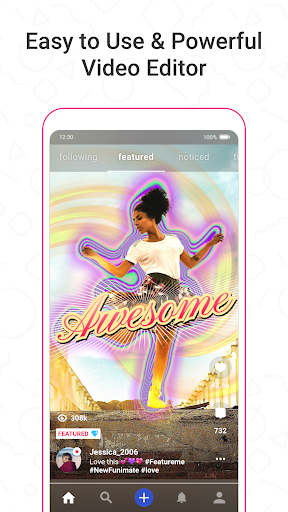
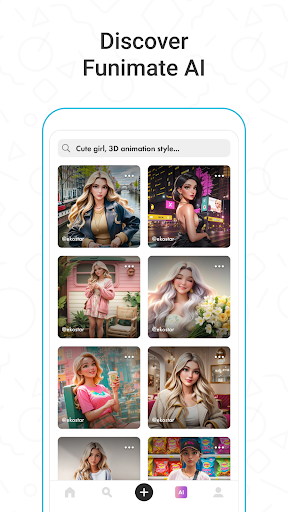
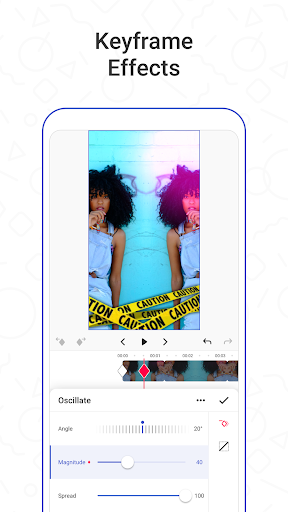
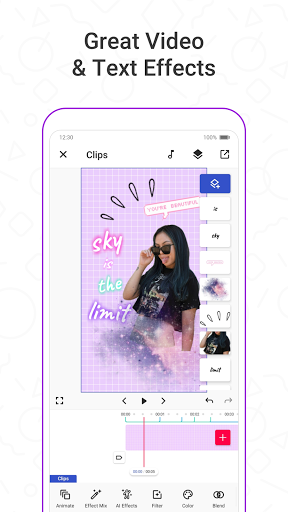
Funimate is the best video editing app you can find on mobile! Join millions of Funimate users who create advanced video edits easily. With Funimate, you’ll be able to create PRO edits very quickly with the help of unique and advanced editing features we have.
Funimate AI Studio, lets you generate AI characters and AI images, offering unlimited creative possibilities. Write prompts, share your creations, and find inspiration within the community to boost your videos' appeal.
Create amazing Fan Edits or spice up your freestyle videos with unique video features like transitions, custom animations, video and text effects and filters. Add stickers, backgrounds and overlays to your video to show off your creativity and amaze your friends from our element library with thousands of options.
You can share the videos you create on Funimate on TikTok, Instagram, Snapchat and amaze your friends and gain followers! Don’t forget to post on Funimate as well to join the Funimate community and for a chance to get featured!
P.S: Funimate users get featured more often on social media like TikTok because of creative videos they make by using unique Funimate video effects!
On Funimate you can find:
Fan Edit videos to show their appreciation and love to influencers and celebrities;
Lip sync, dance and freestyle videos with awesome text effects, AI effects and video effects;
Awesome anime edits our users make with their favorite anime and manga characters;
Game edits to show off your gaming skills;
And MANY MORE...
TOP VIDEO EDITING FEATURES
TRANSITIONS: Awesome transitions for your edits that you can add with a single tap! We have the best video transitions to wow your followers. Just add your pictures & videos and just by using a few taps you create a cool video with professional looking video transitions.
ELEMENT LIBRARY: Video editing is even more fun with overlays, stickers and backgrounds from our element library that has thousands of elements for you to select from. You can also use hundreds of emojis and add text to videos to create cool musical videos, lip sync videos or slow motion videos with Funimate.
KEYFRAMES: You’re not limited to our effects when it comes to making your videos unique. You can create your own effects with the photos on your phone. It’s super easy to animate your layers using keyframes! Discover custom animations to show off your creative skills to your followers.
VIDEO MASK & AI EFFECTS: You can change the background of your videos and add cool mask effects to your videos with just a click! To try this out, add a dance/freestyle video, tap AI Effects button and choose the effect you want. That’s it!
EFFECT MIX: Tons of different effects to add a professional touch to your videos! You can try more than 100 advanced video effects on Funimate video editor.
INTRO & OUTRO EFFECTS: Tens of intro and outro animations you can select for your texts, images and videos.
TEXT EFFECTS: Add lyrics of the music to your video with many text effects like neon lights, colors and many more. Tens of different fonts available!
ADD MUSIC TO VIDEOS: Add your favorite music to videos, to make short music video clips with creative effects.
VIDEO MERGE, CUT & TRIM: Besides all the awesome features, you’ll also have classic video editor app features like cropping, merging, cutting, trimming and editing videos. Funimate is the only video editor you need. You can also create reverse videos and slow motion videos just with a tap!
BE A PART OF FUNIMATE VIDEO EDITING COMMUNITY: Shoot videos for weekly challenges, show your creativity by using video effects, hot music and get featured to grow your fan base on Funimate. Share your creativity on TikTok, Instagram, Youtube and Musically and boost your likes: best way to amaze your friends and get new followers.
Show more

1. Download MEmu installer and finish the setup

2. Start MEmu then open Google Play on the desktop

3. Search Funimate Video Editor & Maker in Google Play
Install
4. Download and Install Funimate Video Editor & Maker
5. On install completion click the icon to start

6. Enjoy using Funimate Video Editor & Maker on PC with MEmu
MEmu Play is the best Android emulator, and 100 million users already enjoy its superb Android app experience. Powered by advanced virtualization technology, it lets you enjoy thousands of Android apps smoothly on your PC—including the most graphics-intensive ones.
Bigger screen with better graphics; Long duration, without limitation of battery or mobile data.
Full Keymapping support for precise control of keyboard and mouse or gamepad.
Multiple game accounts or tasks on single PC at one time with Multi-Instance manager.
Use Funimate Video Editor & Maker on PC by following steps: