
JeryMate Play Live
Updated
Current Version
1.0
Offered By

Stop worrying about high battery drain when using JeryMate Play Live on your phone. Free yourself from the tiny screen and enjoy the app on a much larger display. From now on, get a full-screen experience of your app with the convenience of a keyboard and mouse. MEmu offers you all the surprising features you’d expect: quick installation and easy setup, intuitive controls, and no more worries about battery life, mobile data, or unexpected calls. The all-new MEmu 9 is the choice for using JeryMate Play Live on your computer. With the MEmu multi-instance manager, you can run two or more accounts at the same time. Most importantly, our exclusive emulation engine unlocks your PC’s full potential, delivering smooth and enjoyable performance.
Show more
Enjoy superb experience of using JeryMate Play Live on PC with MEMU App Player. It's a powerful free Android emulator which provides you with thousands of android apps for their desktop version. Enjoy connecting with friends and polishing your work with higher efficiency! Welcome to JeryMate Play Live, the innovative video editing platform, as well as a place for fostering new connections and building friendships through the magic of video interactions!
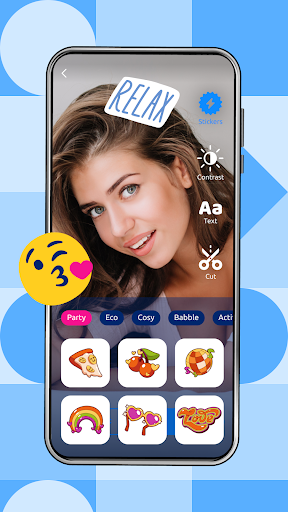



Welcome to JeryMate Play Live, the innovative video editing platform, as well as a place for fostering new connections and building friendships through the magic of video interactions! In a world where meaningful connections often feel distant, JeryMate brings people together in a vibrant community centered around shared interests and live video engagement.
Create Your Profile
Getting started with JeryMate is simple and intuitive. First, you’ll need to register an account. This process involves providing essential details such as your name, age, gender, a profile photo, and location. This information helps JeryMate deliver tailored video suggestions, ensuring you connect with like-minded individuals in your area.
Powerful Video Editing
Upload your video and transform it into a polished masterpiece! Adjust video contrast, trim clips, and enhance your content with a variety of text and sticker options. Whether you’re editing a creative live video, a travel vlog, or a funny clip, JeryMate provides the features you need to make your vision come to life.
Easy Upload and Share
Creating and sharing your live video has never been easier! After editing your video, simply select the categories that best fit your content, and upload it for others to see. Your video will be displayed in relevant categories, making it simple for fellow users to discover and engage with your work. With JeryMate, you can showcase your creativity and gain feedback from a supportive community.
Connect and Socialize
But JeryMate isn’t just about editing — it’s also a social platform! After sharing your video, you can interact with other users by liking and commenting on their posts. This encourages engagement and fosters a sense of community among video creators. You can also explore profiles, view recent uploads, and get to know private details of fellow users through their bios and content.
Explore Profiles and Build Relationships
Navigating the profiles tab reveals a wealth of opportunities to connect. Here, you can view each other’s status (online/offline), profile photos, bios, and recently posted videos. This allows for a more private touch, letting you get a sense of who someone is before reaching out.
If you find someone you’d like to connect with, you can follow them to stay updated on their activities. Initiating private chats is also a breeze, allowing for deeper conversations beyond likes and comments. JeryMate’s focus on privacy ensures that your interactions remain secure and enjoyable.
Experience Our Demo Accounts
As a new platform, JeryMate Play Live includes demo accounts to showcase its features and functionality. Easily identifiable with a "Demo Account" badge, these profiles allow you to experience the platform fully before connecting with real users. Explore the capabilities of JeryMate, engage with demo live videos, and familiarize yourself with the community, all while you await the arrival of new friends.
Join the JeryMate Community Today!
In a digital age where authentic connections are harder to find, JeryMate Play Live stands out as a platform dedicated to bringing people together through the power of video. Join JeryMate today and start exploring powerful video editing tools alongside social features that allow you to chat and collaborate with fellow creators. Your next great video is just a few taps away!
Show more

1. Download MEmu installer and finish the setup

2. Start MEmu then open Google Play on the desktop

3. Search JeryMate Play Live in Google Play
Install
4. Download and Install JeryMate Play Live
5. On install completion click the icon to start

6. Enjoy using JeryMate Play Live on PC with MEmu
MEmu Play is the best Android emulator, and 100 million users already enjoy its superb Android app experience. Powered by advanced virtualization technology, it lets you enjoy thousands of Android apps smoothly on your PC—including the most graphics-intensive ones.
Bigger screen with better graphics; Long duration, without limitation of battery or mobile data.
Full Keymapping support for precise control of keyboard and mouse or gamepad.
Multiple game accounts or tasks on single PC at one time with Multi-Instance manager.
Use JeryMate Play Live on PC by following steps:































