
Media Studio
Updated
Current Version
1541684010
Offered By

Stop worrying about high battery drain when using Media Studio on your phone. Free yourself from the tiny screen and enjoy the app on a much larger display. From now on, get a full-screen experience of your app with the convenience of a keyboard and mouse. MEmu offers you all the surprising features you’d expect: quick installation and easy setup, intuitive controls, and no more worries about battery life, mobile data, or unexpected calls. The all-new MEmu 9 is the choice for using Media Studio on your computer. With the MEmu multi-instance manager, you can run two or more accounts at the same time. Most importantly, our exclusive emulation engine unlocks your PC’s full potential, delivering smooth and enjoyable performance.
Show more
Enjoy superb experience of using Media Studio on PC with MEMU App Player. It's a powerful free Android emulator which provides you with thousands of android apps for their desktop version. Enjoy connecting with friends and polishing your work with higher efficiency! Edit audio and video with this remarkable, next-level mobile app: Media Studio.
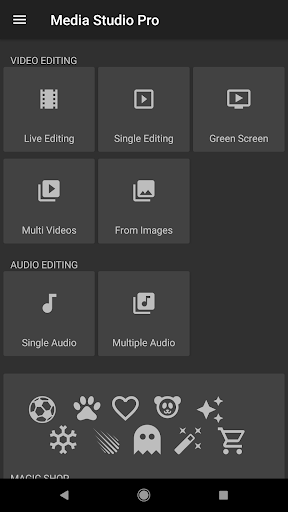
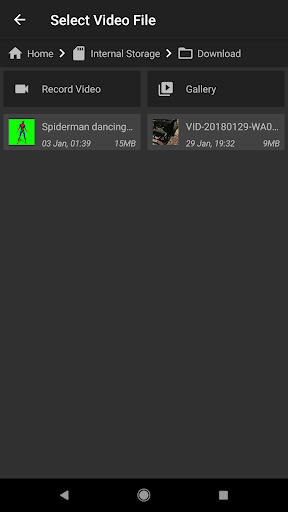
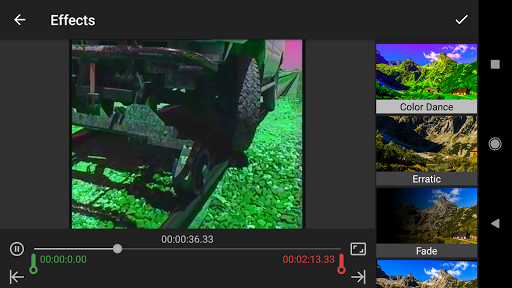
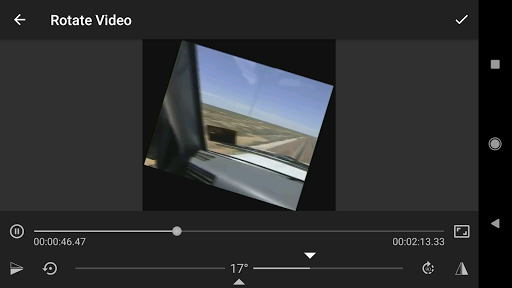
Edit audio and video with this remarkable, next-level mobile app: Media Studio. A versatile, easy-to-use tool for filmmakers or musicians, this app is loaded with expert options to get the look and sound you want. Encode bitrate of up to 30,000 kbps to preserve HD quality, render natively, Split, Trim, Rotate and Flip, Extract Video, Extract Audio, Add Text, Blur Area, Negate and more. Advanced settings and conversion to various formats make import and export simple. Carry a full editing suite around with you and work on your video or music wherever you are (internet connection is not compulsory).
Features:-
*Full 4K support.
*NO WATERMARK.
*Export full length video.
*Besides basic options like Trim, Delete middle, Split, Extract audio or video, PNG sequence, e.t.c.,
*There are many unique editing options like Green Screen, GIF creator, Reverse Video, Color Dance, Add Text, Focus and Guassian Blur, Mirror effect, Slow or Fast motion and many more.
*Convert your videos (Convert option is in Multiple Video editing) into Square videos or Full 4K video.
*More than 150 color filters to apply on video, with live preview.
Note:
o Only single effect will be applied on a video in free version. To apply more than one effect at a time, please upgrade to pro version.
o Now supports any audio format with live editing.
Tutorial :- A video demo of live editing can be seen at,
https://www.youtube.com/watch?v=YisdurGlZg0
Tutorial (Green Screen) :- A video demo showing how to use green screen editing,
https://www.youtube.com/watch?v=8b1Wrasz-DA
Special Effect samples on black background:-
http://www.youtube.com/playlist?list=PLufUmNsXjXBsvVyKTQdG-Wi-9l_JMBInz
Know more about Stop Motion,
http://www.youtube.com/watch?v=Tn83QFzKe90
Media Studio uses libraries from the FFmpeg project under the LGPLv2.1
The app is supported on any processors.
If you have any problem/query or suggestion, please mail at kaushal.kumar86@gmail.com
If the app doesn't work on your device, go to "Settings" option of the app and submit complaint.
Tested on:-
Moto E 2nd gen
Samsung. Galaxy S7; Galaxy S6; Galaxy S6 edge+; Galaxy S8/ S8+; Note 8, Galaxy S9/S9+, Note 9.
HUAWEI GR5
SAMSUNG GALAXY NOTE 2
BLADE X Z965
HUAWEI P8 LITE
MATE 9
SONY XPERIA XZ PREMIUM
LG G6
GALAXY J7 2016
SAMSUNG GALAXY J1 ACE
MOTO G4 PLAY
MOTO G5
Google Pixel and Pixel 2
Credit:-
Kaushal Kumar Agrawal
Show more

1. Download MEmu installer and finish the setup

2. Start MEmu then open Google Play on the desktop

3. Search Media Studio in Google Play
Install
4. Download and Install Media Studio
5. On install completion click the icon to start

6. Enjoy using Media Studio on PC with MEmu
MEmu Play is the best Android emulator, and 100 million users already enjoy its superb Android app experience. Powered by advanced virtualization technology, it lets you enjoy thousands of Android apps smoothly on your PC—including the most graphics-intensive ones.
Bigger screen with better graphics; Long duration, without limitation of battery or mobile data.
Full Keymapping support for precise control of keyboard and mouse or gamepad.
Multiple game accounts or tasks on single PC at one time with Multi-Instance manager.
Use Media Studio on PC by following steps:































