Video Maker Music Video Editor
Updated
Current Version
3.7.2
Offered By

Stop worrying about high battery drain when using Video Maker Music Video Editor on your phone. Free yourself from the tiny screen and enjoy the app on a much larger display. From now on, get a full-screen experience of your app with the convenience of a keyboard and mouse. MEmu offers you all the surprising features you’d expect: quick installation and easy setup, intuitive controls, and no more worries about battery life, mobile data, or unexpected calls. The all-new MEmu 9 is the choice for using Video Maker Music Video Editor on your computer. With the MEmu multi-instance manager, you can run two or more accounts at the same time. Most importantly, our exclusive emulation engine unlocks your PC’s full potential, delivering smooth and enjoyable performance.
Show more
Enjoy superb experience of using Video Maker Music Video Editor on PC with MEMU App Player. It's a powerful free Android emulator which provides you with thousands of android apps for their desktop version. Enjoy connecting with friends and polishing your work with higher efficiency! Video Maker - Video Editor is the best FREE HD video editor, video maker & video trimmer app, with all video editing and photo slideshow maker features: cut video, trim video, crop video, split a long video into short video clips, merge video, edit video with music, edit video for YouTube , add music to video, add text to video, and so on.
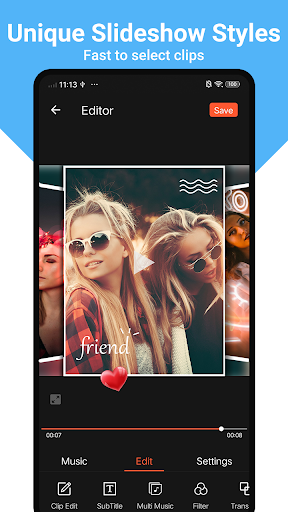
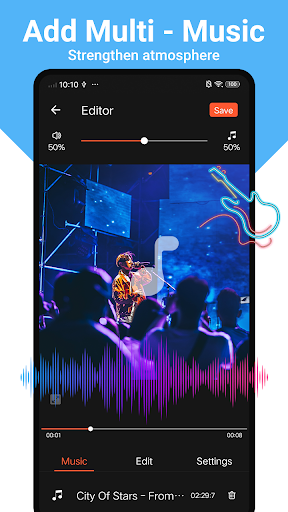
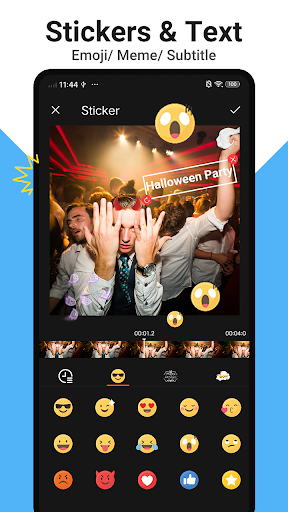
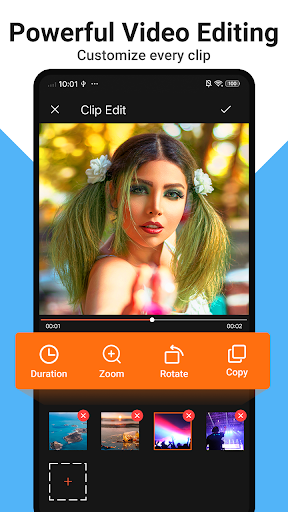
Video Maker - Video Editor is the best FREE HD video editor, video maker & video trimmer app, with all video editing and photo slideshow maker features: cut video, trim video, crop video, split a long video into short video clips, merge video, edit video with music, edit video for YouTube , add music to video, add text to video, and so on.
Video Maker - Video Editor makes every user become a pro at vlog video editing for YouTube. Video editor, as a distinctive video trimmer and video joiner app, help your videos standout by constantly updating various effects, filters, backgrounds and fonts, etc. Download video maker to edit video with music & effects, and share to YouTube, TikTok and Instagram!
No Watermark
As a free music video editor and full screen video maker for YouTube, Video Maker will never add Watermark to your video.
Key Features for video maker & video editor:
Best Video Trimmer & Video Cutter & Video Splitter & Video Merger & Video Joiner
* Trim and cut video. Pro video trimmer & cutter and video crop app.
* Split videos into two parts, Multi-split videos into several clips.
* Merge multiple video clips into one video without losing quality.
* Combine and compress your videos without losing quality.
Add Music to Video
- Best video maker with song and pictures, free video editor with music, photo and text.
- Professional music video maker with song and effects. Make videos from pics with song easily.
- Add your own music for YouTube editing, include lip sync.
- Adjust the original video volume and music fade in/out option.
It is a professional and Easy-to-use music video maker for Tik Tok editor, YouTube intro maker and Instagram story cutter that meets your need in every way.
Add Text & Sticker to Video
- Add text to video & photo with font and style.
- Add text on video, edit video with subtitles.
- Add cute stickers and emoji.
All-in-one video editor:
- You can edit/merge/trim/split/reverse/duplicate/rotate/blur/collage clips or videos in this video maker
- Add stunning video filters and FX effects to make videos different.
- Make video with transition effects and Glitch effect.
- Change the background color of your video, White for Instagram, black for pro video, blur for fashion.
- Zoom in and out. Let your audience focus on the region you want!
- Doodle on video.
- Crop video without losing quality. Free video cutter and editor for YouTube.
- Improve the quality of your converted video, supporting resolution up to 4K.
- Movie maker and film editor without watermark.
Photo Slideshow Maker
- Free music video editor with photos, merge photos to create slideshow with music.
- Combine videos with photos, add custom photo cover for video, edit videos with music like a pro.
Slideshow maker, helps create slideshow in minutes.
Save and Share Video
- Export video/movie in 720p, Full HD 1080p and 4K with no quality loss, no duration limit.
- Export video in HD quality.
- Save videos to your phone or share to YouTube, Instagram, Tik Tok, etc.
You can save the video or slideshow to your draft or album at any time.
With Video Maker, you can easily add music to video, add text on video, rotate video, merge video. Video Maker is a free HD full screen video editor and video cutter. Make your own vlog or funny video using this video editor. You can crop video easily and export it without losing quality, and share your videos to Instagram, Facebook, Whatsapp,and YouTube by one click, or edit video with music and pic for Tik Tok.
Show more

1. Download MEmu installer and finish the setup

2. Start MEmu then open Google Play on the desktop

3. Search Video Maker Music Video Editor in Google Play
Install
4. Download and Install Video Maker Music Video Editor
5. On install completion click the icon to start

6. Enjoy using Video Maker Music Video Editor on PC with MEmu
MEmu Play is the best Android emulator, and 100 million users already enjoy its superb Android app experience. Powered by advanced virtualization technology, it lets you enjoy thousands of Android apps smoothly on your PC—including the most graphics-intensive ones.
Bigger screen with better graphics; Long duration, without limitation of battery or mobile data.
Full Keymapping support for precise control of keyboard and mouse or gamepad.
Multiple game accounts or tasks on single PC at one time with Multi-Instance manager.
Use Video Maker Music Video Editor on PC by following steps: