NM PLAYER - Video Player
Updated
Current Version
1.0.0
Offered By

Stop worrying about high battery drain when using NM PLAYER - Video Player on your phone. Free yourself from the tiny screen and enjoy the app on a much larger display. From now on, get a full-screen experience of your app with the convenience of a keyboard and mouse. MEmu offers you all the surprising features you’d expect: quick installation and easy setup, intuitive controls, and no more worries about battery life, mobile data, or unexpected calls. The all-new MEmu 9 is the choice for using NM PLAYER - Video Player on your computer. With the MEmu multi-instance manager, you can run two or more accounts at the same time. Most importantly, our exclusive emulation engine unlocks your PC’s full potential, delivering smooth and enjoyable performance.
Show more
Enjoy superb experience of using NM PLAYER - Video Player on PC with MEMU App Player. It's a powerful free Android emulator which provides you with thousands of android apps for their desktop version. Enjoy connecting with friends and polishing your work with higher efficiency! Introducing NM Player, the ultimate multimedia player designed to transform the way you experience entertainment on your device.
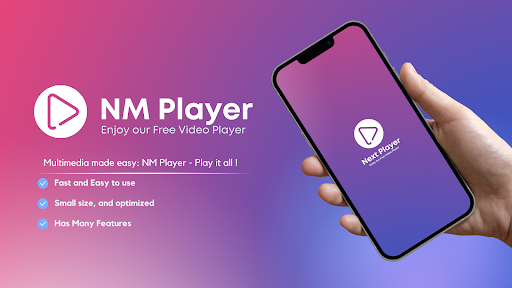
Introducing NM Player, the ultimate multimedia player designed to transform the way you experience entertainment on your device. This free and intuitive app is your gateway to a world of seamless multimedia playback, whether it's video files, discs, or network streams.
NM Player boasts a wide range of features that elevate your multimedia experience to new heights. Need to access a network stream? Not a problem! With NM Player's support for network streams, you can effortlessly stream your favorite content and stay connected to the latest media trends.
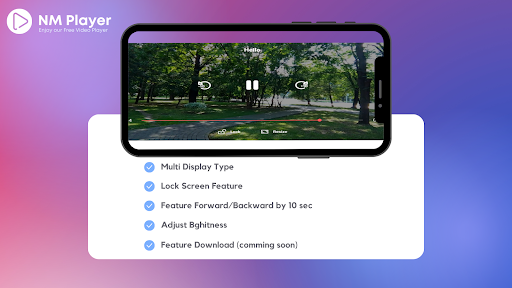
Downloading files is a breeze with NM Player. Simply choose your preferred media, click on the download button, and enjoy offline access to your favorite content at your convenience.
Taking control of your viewing experience has never been easier. Adjust the screen brightness to your liking and optimize your environment for the best multimedia enjoyment. Plus, with the ability to adjust sound volume directly from the app, you can fine-tune the audio to suit your preferences.
But that's not all - NM Player has even more to offer. Experience smoother playback with the acceleration feature, ensuring you never miss a moment of action in your videos.
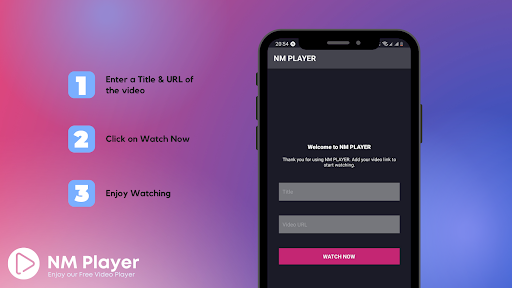
At NM Player, simplicity and convenience are our top priorities. To get started, all you need to do is enter the video URL you want to watch, and our app takes care of the rest. Say goodbye to complicated setups and enjoy your media hassle-free.
Permission Details:
NM Player requires certain permissions to provide you with the best possible user experience. Here's why we need them:
"Change your audio settings": This permission enables us to adjust the audio volume within the app, so you can enjoy your multimedia at the perfect sound level.
"View network connections": We use this permission to monitor your device's network status, ensuring seamless playback of network streams and providing you with a reliable media experience.
"Prevent phone from sleeping": While you're engrossed in watching a video, NM Player ensures your device stays awake, preventing any interruptions caused by your phone going to sleep.
"Full network access": This permission allows us to open network and internet streams, giving you access to a vast array of online media content.
"Read the contents of your storage": To play your media files effectively, NM Player requires permission to read and access your local storage.
Discover the next level of multimedia entertainment with NM Player. Download the app now and enjoy a world of immersive playback and user-friendly controls. Whether it's your favorite video or a network stream, NM Player has you covered. Experience it today!
If you have any questions, consider contact us on :
Email : mediaplus.ma@gmail.com
Website : www.mediaplus.ma
Privacy Policy Page :
https://sites.google.com/view/privacy-policy-nm-player-app/home
Show more

1. Download MEmu installer and finish the setup

2. Start MEmu then open Google Play on the desktop

3. Search NM PLAYER - Video Player in Google Play
Install
4. Download and Install NM PLAYER - Video Player
5. On install completion click the icon to start

6. Enjoy using NM PLAYER - Video Player on PC with MEmu
MEmu Play is the best Android emulator, and 100 million users already enjoy its superb Android app experience. Powered by advanced virtualization technology, it lets you enjoy thousands of Android apps smoothly on your PC—including the most graphics-intensive ones.
Bigger screen with better graphics; Long duration, without limitation of battery or mobile data.
Full Keymapping support for precise control of keyboard and mouse or gamepad.
Multiple game accounts or tasks on single PC at one time with Multi-Instance manager.
Use NM PLAYER - Video Player on PC by following steps: