Photo Slideshow Video Editor
Updated
Current Version
2.0.3
Offered By

Stop worrying about high battery drain when using Photo Slideshow Video Editor on your phone. Free yourself from the tiny screen and enjoy the app on a much larger display. From now on, get a full-screen experience of your app with the convenience of a keyboard and mouse. MEmu offers you all the surprising features you’d expect: quick installation and easy setup, intuitive controls, and no more worries about battery life, mobile data, or unexpected calls. The all-new MEmu 9 is the choice for using Photo Slideshow Video Editor on your computer. With the MEmu multi-instance manager, you can run two or more accounts at the same time. Most importantly, our exclusive emulation engine unlocks your PC’s full potential, delivering smooth and enjoyable performance.
Show more
Enjoy superb experience of using Photo Slideshow Video Editor on PC with MEMU App Player. It's a powerful free Android emulator which provides you with thousands of android apps for their desktop version. Enjoy connecting with friends and polishing your work with higher efficiency! In the dynamic landscape of visual storytelling, the Photo Slideshow Video Editor from SimoneaFord emerges as an innovative and robust tool, providing users with a rich platform for crafting compelling narratives.

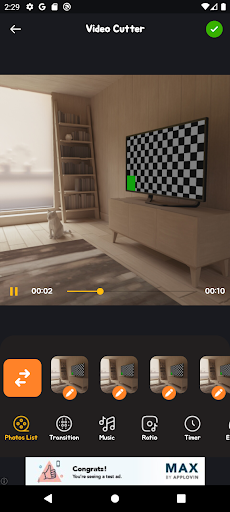
In the dynamic landscape of visual storytelling, the Photo Slideshow Video Editor from SimoneaFord emerges as an innovative and robust tool, providing users with a rich platform for crafting compelling narratives. This application encompasses a suite of features, including image-to-video transformation, playlist management, playback acceleration, cutting, and merging, designed to cater to the diverse needs of content creators.
At its core, the Photo Slideshow Video Editor is a conduit for transforming static images into dynamic narratives. The primary functionality, seamlessly converting images into videos, reflects a commitment to simplicity and creative expression. Whether users are compiling cherished memories, developing engaging promotional content, or expressing artistic endeavors, this feature-rich application serves as a canvas for weaving visual tales that resonate with audiences.
A noteworthy feature of this application is its robust playlist management system, demonstrating SimoneaFord's dedication to providing users with a comprehensive and organized creative space. This functionality allows users to curate and arrange their videos seamlessly, facilitating a smooth playback experience. From social media influencers managing content streams to businesses establishing a cohesive brand presence, the playlist management feature offers versatility and efficiency.
Acknowledging the accelerated pace of modern communication, the Photo Slideshow Video Editor introduces an innovative playback acceleration feature. This dynamic functionality empowers users to adjust the speed of their videos, whether to create enthralling time-lapse sequences or to convey information with a heightened tempo. Beyond adding a layer of creativity, this feature serves as a pragmatic solution for those seeking efficient and impactful visual communication.
Precision in video editing is a cornerstone of the Photo Slideshow Video Editor, evident in its cutting and merging capabilities. Users can seamlessly trim unwanted segments, ensuring that their videos maintain a polished and streamlined quality. The merging feature further enables the combination of multiple clips, providing users with the flexibility to craft cohesive narratives that flow seamlessly from one frame to the next. This meticulous attention to detail offers creators a high level of control over their visual storytelling process.
Beyond its feature-rich offerings, the Photo Slideshow Video Editor stands out for its accessible and user-friendly interface. Designed to cater to both novices and seasoned content creators, the application ensures a smooth navigation experience. Clear menus and concise instructions guide users through the video creation journey, making it an inclusive platform for individuals with varying levels of technical proficiency.
In conclusion, the Photo Slideshow Video Editor by SimoneaFord is more than just an application; it is a gateway to unparalleled creativity and storytelling. With its seamless image-to-video conversion, playlist management, acceleration, cutting, and merging features, this application caters to a diverse audience of content creators. Whether one is a social media influencer, a business professional, or an aspiring artist, the Photo Slideshow Video Editor empowers users to breathe life into their visual stories, making it an indispensable addition to the creative toolkit while adhering to policies and guidelines.
Show more

1. Download MEmu installer and finish the setup

2. Start MEmu then open Google Play on the desktop

3. Search Photo Slideshow Video Editor in Google Play
Install
4. Download and Install Photo Slideshow Video Editor
5. On install completion click the icon to start

6. Enjoy using Photo Slideshow Video Editor on PC with MEmu
MEmu Play is the best Android emulator, and 100 million users already enjoy its superb Android app experience. Powered by advanced virtualization technology, it lets you enjoy thousands of Android apps smoothly on your PC—including the most graphics-intensive ones.
Bigger screen with better graphics; Long duration, without limitation of battery or mobile data.
Full Keymapping support for precise control of keyboard and mouse or gamepad.
Multiple game accounts or tasks on single PC at one time with Multi-Instance manager.
Use Photo Slideshow Video Editor on PC by following steps:































