Precise Frame mpv Video Player
Updated
Current Version
3.3.3
Offered By

Stop worrying about high battery drain when using Precise Frame mpv Video Player on your phone. Free yourself from the tiny screen and enjoy the app on a much larger display. From now on, get a full-screen experience of your app with the convenience of a keyboard and mouse. MEmu offers you all the surprising features you’d expect: quick installation and easy setup, intuitive controls, and no more worries about battery life, mobile data, or unexpected calls. The all-new MEmu 9 is the choice for using Precise Frame mpv Video Player on your computer. With the MEmu multi-instance manager, you can run two or more accounts at the same time. Most importantly, our exclusive emulation engine unlocks your PC’s full potential, delivering smooth and enjoyable performance.
Show more
Enjoy superb experience of using Precise Frame mpv Video Player on PC with MEMU App Player. It's a powerful free Android emulator which provides you with thousands of android apps for their desktop version. Enjoy connecting with friends and polishing your work with higher efficiency! Summary:.
Summary:
Video player for android with rare features not found in most popular players. Focuses on precise control of the playback such as volume level, video seek, etc.
Rare Features
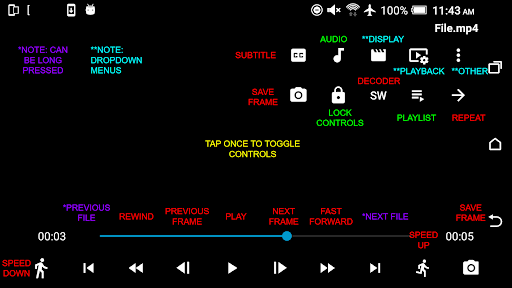
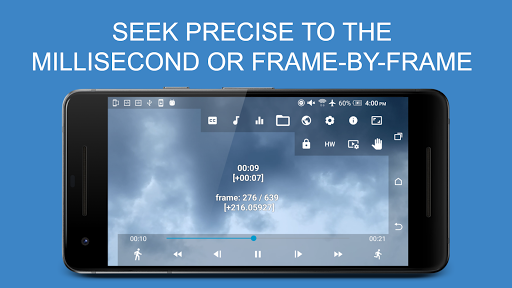
- Exact seek: seek video exact to the millisecond (fast forward / rewind)
- Frame step: step the video frame by frame
- Toggle display of current millisecond timestamp and frame number during playback
- Adjust seek precision: adjust how exact you want the video seek to be (precise to 1 millisecond)
- Separate volume: volume control separate from the device volume with precise volume level adjustment from 1% and option to boost volume up 1000 times (100,000%)
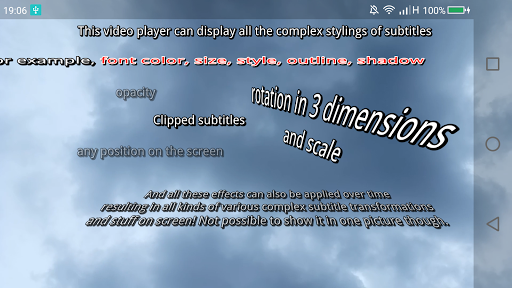
- Support for complex styling in Advanced SubStation Alpha subtitles, and up to 2 subtitle tracks at the same time
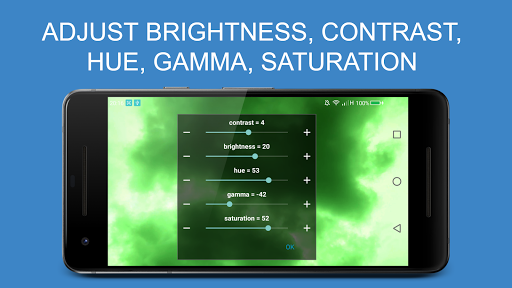
- Picture adjustments such as brightness, contrast, gamma, hue and saturation
- 18-band audio equaliser GUI
- Video filters such as scaling, debanding and interpolation
- Quickly capture/snapshot current frame of video as image file
- Extract and add external audio or subtitle tracks from a video URL or file
Other Features:
- Supports most popular video and audio formats
- Adjust subtitle and audio sync/timing precise to decimal points of a second and support for large input value
- Hardware acceleration for faster performance
- Pan and zoom video
- Play video with subtitles
- Load external subtitle files
- Automatically resume playback position of videos
- Stream videos from the URL
- Change playback speed during playback
- Convenient touch gestures to seek video and change volume
- Select video, audio and subtitle track during playback
- Adjust video aspect ratio with preset or custom values
- Lock controls
- Open file using file chooser/device explorer
- Choose whether to autohide and how long to show controls
- A-B repeat part of video
- Picture in picture mode
- Background play
Supported formats/codecs (also depends on your device hardware and Android version):
File containers:
- 3GPP (.3gp)
- AMR
- Audio Data Transport Stream (ADTS) / Advanced Audio Coding (AAC)
- Audio Video Interleave (.avi)
- Common Media Application Format (CMAF)
- DivX / XviD
- Flash Video (.flv)
- Fragmented MP4 (fMP4)
- Graphics Interchange Format (.gif)
- Matroska (.mkv)
- Ogg
- MPEG-4 (.mp4)
- MPEG-TS (.ts)
- Waveform Audio File Format (WAV)
- WebM (.webm)
- Video formats:
- AOMedia Video 1 (AV1)
- H.263
- H.264 AVC Baseline Profile (BP)
- H.264 AVC Main Profile (MP)
- H.265 HEVC
- MPEG-4 SP
- VP8
- VP9
Audio formats:
- Advanced Audio Coding Low Complexity (AAC LC)
- enhanced low delay AAC (AAC ELD )
- Dolby AC-3
- Dolby Digital Plus / Enhanced AC-3 (E-AC-3)
- Dolby TrueHD
- DTS
- DTS-HD
- Apple Lossless (ALAC)
- AMR-NB
- AMR-WB
- FLAC
- GSM
- HE-AACv1 (AAC+)
- HE-AACv2 (enhanced AAC+)
- MIDI
- MP1, MP2, MP3
- Opus
- PCM μ-law
- PCM A-law
- Vorbis
- WAV
Subtitle/closed caption formats:
- Advanced SubStation Alpha
- CEA-608
- SubRip
- SubStationAlpha (SSA)
- SMPTE-TT
- TTML
- WebVTT
Uses the software libraries:
Apache 2.0 (http://www.apache.org/licenses/LICENSE-2.0)
- mbedtls (https://github.com/ARMmbed/mbedtls/blob/development/LICENSE)
FreeType License (FTL)
- FreeType (https://www.freetype.org/index.html)
ISC license (https://opensource.org/licenses/ISC)
- libass (https://github.com/libass/libass/blob/master/COPYING)
MIT license (https://opensource.org/licenses/mit-license.html)
- lua (https://www.lua.org/license.html)
- mpv-android (https://github.com/mpv-android/mpv-android/blob/master/LICENSE)
Old MIT license
- harfbuzz (https://github.com/harfbuzz/harfbuzz/blob/master/COPYING)
Unknown license
- dav1d (https://code.videolan.org/videolan/dav1d)
GNU Lesser General Public License, version 2.1
- FFmpeg (https://www.gnu.org/licenses/old-licenses/lgpl-2.1.html)
- mpv (https://github.com/mpv-player/mpv/blob/master/LICENSE.LGPL)
- fribidi (https://github.com/fribidi/fribidi/blob/master/COPYING)
- libplacebo
Show more

1. Download MEmu installer and finish the setup

2. Start MEmu then open Google Play on the desktop

3. Search Precise Frame mpv Video Player in Google Play
Install
4. Download and Install Precise Frame mpv Video Player
5. On install completion click the icon to start

6. Enjoy using Precise Frame mpv Video Player on PC with MEmu
MEmu Play is the best Android emulator, and 100 million users already enjoy its superb Android app experience. Powered by advanced virtualization technology, it lets you enjoy thousands of Android apps smoothly on your PC—including the most graphics-intensive ones.
Bigger screen with better graphics; Long duration, without limitation of battery or mobile data.
Full Keymapping support for precise control of keyboard and mouse or gamepad.
Multiple game accounts or tasks on single PC at one time with Multi-Instance manager.
Use Precise Frame mpv Video Player on PC by following steps: