Publiled - Digital Signage
Updated
Current Version
1.9
Offered By

Stop worrying about high battery drain when using Publiled - Digital Signage on your phone. Free yourself from the tiny screen and enjoy the app on a much larger display. From now on, get a full-screen experience of your app with the convenience of a keyboard and mouse. MEmu offers you all the surprising features you’d expect: quick installation and easy setup, intuitive controls, and no more worries about battery life, mobile data, or unexpected calls. The all-new MEmu 9 is the choice for using Publiled - Digital Signage on your computer. With the MEmu multi-instance manager, you can run two or more accounts at the same time. Most importantly, our exclusive emulation engine unlocks your PC’s full potential, delivering smooth and enjoyable performance.
Show more
Enjoy superb experience of using Publiled - Digital Signage on PC with MEMU App Player. It's a powerful free Android emulator which provides you with thousands of android apps for their desktop version. Enjoy connecting with friends and polishing your work with higher efficiency! Publiled – Cartelería Digital es la herramienta definitiva para la gestión eficiente de contenido publicitario en televisores con Android TV.
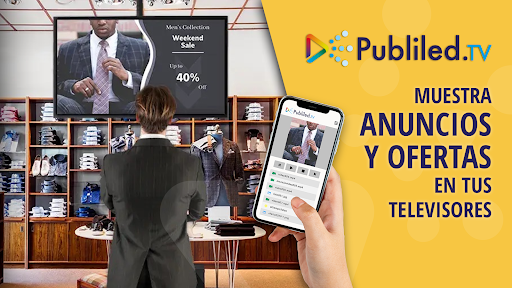
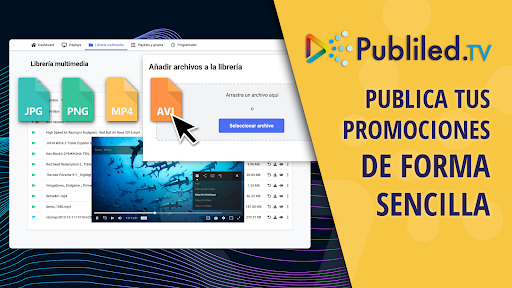
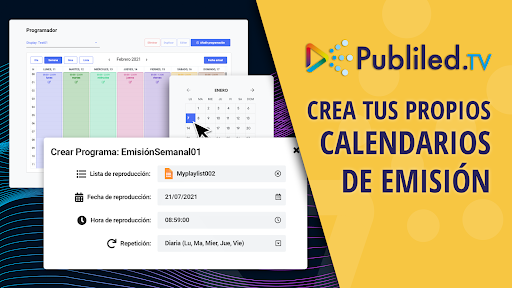
Publiled – Cartelería Digital es la herramienta definitiva para la gestión eficiente de contenido publicitario en televisores con Android TV. Diseñada para simplificar la experiencia de señalización digital, esta aplicación potente y versátil ofrece una amplia gama de funciones para administrar y controlar pantallas publicitarias desde la comodidad de tu navegador web. Con esta app podrás convertir cualquier pantalla de TV en una plataforma publicitaria de digital signage profesional adecuada para escaparates, tiendas y puntos de venta de todo tipo.
¿Cómo empiezo a usar Publiled - Cartelería Digital?
Instala la aplicación en tu dispositivo basado en Android y remotamente podrás gestionar y publicar tus anuncios publicitarios en todas tus pantallas.
¿Qué funcionalidades de señalización digital ofrece Publiled?
Nuestro portal web de administración de pantallas pone a tu alcance todo lo necesario para transmitir contenidos a pantallas con interfaz de usuario accesible para todo el mundo. Sus funciones más destacadas son;
Control de pantallas sin esfuerzo
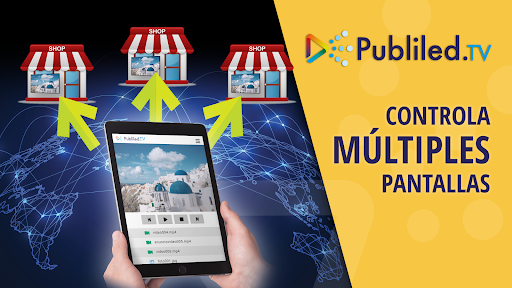
Con Publiled, el control de una o múltiples pantallas se vuelve completamente accesible. ¿Tienes una red de pantallas de publicidad en varias ubicaciones? Administra cada dispositivo desde una única interfaz intuitiva con nuestro panel de control de pantallas centralizado.
Biblioteca de medios en la nube
Crea tu propia biblioteca de archivos en la nube para almacenar y organizar fotos y vídeos. Permite una gestión eficiente de tu contenido publicitario y la capacidad de hacer streaming con tus archivos a cada una de tus pantallas de cartelería digital. Además, nuestra aplicación es compatible con los formatos de archivos de medios más utilizados: jpg, png, avi, mp4
Editor de Playlists Personalizables
Crea listas de reproducción personalizadas en segundos. Asigna tiempos de reproducción en pantalla y ordena el contenido publicitario de manera fácil y flexible.
Widgets Personalizables
Potencia tu contenido con widgets informativos inteligentes que se actualizarán de forma automática sin tu intervención directa: información meteorológica del tiempo totalmente personalizables para tu ciudad, noticias RSS de tu periódico favorito, relojes y calendarios tanto a pantalla completa como superpuestas a tus propios contenidos.
Calendario Visual de Programación
Hacer que tus contenidos aparezcan en tu TV en la fecha y hora adecuada no podría ser más fácil. Visualiza y gestiona la programación de contenidos para cada pantalla de forma clara y conveniente con calendarios de contenido.
Compatibilidad con una Amplia Gama de Dispositivos Android TV
Publiled - Cartelería Digital es compatible con una variedad de dispositivos y media players Android TV, incluyendo los más populares como Google Chromecast TV, NVIDIA Shield TV, Xiaomi Mi Box, Amazon Fire TV y televisores smartTV de Sony, TCL, Hisense entre otros. Esta compatibilidad asegura una integración perfecta con tu infraestructura existente.
¿Qué aplicaciones tiene una pantalla con Publiled - Cartelería Digital?
Las aplicaciones más usuales son: programar publicidad en escaparates, pantallas informativas en puntos de venta y en showrooms, kiosko digital, tableros informativos digitales de precios, pantallas de menús digitales para hostelería, señalización interior para complejos hoteleros, señalización para congresos y ferias, paneles digitales promocionales para stands de ferias, presentación de productos.
¿Quieres más información sobre el funcionamiento de Publiled - Cartelería Digital? Visita nuestro website www.publiled.tv y échale un vistazo a este video en Youtube: https://youtu.be/fUlOlqnCxVg?si=6f2zssFGSb5SxEbd
Show more

1. Download MEmu installer and finish the setup

2. Start MEmu then open Google Play on the desktop

3. Search Publiled - Digital Signage in Google Play
Install
4. Download and Install Publiled - Digital Signage
5. On install completion click the icon to start

6. Enjoy using Publiled - Digital Signage on PC with MEmu
MEmu Play is the best Android emulator, and 100 million users already enjoy its superb Android app experience. Powered by advanced virtualization technology, it lets you enjoy thousands of Android apps smoothly on your PC—including the most graphics-intensive ones.
Bigger screen with better graphics; Long duration, without limitation of battery or mobile data.
Full Keymapping support for precise control of keyboard and mouse or gamepad.
Multiple game accounts or tasks on single PC at one time with Multi-Instance manager.
Use Publiled - Digital Signage on PC by following steps: