REZEO
Updated
Current Version
1.0.33
Offered By

Stop worrying about high battery drain when using REZEO on your phone. Free yourself from the tiny screen and enjoy the app on a much larger display. From now on, get a full-screen experience of your app with the convenience of a keyboard and mouse. MEmu offers you all the surprising features you’d expect: quick installation and easy setup, intuitive controls, and no more worries about battery life, mobile data, or unexpected calls. The all-new MEmu 9 is the choice for using REZEO on your computer. With the MEmu multi-instance manager, you can run two or more accounts at the same time. Most importantly, our exclusive emulation engine unlocks your PC’s full potential, delivering smooth and enjoyable performance.
Show more
Enjoy superb experience of using REZEO on PC with MEMU App Player. It's a powerful free Android emulator which provides you with thousands of android apps for their desktop version. Enjoy connecting with friends and polishing your work with higher efficiency! Stand Out in a Competitive Job Market with REZEO.
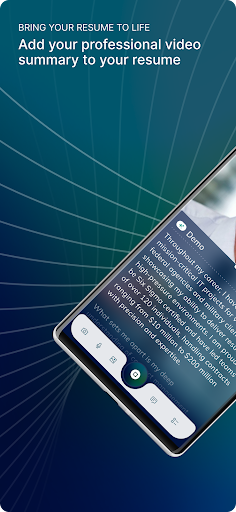
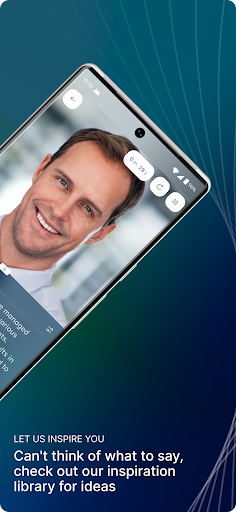
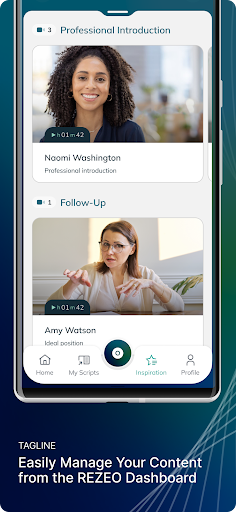
Stand Out in a Competitive Job Market with REZEO
In today's competitive job market, making a strong first impression is crucial. Traditional resumes and cover letters can only do so much to showcase your unique skills and personality. That's where REZEO comes in. The REZEO platform provides a comprehensive suite of tools designed to help you create and share professional video summaries with prospective employers, giving you the edge you need to stand out.
Getting a Job Just Got a Lot Easier with Professional Video Profiles
REZEO profiles and video messages enable job seekers to make impactful introductions to prospective employers by telling their own story - in their own words. By bringing your resume to life, REZEO allows you to convey your personality, enthusiasm, and professionalism in a way that paper simply can't match.
REZEO Brings Your Resume to Life
Simple and User-Friendly
A REZEO profile makes getting a job easier and managing your REZEO profile is also straightforward. Our platform is designed to be user-friendly and intuitive, with three main components: Manage, Create, and Share.
Manage
The REZEO dashboard empowers job seekers to create and share professional video summaries, cover letters, and post-interview thank you notes. From the dashboard, users can choose the type of content they want to create, launch the REZEO Toolkit, and manage their video content distribution. You can easily organize your videos, keep track of which ones you've sent out, and see how they are performing with potential employers.
Create
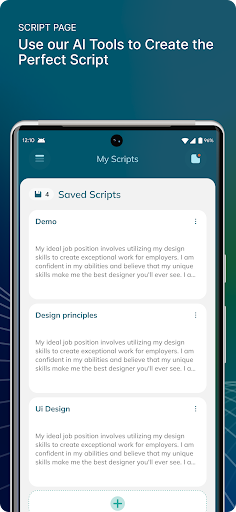
Unleash your creativity with our powerful video creation tools. REZEO offers a range of features designed to help you produce dynamic and engaging content. AI-generated scripts provide personalized suggestions to enhance your video content, ensuring you hit all the key points and present yourself in the best light. The built-in teleprompter allows you to follow along with your script while recording, ensuring a smooth and professional delivery every time. Customizable video backgrounds help you create a polished and professional look that suits your personal brand. Video trimming lets you edit your videos to ensure they are concise and impactful, helping you to deliver your message clearly and effectively. Whether you're recording from your computer or mobile device, our platform makes it easy to create professional-quality videos that stand out to potential employers.
Share
Sharing your professional introduction and video messages is effortless with REZEO. Simply add a link to your resume, cover letter, and LinkedIn profile, or send your videos directly to hiring managers and recruiters. You have full control over which videos to make public and which to keep private, allowing you to tailor your content for specific job applications. REZEO makes it simple to share your video profiles with prospective employers. Include links to your REZEO profile in your resume, cover letter, and LinkedIn profile. Send your videos directly to hiring managers and recruiters, ensuring that your application stands out. With REZEO, you have full control over your video content. Decide which videos to make public and which to keep private. Tailor your video profiles to specific job applications, showcasing the most relevant skills and experiences for each opportunity.
Start Today
Join the REZEO community and transform the way you present yourself to prospective employers. With REZEO, your resume comes to life, making it easier to secure your next job opportunity. Download REZEO now and start creating your professional video profile today. Stand out in the job market and take control of your career with REZEO.
Show more

1. Download MEmu installer and finish the setup

2. Start MEmu then open Google Play on the desktop

3. Search REZEO in Google Play
Install
4. Download and Install REZEO
5. On install completion click the icon to start

6. Enjoy using REZEO on PC with MEmu
MEmu Play is the best Android emulator, and 100 million users already enjoy its superb Android app experience. Powered by advanced virtualization technology, it lets you enjoy thousands of Android apps smoothly on your PC—including the most graphics-intensive ones.
Bigger screen with better graphics; Long duration, without limitation of battery or mobile data.
Full Keymapping support for precise control of keyboard and mouse or gamepad.
Multiple game accounts or tasks on single PC at one time with Multi-Instance manager.
Use REZEO on PC by following steps: